Comment-to-DM is the Instagram funnel where a viewer comments a keyword under your post or reel and gets a direct message with what you promised: a link, a guide, a discount code or a booking slot. It replaces "link in bio" with a step people already take on Instagram. It runs through Meta's official Instagram API, so it doesn't put your account at risk the way bots that fake likes or follows do.
This guide covers how it works in 2026, the two rules Meta sets, how to choose a keyword, what the first message should say, and how to measure the result on your own account.
How comment-to-DM works
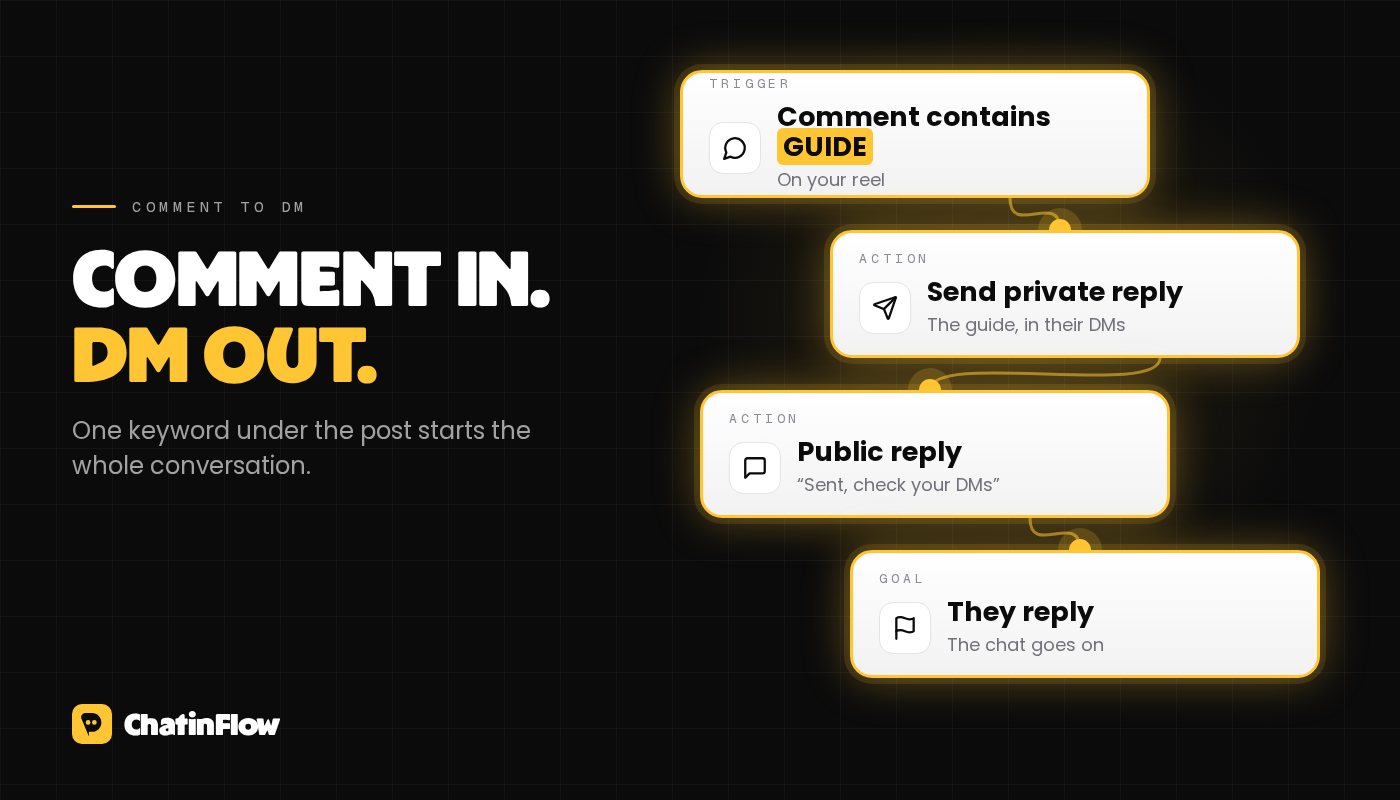
- You publish a post or reel and tell viewers what to comment, for example "Comment GUIDE and I'll send it to you".
- Someone comments GUIDE. Instagram notifies the automation tool connected to your account.
- The tool sends a private reply: a DM that answers that one comment. It can also leave a public reply under the comment, such as "Sent, check your DMs".
- If the person answers the DM, a conversation opens and the rest of your flow can run: questions, buttons, a link, a code, a booking.
The private reply includes a link back to the post they commented on, so the person sees why they got the message. If they follow you, it lands in their main inbox. If they don't, Instagram puts it in their message requests. Plan for that second case: it is where most of your new audience will be.
The two Meta rules that shape every setup
Meta's Instagram Platform documentation sets two limits on private replies:
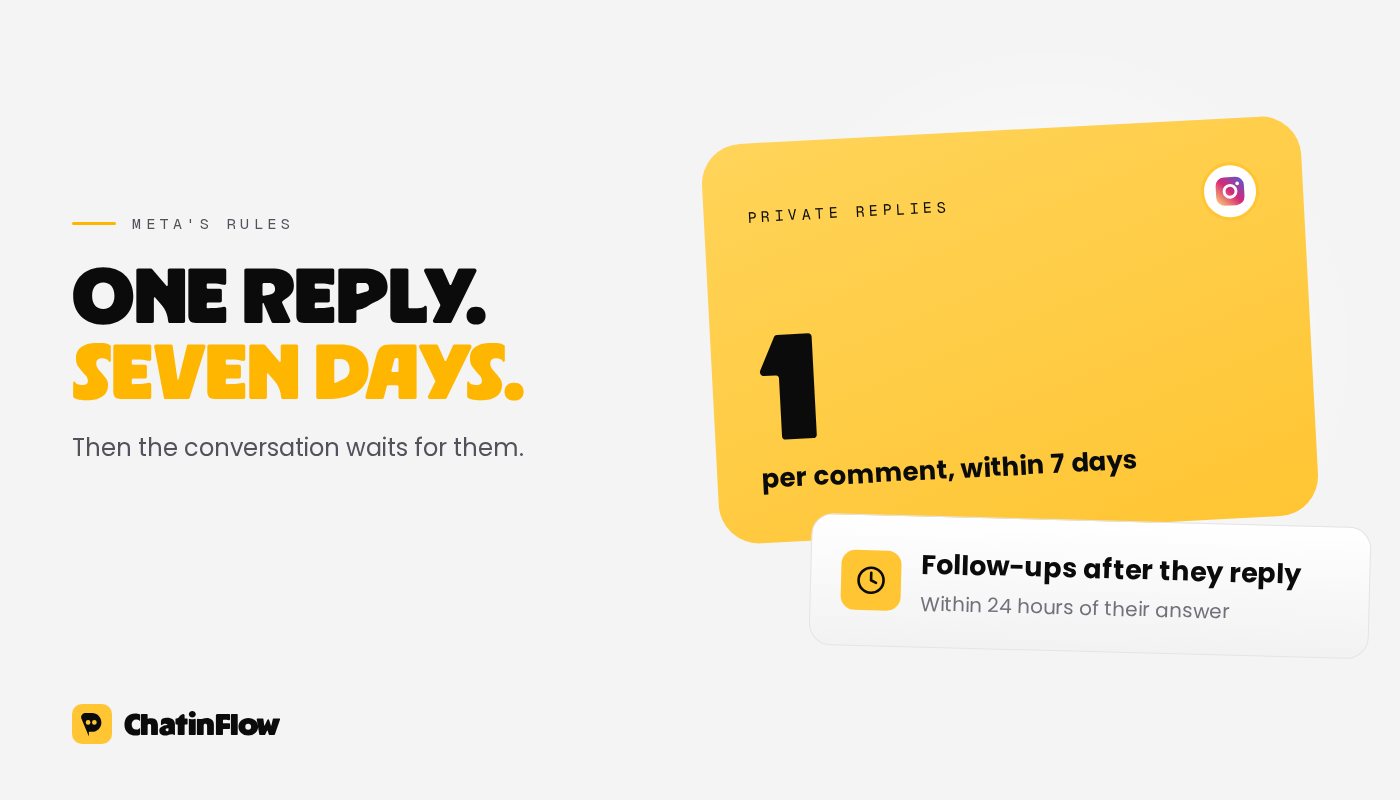
- One private reply per comment, within 7 days. Your tool can send one message in response to a comment, and only within 7 days of when the comment was posted. For Instagram Live, the window is the broadcast itself: once the live ends, its comments can no longer get a private reply.
- Follow-ups need a reply first. After the private reply, you can message the person again only once they respond, and then within 24 hours of their response. This is the standard messaging window, and every new message from them opens it again.
So a good setup does two things with its single guaranteed message: it delivers what the post promised, and it gives the person a reason to reply, so the conversation can continue.
Choosing the keyword
The keyword is an instruction for an audience that is scrolling fast. What works:
- One short word that is easy to spell. GUIDE, LINK, RECIPE, PLAN, PRICE. Avoid words that phone keyboards autocorrect, or that people write in different ways.
- Say it three times. On screen in the video, in the caption, and in a pinned comment. People who miss the instruction comment "link?" or "how?", which your trigger won't catch.
- Decide how strict the match is. Most tools offer "contains", "is exactly" and "starts with". "Contains" catches "guide please" and "GUIDE 🙏", which is usually what you want. "Is exactly" is better when the word is common in normal comments, such as YES.
- Don't count on typo tolerance. In ChatinFlow, matching ignores upper and lower case, but there is no fuzzy matching: "GIUDE" is not "GUIDE". If a typo is common in your audience, add it as a second keyword.
- Use a different keyword per offer. If two posts promise different things, give them different words, or tie each automation to its own post. The right person gets the right thing, and your numbers stay separate.
You can check a keyword against real comment text before going live with the free keyword tester. For ideas by goal, see comment keyword ideas for Instagram.
Writing the first DM
The private reply is the only message you are sure to send, so make it count:
- Deliver first. Put the link, the code or the answer in this message. Don't make the person reply to get what the post promised. People who feel tricked don't come back, and they don't comment next time.
- Ask one easy question. "Want the 3-step checklist too? Reply YES." or "Beginner or already doing this? Tap one." A reply opens the 24-hour window, and the conversation can go on.
- Use buttons when you can. A quick reply is a tap, not a typed message, and the tap counts as a reply.
- Write like a person. First name, short sentences, no wall of text. It is a DM, not a newsletter.
The follow-up flow
Once the person replies, a second automation picks up. A typical creator flow:
- Ask a question with two or three tap-to-answer options, for example their level or what they want next.
- Tag contact with the answer, so you know who wanted what.
- For people who want more: ask for their email with an answer type that checks the address, then send it to your email tool. ChatinFlow's Add to CRM or email list step works with Mailchimp, Klaviyo, Kit, ActiveCampaign and HubSpot.
- For people ready to buy: send a Buy button that opens checkout on Stripe or PayPal, or a link to book a call.
- Everyone else gets something useful and an easy way to come back later.
ChatinFlow has the first part as a ready template: comment-to-DM with a link. For a lead form inside the DM, see DM lead generation.
The public reply
A public reply under each comment does two jobs. It tells the person to check their DMs, which matters when the message went to their requests folder. And it shows other viewers that the keyword works, which brings more comments.
- Write several variants and let the tool rotate them, so the thread doesn't look like a bot repeating itself.
- Keep it short and human: "Sent! Check your message requests if you don't follow me yet."
Common mistakes
- Putting a gate in front of the promise. "Follow me first, then comment" adds a step between the person and what you promised, and many people drop off there. ChatinFlow doesn't gate on follows: deliver to everyone who comments.
- Too many messages. The private reply, plus a follow-up after they answer, is enough. Messages people didn't ask for are how DMs get reported.
- One automation for every comment on every post. It answers "love this" with a sales message. Tie the trigger to a keyword, to a post, or to both.
- No test. Comment from a second account, ideally one that doesn't follow you, before you publish. Check the private reply, the public reply and the follow-up.
How to measure it
Count these numbers for each post, on your own account:
- Comments with the keyword.
- Private replies sent.
- People who replied to the first DM.
- People who reached the goal: an email given, a purchase, a booking.
The drop between two steps tells you what to fix. Few keyword comments points at the call to action. Few replies points at the first DM. Few goals points at the offer or the follow-up. ChatinFlow's run history shows every step a flow ran for each person, and a Record a conversion step at the end of the flow counts results in your reports.
Does asking for a keyword hurt your reach?
In June 2024, Instagram told creators that posts which try to "hack" engagement may not be recommended to people who don't follow them, and named asking people to comment a specific word, number or emoji as an example. After creators pushed back, Instagram clarified: open-ended calls to action are fine, its recommendation guidelines hadn't changed, and creators can still use third-party services such as ManyChat to engage with their audiences. What it targets is content made to game reach.
In practice:
- Use a keyword when it delivers something the post promises: the guide, the link, the recipe. That is a service to the viewer, not a trick.
- Don't ask for a word just to inflate comments, such as "comment YES if you agree".
- If reach drops, check Account Status in the app. Professional accounts can see there whether a post isn't eligible for recommendations, and why.
Is comment-to-DM allowed?
Yes, when it runs through Meta's official API on your own content and stays inside the limits above. What gets accounts in trouble is something else: bots that comment or message on other people's content, unofficial tools that log in with your password, and messages people didn't ask for. For the full list, read Instagram DM automation rules in 2026.
Sources
- Social Media Today, Instagram clarifies its advice on single-word calls to action (June 5, 2024): calls to action are fine and tools such as ManyChat can still be used; content made to game reach may not be recommended. Checked October 2026.
- Meta for Developers, Private Replies: one private reply per comment, within 7 days (Live comments only during the broadcast); follow-ups only after the person responds, within 24 hours. Checked October 2026.
Qua email
Luồng mới trong hộp thư của bạn.
Những luồng hiệu quả, playbook mới và những thay đổi trong ChatinFlow. Không spam, hủy chỉ với một chạm.
Có thể bạn sẽ thích

Hỏi đáp
Hãy đặt câu hỏi về bài viết này. Đội ngũ ChatinFlow trả lời ngay tại đây.
Đội ngũ ChatinFlow
Chưa có câu hỏi nào. Hãy là người hỏi đầu tiên, chúng tôi sẽ trả lời ngay tại đây.