The full guide
How to answer Viber customers automatically with a Viber bot
By the ChatinFlow product team · Updated October 17, 2026 · 9 min read
Download the PDF8-page PDF · 418 KBIn much of Eastern Europe, the Balkans, the Middle East and parts of Asia, Viber is the app customers open first when they want to ask a shop a question. A bakery takes cake orders there, a clinic confirms appointments, a repair shop sends quotes. ChatinFlow connects to your Viber bot and answers those chats with the same flows you build for Instagram, WhatsApp and Telegram: buttons and quick replies, bookings, codes, payments and AI, with your team taking over in the same inbox. This guide explains how Viber bots work, how to connect yours, what to build first, and the rules that make Viber different from the other channels.
How Viber bots work
A Viber bot is a business account inside Viber that people can find and message. Unlike a personal number, it is built for software: messages arrive at a webhook, and replies go back through Viber's API. Three facts shape everything you build.
| Fact | What it means for your flows |
|---|---|
| People write to your bot first | Every conversation starts with the customer, so your flows answer, they do not cold-message |
| Viber bills bot owners under its own terms | Messages a bot starts on its own can cost money, which is why ChatinFlow does not send Viber broadcasts |
| Buttons and quick replies are native | A customer can tap through sizes, times and options instead of typing |
Viber's commercial terms for bots have changed over the years. Check Viber's current terms for bot accounts before you start; ChatinFlow adds nothing to Viber's own charges.
Step 1: Create the bot account and copy its token
Create the bot account in Viber's own tools for businesses, following Viber's current process for bot accounts. When the account is ready, Viber gives you its token, a long string that lets software send as your bot. Keep it private: whoever has it can send messages as your bot.
Before you connect, prepare the bot's public face in Viber: its name, picture and a short description of what it does, so people who find it know whose bot it is and what to ask.
Step 2: Connect Viber to ChatinFlow
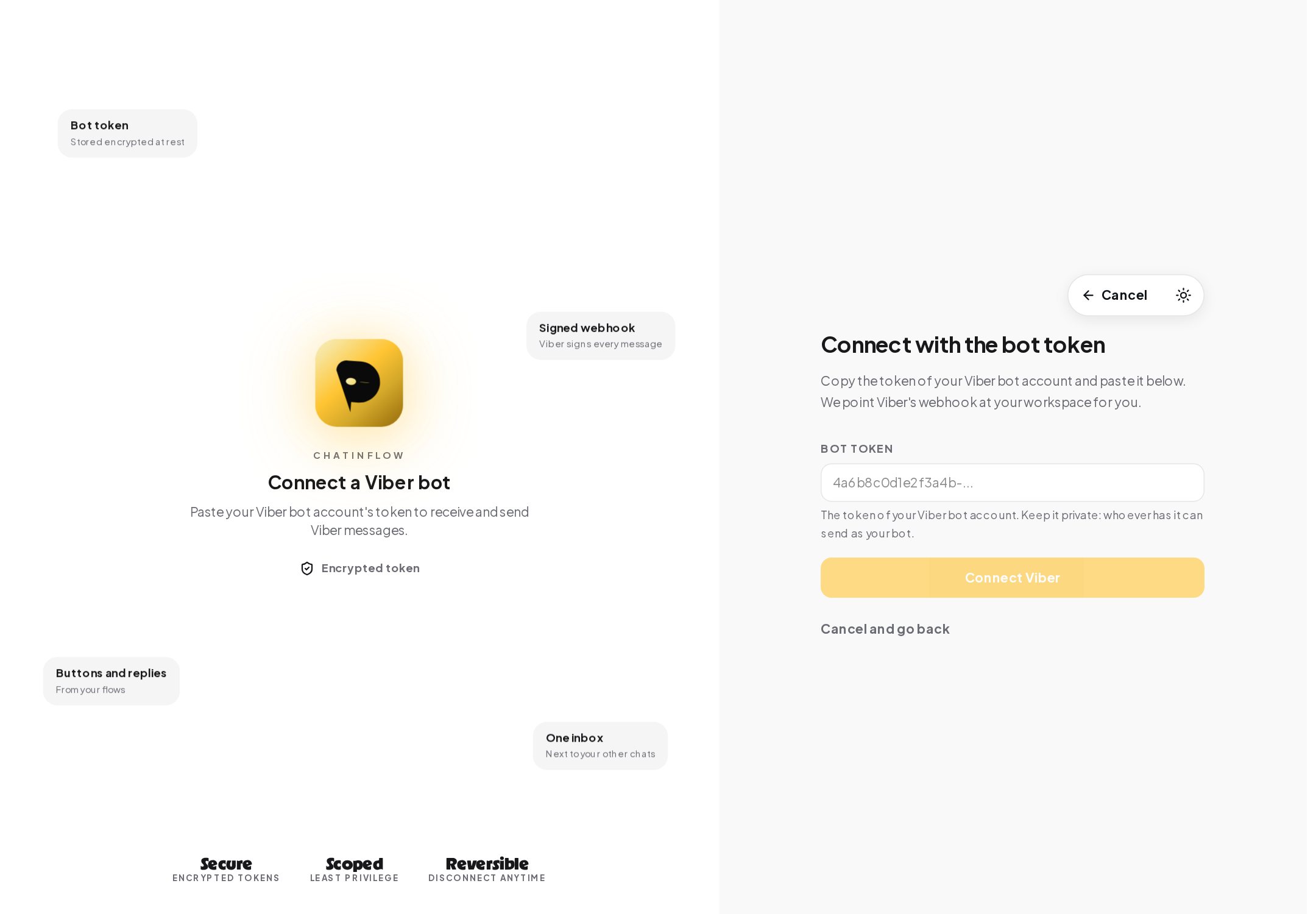
In ChatinFlow, open Settings, Channels, Viber, or the Viber card under Add more channels on the Channels page, and press Connect.
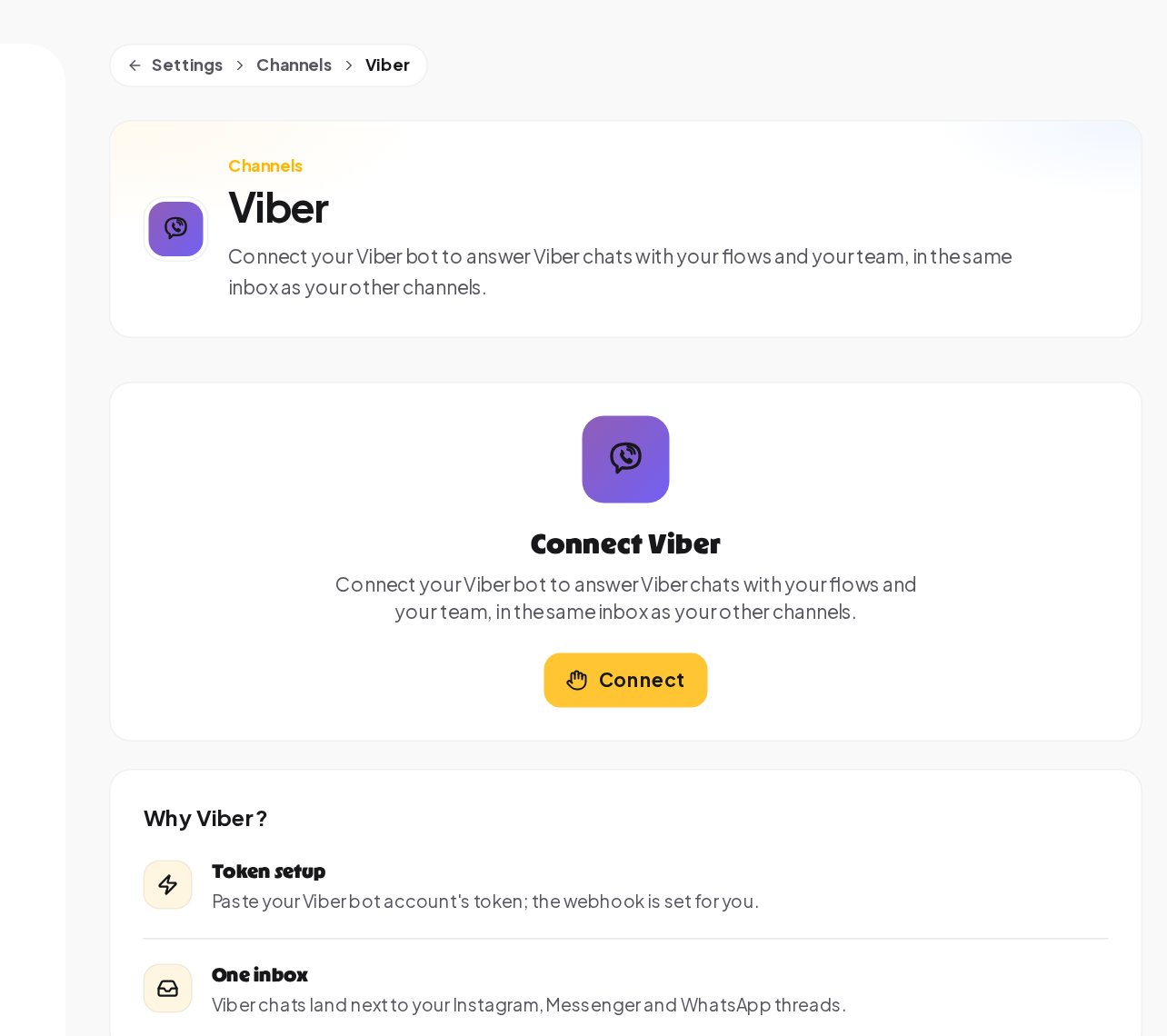
Paste the token. ChatinFlow points Viber's webhook at your workspace, stores the token encrypted, and checks Viber's signature on every incoming message, so a message that did not come from Viber is ignored.
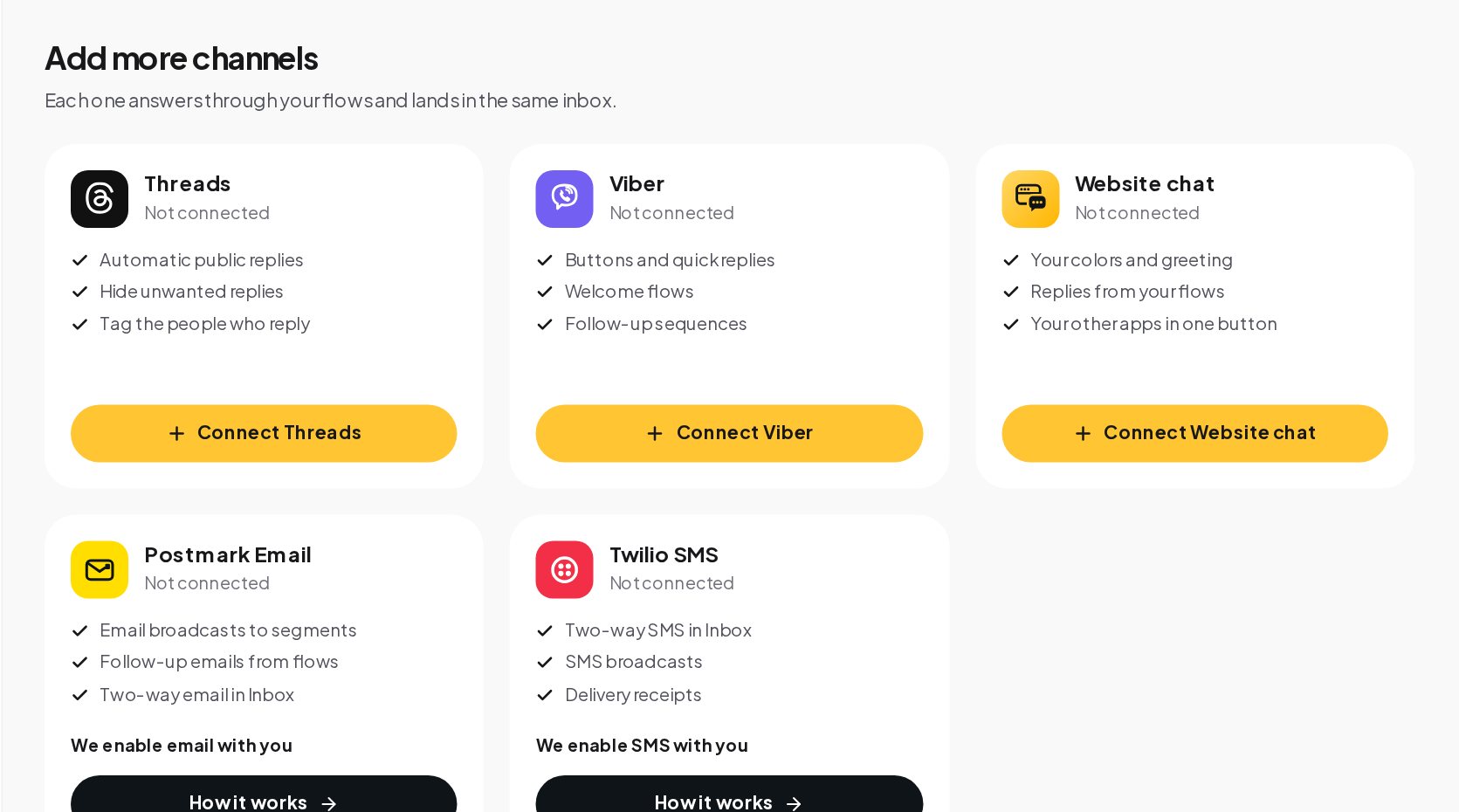
Viber sits on the Channels page next to Threads, website chat, email and SMS, which can be added the same way.
Step 3: Build the flows Viber customers expect
Viber customers are used to tapping. Build your flows around buttons and quick replies, and keep typing for the details only a person can give.
Orders by tapping. A customer asks for a cake. Quick replies offer the sizes, then your real pickup times; the order is saved on the customer's record and in your calendar with every detail. A special request, such as a custom message on the cake, goes to a person.
Bookings. A menu with buttons instead of typed questions, real free times from your calendar, and the booking saved with the time and the details. Reminders before the visit, a review request after it and rebooking for no-shows follow the same pattern.
Usual questions. Prices, opening hours and delivery questions answered the moment they arrive, with five match modes for keywords, in any language. Anything else waits in your inbox for the team.
A default reply. One automation set to any message answers what nothing else matched, so every customer hears back, even at night.
Step 4: Codes, spots and payments
Viber is often where a local business's most loyal customers are, which makes it a good place for limited offers.
A code for each customer. In the flow customers already use, offer limited places. The earliest replies of YES get a spot and their own code from your code list, the same one if they ask twice. When the last place is taken, anyone too late is offered the waitlist.
Take payment in the chat. A Buy button opens checkout with Stripe or PayPal at your price. The money goes to your own account, the thank-you arrives in the chat, and the sale is recorded for your results in Analytics.
Step 5: Add AI, and bring in your team
An AI reply or the AI agent can answer from the sources you added, in your voice, on your own AI key on a paid plan. When a person should answer, the agent hands the chat over.
Viber chats appear in the shared inbox next to Instagram, WhatsApp and Telegram. Assign a chat to a teammate or the next free agent, and while your teammate writes, the bot pauses for that chat. Every choice a customer tapped, sizes, times and options, is saved on their record, so whoever picks up the chat sees it.
Writing messages that work on Viber
A Viber chat is read on a phone, often between other things. Short, clear messages with buttons beat long paragraphs.
- Lead with the answer. "Yes, we deliver on Saturdays until 14:00" is better than a greeting followed by the answer.
- Offer the next step as a button. After a price, offer Order, Ask a question and Opening hours as quick replies.
- Keep one idea per message. Split a long answer into two messages, with a typing indicator between them, so it reads like a person.
- Use the customer's language. Keyword matching works in any language and script, so add the words your customers really use, in Cyrillic, Latin or both.
- Confirm what you saved. After an order, repeat the size, the date and the pickup time, so the customer can spot a mistake before you bake the wrong cake.
Opening hours and after-hours replies
Many Viber customers write in the evening, when the shop is closed. Two tools handle it without anyone staying late.
The Business hours condition step checks whether you are open right now. Put it after the welcome: when you are open, hand the chat to the team; when you are not, let the bot answer, take the order details and say when someone will confirm. An automation can also run on a schedule, following weekly hours in your business time zone with holidays to skip, so a "we are closed today" reply only goes out on the days it is true.
Either way, the conversation waits in the inbox with everything the customer tapped, so the first person in the morning can confirm the order in one message.
Measuring what the bot does
Viber chats count in Analytics like every other channel. Filter the Channels tab to Viber to see its messages, the time to the first answer and how many of its connections are working. On the Automations tab, each flow shows its runs and how many finished; a flow with a low finish rate has a step that fails, and its Activity view names it. The questions your team still answers by hand in the inbox are the list of automations to build next.
What ChatinFlow does not do on Viber
Clear limits save surprises.
- No broadcasts. Viber charges for messages a bot starts, so ChatinFlow leaves Viber out of broadcasts on purpose. Announce offers on a channel where that is free, such as Telegram, and answer the replies on Viber.
- No cold messages. The bot answers people who wrote to it, at any hour, and the flows they start.
- Viber's own decisions. Approval of bot accounts, their charges and their limits are set by Viber.
Viber versus WhatsApp and Telegram
If your customers use several apps, each channel has a job.
| Viber | Telegram | ||
|---|---|---|---|
| Who starts the chat | The customer | The customer, or you with an approved template | The customer, by starting your bot |
| Broadcasts in ChatinFlow | Not used | Templates outside the 24-hour window | Plain text to everyone who started the bot |
| Time limit on replies | Answers go to people who wrote to your bot | 24-hour window for free text | No window after the start |
| Best for | Answering and taking orders where customers already are | Order updates, reminders and support | Announcements, courses and communities |
A first week on Viber
- Day 1. Create the bot account, connect it and write a welcome with three buttons.
- Day 2. Add keyword replies for prices, opening hours and delivery.
- Day 3. Build the order or booking flow with quick replies and real times.
- Day 4. Add a default reply that says when the team will answer.
- Day 5. Add a Buy button for your most popular item.
- Day 6. Put the bot's link on your website, receipts and shop window.
- Day 7. Read the Automations tab in Analytics and fix the step that fails most.
Terms in this guide
- Bot account. The Viber account your customers message, created in Viber's own tools for businesses and connected to ChatinFlow with its token.
- Token. The long secret that lets software send as your bot. ChatinFlow stores it encrypted.
- Signed message. Viber signs every message it sends to ChatinFlow, so a message that does not come from Viber is not accepted.
- Reply. A message that answers what a person wrote or continues a flow they started. ChatinFlow sends Viber messages only this way, never as broadcasts.
- Shared inbox. The one place where Viber chats sit next to every other channel, so your team answers them all from the same screen.
Common mistakes
- Planning a Viber broadcast. It is not available in ChatinFlow; plan announcements on another channel.
- Typing-heavy flows. Viber customers expect to tap. Offer quick replies wherever the answer is one of a few options.
- Sharing the token. Whoever has it can send as your bot.
- No person behind the bot. A special request should always reach someone.
- Forgetting Viber's terms. Read Viber's current bot terms before you launch, so costs do not surprise you.
Quick answers
Can I send promotions to my Viber customers?
Not as broadcasts. ChatinFlow sends Viber messages only as replies and from the flows customers start, because Viber charges for messages a bot starts on its own.
What do I need to connect Viber?
A Viber bot account and its token. Paste the token into ChatinFlow and the webhook is set up for you.
Can customers book or order through the Viber bot?
Yes. Buttons and quick replies offer sizes, options and real free times from your calendar, and the booking or order is saved with its details.
Is a Viber message checked to really come from Viber?
Yes. Viber signs every message it sends, and ChatinFlow checks the signature before a message starts anything.
Do Viber chats show in the same inbox as my other channels?
Yes. Viber chats sit in the shared inbox next to Instagram, WhatsApp and Telegram, with the customer's choices saved on their record.
Sources
- Viber REST API, Viber Developers Hub, on bot tokens, webhooks and the signature on every callback.
- Viber services to promote your business, Viber for Business, on business accounts.