Copy this flow
Copy it. Make it yours.
Open the template in your workspace, change the words to yours and publish when it looks right. It's free to start.
More recipes
Flows that pair well with this one.
- Flow template · AI
AI conversation
AI answers from your sources and hands off when it should.
- Flow template · Cross-channel
Instagram to WhatsApp
One tap moves the chat to your WhatsApp number.
When people step in, blogdan seçtiklerimiz.
 Büyüme5 dk okuma
How to automate your business with AI in 2026 without losing the human touch
Hand AI the repetitive, language-heavy work and keep people on decisions and relationships. What to automate, where AI beats simple rules, how to set it up safely and how to tell whether it works.
 Politika6 dk okuma
Meta's 24-hour messaging rule on Instagram, WhatsApp and Messenger
A business can message a person freely for 24 hours after their last message. What opens the window, what each app allows after it, and the 2026 changes to Messenger tags.
 Politika6 dk okuma
Instagram DM automation rules in 2026: what Meta allows
Automated Instagram DMs are allowed on three conditions. The rules that matter in practice: the official API, who you can message, the 24-hour window, the human agent exception, rate limits and opt-outs.
The full guide
Chatbot to human handoff: pass the chat to a live agent without making customers repeat
Listen for the words people use to ask for a person, reply honestly, move the chat to your team with the history attached and keep the bot quiet.
Automation earns its keep on the questions it can answer. It loses customers on the ones it cannot: a refund, a complaint, a large order, a question nobody predicted. The worst moment in a chat is a customer typing "can I talk to a human?" and getting the same menu again. A handoff flow listens for that moment, answers kindly, moves the conversation to your team with everything said so far, alerts the right person, and keeps the bot quiet while they talk. This guide sets it up step by step, on Messenger and every other channel, and covers the inbox settings that make the handover feel fast.
How chatbot to human handoff works
| Step | What happens | Built with |
|---|---|---|
| 1. The ask | "Can I talk to a person?", a button or the AI agent stepping aside | A DM keyword, a button, the AI agent's other path |
| 2. The reply | "Got it! Someone from our team will take it from here." | Send DM |
| 3. The move | The chat goes to the team's inbox | Hand over to Facebook inbox on Messenger, Assign the conversation |
| 4. The alert | The right teammate hears about it at once | Notify the team |
| 5. The person | A teammate replies, and the bot steps aside | The inbox |
Set up human handoff from the template
Open Automations and search the gallery for "human". Hand off to a person passes the chat to your Page inbox and alerts the team when someone asks for a human.
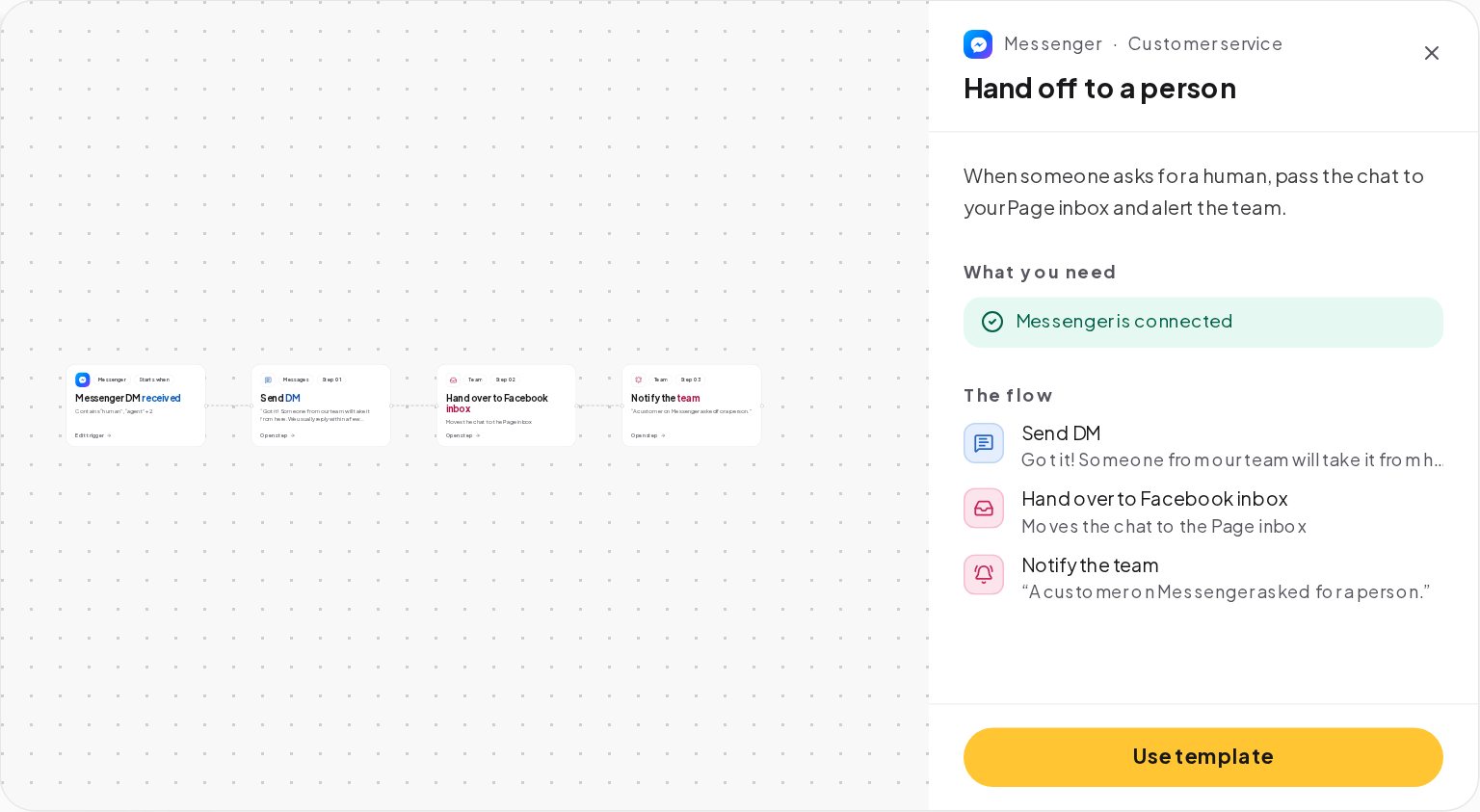
Its trigger listens for words such as human and agent in Messenger DMs. Its three steps reply to the customer, move the chat to the Page inbox with Hand over to Facebook inbox and notify the team: "A customer on Messenger asked for a person."
Detect when a customer asks for a human
People ask for a person in many ways. Add the ones your customers write, in every language you serve:
- The obvious ones: human, person, agent, someone, staff.
- The frustrated ones: "this isn't helping", "speak to someone", "real person".
- Your own language's words, since keywords accept any script.
Turn on Catch typos so "humna" and "agnet" still count, and set the match to Contains, so "can I talk to a human please" works.
Hand over on Instagram, WhatsApp, Messenger and Telegram
Hand over to Facebook inbox is a Messenger step: it moves the chat to your Page inbox, for teams that also answer in Meta's own tools. On every channel, the conversation is already in the ChatinFlow inbox with its full history, and these steps do the handover:
- Assign the conversation to a teammate, so it lands with the right person.
- Notify the team, so a teammate hears about it in the bell, by email or on their phone with push turned on.
- Create a task, such as "Call back about the refund", when the answer needs work outside the chat.
Tell the customer a person is coming, honestly
The customer just asked for a person; tell them what happens next, and when:
- Say when. "Within an hour on weekdays" beats "soon".
- Say that the history travels. Nobody likes explaining twice.
- Outside hours, say so. A Business hours condition can send "We're closed now, a teammate will reply at 9:00" instead.
Route the chat to the right teammate in the shared inbox
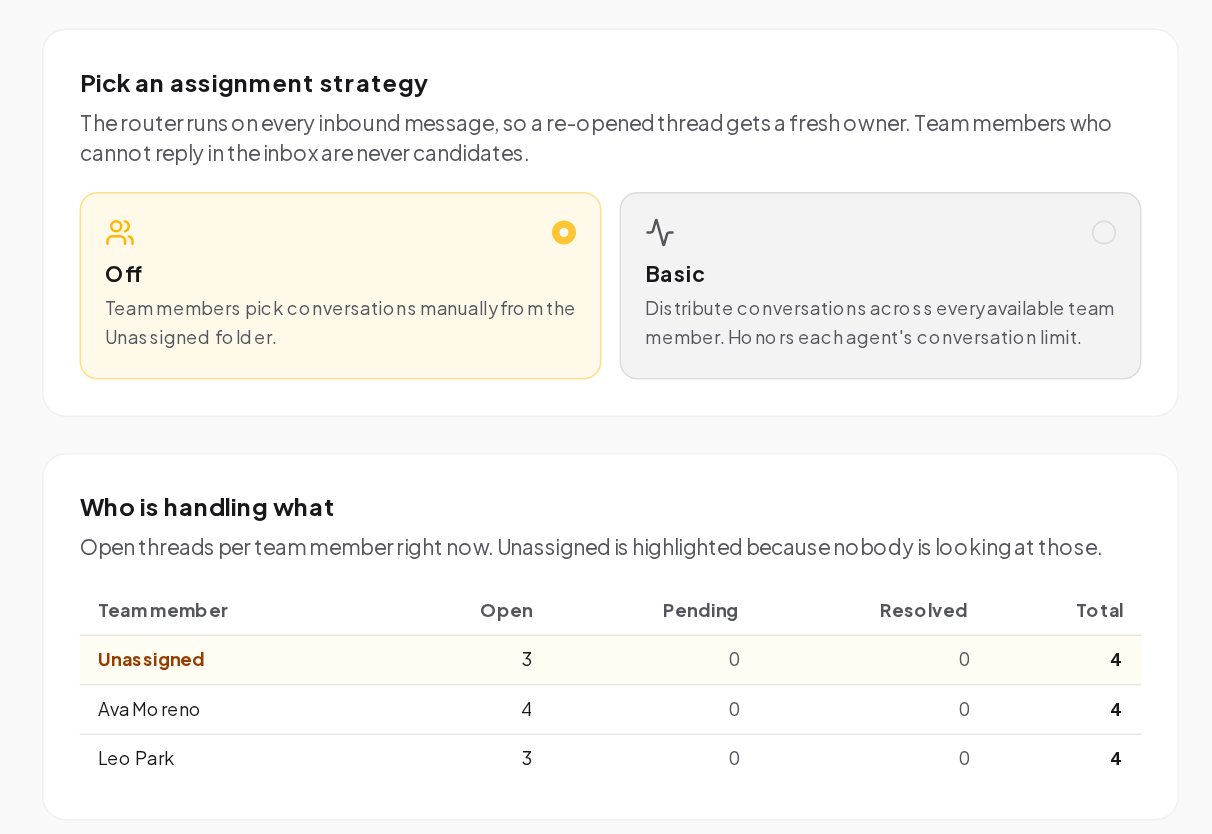
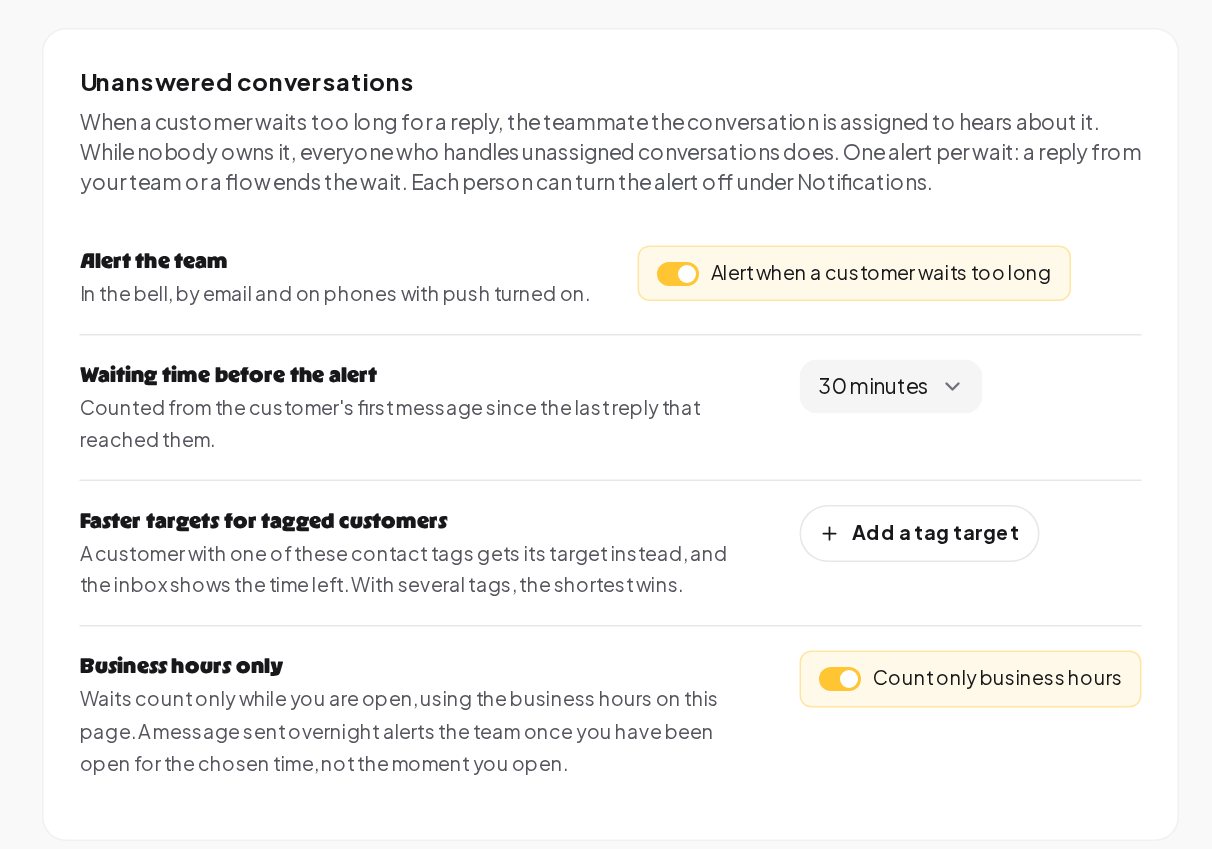
Open Settings, Inbox. Three settings make the handover feel fast:
- Auto-assignment. With Basic, new conversations are spread across available teammates, in turn or to whoever has the fewest open conversations, never over an agent's limit.
- Automation pause during human chat. While a teammate is replying, automations for that contact pause, for 30 minutes after the last reply or the time you choose.
- Unanswered conversations. When a customer waits longer than the time you choose, the assigned teammate hears about it, with faster targets for the customers you tag.
Add a human handoff to any flow
The keyword is one way in. Connect the same handover steps to:
- The AI agent's other path, taken when the answer is not in your sources, when the customer asks for a person or when no answer comes back.
- A Talk to a person button in your welcome and your default reply.
- The No path of a question, such as "Did that answer your question?" with Yes and No buttons.
- An order lookup that fails, when the HTTP request step to your store finds no order.
One handover, used everywhere, means every route to a person works the same way, and fixing it once fixes it everywhere.
Who sees the handed-over chats
The handover lands in a shared inbox, and roles decide who works it:
- Inbox agents work only in the inbox and see the conversations assigned to them, unless you turn on "Inbox agents see every conversation" under Settings, Inbox.
- Owners, admins and members always see the whole inbox.
- A custom role can fit a support lead who answers and assigns conversations but never touches billing.
For a small team, let everyone see everything. For a larger one, assign handovers and keep each agent's view to their own conversations, so nothing is answered twice.
Give the agent the whole conversation
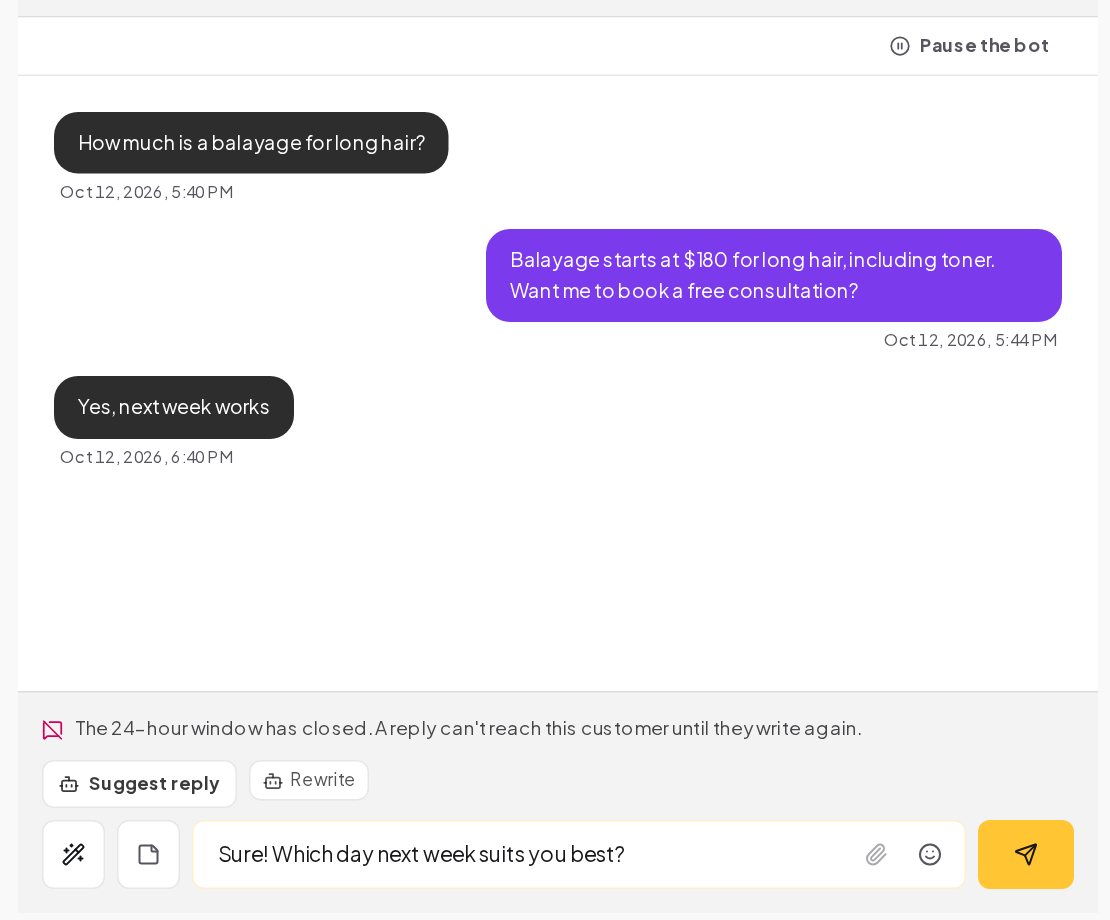
Once a person takes over, the inbox helps them answer quickly:
- The whole history of the conversation, from every channel, on one screen.
- Quick replies, shared across the workspace, inserted into the composer with one click and edited before sending.
- Suggest reply and Rewrite, on a paid plan with your own AI key, to draft an answer or make one shorter, friendlier or translated. Nothing is sent until the teammate presses send.
- Pause the bot at the top of the conversation, for 30 minutes, 1 hour or 24 hours, before typing.
When the bot should hand over without being asked
Some conversations should reach a person before the customer asks. Build the handover into the flow at these points:
- Money. A refund, a charge they do not recognize, a large order or a quote.
- Emotion. A complaint, a frustrated message or anything about a bad experience.
- Risk. Health, legal or safety questions, which no automated answer should touch.
- Value. A business enquiry, a wholesale order or a press request.
- Dead ends. The end of every menu path, with a Still need help? button that leads to a person.
Keyword automations for words such as refund, complaint or wholesale can lead straight to the handover, so these chats never sit behind a menu.
Handoff message templates you can copy
Back to the bot after the agent is done
A handover is finished when the customer's question is, not when a teammate replies. A few habits close it well:
- Close the conversation when it is resolved, so the inbox shows what is still open.
- Re-opened conversations can go back to the agent who handled them last time, with the setting under Settings, Inbox, so the customer talks to the same person.
- The satisfaction survey can ask the customer to rate the conversation once it is closed, and a low score can ask what went wrong.
How to measure human handoffs
The automation's Activity tab shows how many chats reached the handover. The Answers tab of Analytics shows how long customers waited for the first answer, day by day. Read the handed-over chats every week: the same question coming up again and again is a keyword reply or a source for the AI agent waiting to be written, and every one you add is a handover your team no longer needs.
Human handoff example: an online shop's order questions
An online shop answers order questions on Messenger and Instagram.
- The menu offers Track my order, Returns and Talk to a person.
- Track my order asks for the order number and looks it up in the shop's system with an HTTP request step. A found order gets its status; a missing one goes to the handover.
- Talk to a person, or any message with human or agent, starts the handover: the honest reply, assignment to the support team, and a team alert.
- On Messenger, the chat also moves to the Page inbox for the teammate who works in Meta's tools.
- A teammate replies within the hour. The bot stays quiet, and when the conversation is closed, the satisfaction survey asks the customer how it went.
Human handoff mistakes to avoid
- No way to reach a person. Every flow needs a door to the team, visible and easy.
- The menu again after "human". Listen for the words people use, and answer them.
- A handover with no alert. The chat moves, and nobody knows.
- The bot talking over the teammate. Keep the automation pause on, and use Pause the bot.
- Making the customer repeat. The history is in the inbox; say so in the reply, and read it before answering.
Human handoff glossary
- Handover. Moving a chat from the automation to a person, with the conversation attached.
- Hand over to Facebook inbox. The Messenger step that moves the chat to your Page inbox.
- Assign the conversation. The step that gives a conversation to a teammate.
- Notify the team. The step that alerts your teammates about a conversation.
- Quiet time. How long the bot stays silent in a chat after a teammate replies.
- Unanswered conversations. The inbox setting that alerts the assigned teammate when a customer waits too long.
Chatbot to human handoff: FAQ
Does the customer see that the chat moved?
They see your reply saying a teammate will take over, then the teammate's message in the same chat. The move happens on your side.
Can the bot come back after the teammate is done?
Yes. When the quiet time after the teammate's last reply ends, automations can answer that contact again.
Can I hand over only during working hours?
Yes. A Business hours condition in the flow can hand over during the day and send a "we'll reply at 9:00" message at night, with the request kept in the inbox.
Do Instagram and WhatsApp have a Page inbox step too?
No. Hand over to Facebook inbox is for Messenger. On Instagram, WhatsApp and every other channel, assign the conversation in the ChatinFlow inbox and notify the team.
Sources
- Handover Protocol, Meta for Developers, on passing a Messenger conversation between apps and the Page inbox.
- Messenger Platform and IG Messaging API policy, Meta for Developers, on the 24-hour window for human replies too.