



The full guide
Instagram automation for creators: turn comments into fans, leads and brand deals
Answer every comment and story reply with the link you promised, grow an email list, sort brand deals and sell a guide or a course, without living in your inbox.
A creator's inbox is a strange place. The same post that brings ten thousand views brings three hundred comments asking for the link, forty story replies asking where the lamp is from, a brand asking for your rates and a fan asking whether you are going live this week. Answering all of it by hand eats the hours you need to make the next post; ignoring it wastes the attention you worked for. ChatinFlow answers the predictable part for you, on Instagram, Messenger, WhatsApp and Telegram, and brings the messages that matter, such as brand deals, to the top. This guide shows the automations creators set up first, step by step in the dashboard, and how to grow from a comment keyword to a list you own.
What creators automate first on Instagram
| Moment | What the automation does | Template to start from |
|---|---|---|
| A comment with your keyword | Sends the link in a DM and replies in public | Comment to DM |
| A reply to your story | Sends what they asked for and starts a conversation | Story reply DM |
| A tag in someone's story | A heart, a thank-you and an optional code | Thank people who share you in their Story |
| A brand writes in | Asks budget and timing, alerts you | Get more collabs from Story replies |
| A Live comment | A private reply with the plan you mentioned | Answer Live questions privately |
| START in a DM | A five-day mini-course, one message a day | A sequence started by a keyword |
Find DM templates for your content
Open Automations, stay on Explore and search the gallery. A search for "story" shows six templates built around stories: story reply DMs, lead generation from stories, thanking people who share you, collab requests, coupons and AI answers to story replies.
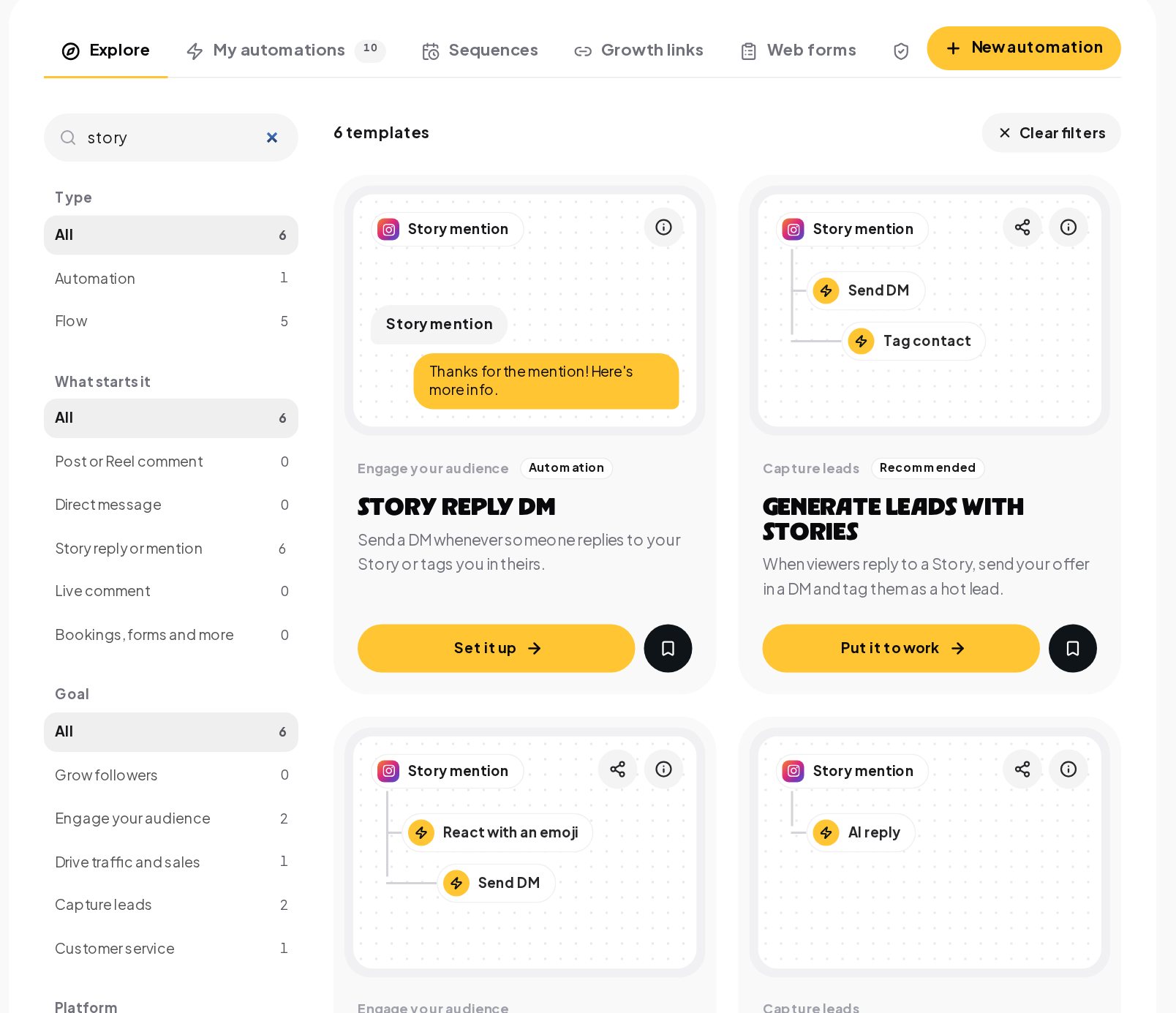
Each card shows the trigger and the first steps, so you can see the flow before you open it. Press Put it to work, change the words to yours and publish.
Send a DM to everyone who comments
People comment because they want something. The comment-to-DM flow answers every one of them in private, thanks them in public, and turns a passing scroll into a conversation you own.

- The word. Pick one short word, such as LINK, GUIDE or PLAN, and put it in the caption in capitals. People copy what they see.
- The post. Watch one post, your next one, or all of them. A post-specific automation wins over one that watches everything, so each Reel can send its own link.
- The private reply. Instagram allows one private reply per comment, within 7 days of the comment. Send the link, the guide or the code in it.
- The public reply. A short answer under the comment, such as "Sent, check your DMs", in up to three versions picked at random so the thread does not look automated.
- The next step. A button offers the follow-along video or the full guide, so fans who want more raise their hand with one tap, and the fan is saved as a contact.
Set The same person again to once per post, so someone who comments twice to tag friends does not get the same DM twice.
Turn story replies into conversations
Stories are where your most engaged followers are. Two automations cover them.
Story replies. Someone replies to your story with a question or your keyword, and a DM goes back with what they came for. A two-message flow can ask for their email and save it on the contact, which turns a story view into a subscriber.
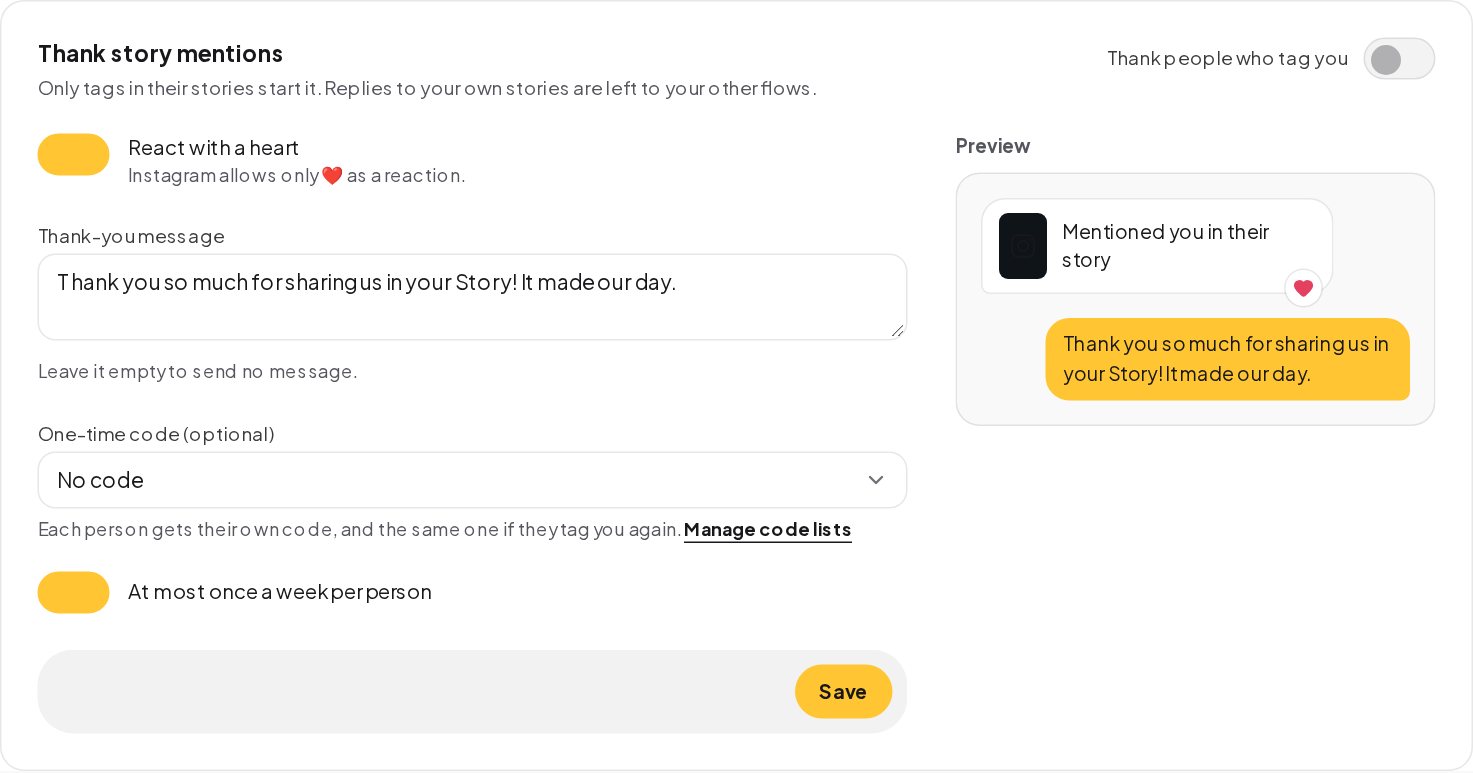
Story mentions. A tag in someone else's story is free word of mouth. Under Automations, Story mentions, thank everyone who tags you: a heart on their message, a thank-you and, if you like, a one-time code from your code list, at most once a week per person.
Sort brand deal inquiries from fan mail
The DMs that pay the bills are easy to miss between hundreds of "love this". A brand-deal flow catches them.
- Quick replies ask the budget and the date in two taps, instead of a back and forth.
- Custom fields keep the answers on the brand's contact, so you read real offers instead of chasing details.
- A team alert tells you, or your manager, that a deal just came in.
Start it from a keyword in your bio, such as COLLAB, from a button in your chat menu, or from the "Get more collabs from Story replies" template. Brand conversations then wait in your inbox with their budget and timing already filled in.
Answer Live comments without stopping the Live
While you are live, anyone who comments your word gets the plan you are talking about in their DMs. You keep going, and nobody has to wait for the replay. A button can offer the full version to whoever wants it, and a tag marks everyone who joined, so you can message them about the next Live.
Sell a mini-course one lesson a day
Someone writes START and gets a five-day plan, one message a day at the hour you set. It is the easiest way to show what your paid course feels like.
- A keyword trigger starts it from START or any word you pick.
- A sequence sends day two, three and four on schedule, and a reply takes the person out so nobody gets lessons after they asked a question.
- A Buy button on the last day opens a Stripe or PayPal checkout for the full course, with the money going straight to your account.
On Instagram and Messenger, a message can go out only within 24 hours of the person's last message, so build the mini-course to ask a small question each day; their answer keeps the window open. On Telegram there is no window once they have started your bot, and on WhatsApp an approved template keeps it going after the first 24 hours.
Hide spam and hate comments automatically
A post that goes viral attracts "check my bio" bots, fake giveaways and people posting phone numbers. Comment protection hides them as they arrive, while the person who wrote a hidden comment still sees it, so nobody feels blocked.
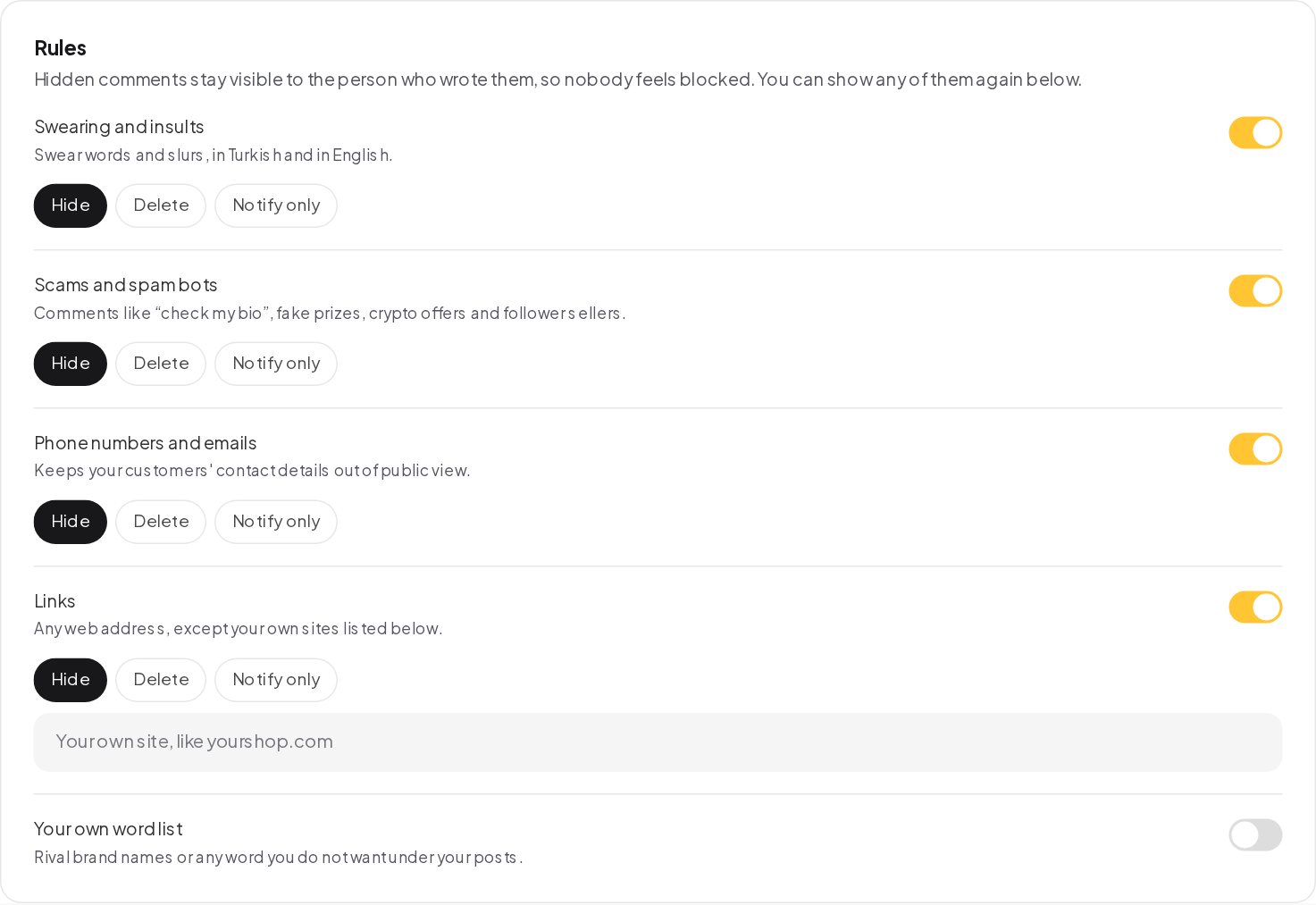
Add rival brand names or anything you do not want under your posts to your own word list, and check the list of hidden comments once a week; a real fan can look like spam.
See which post or Reel brought your fans
A growth link gives each place you share your chat link its own code: your bio, a Reel, a collab partner, a podcast. Each link counts the unique people it brought in and can start its own welcome.
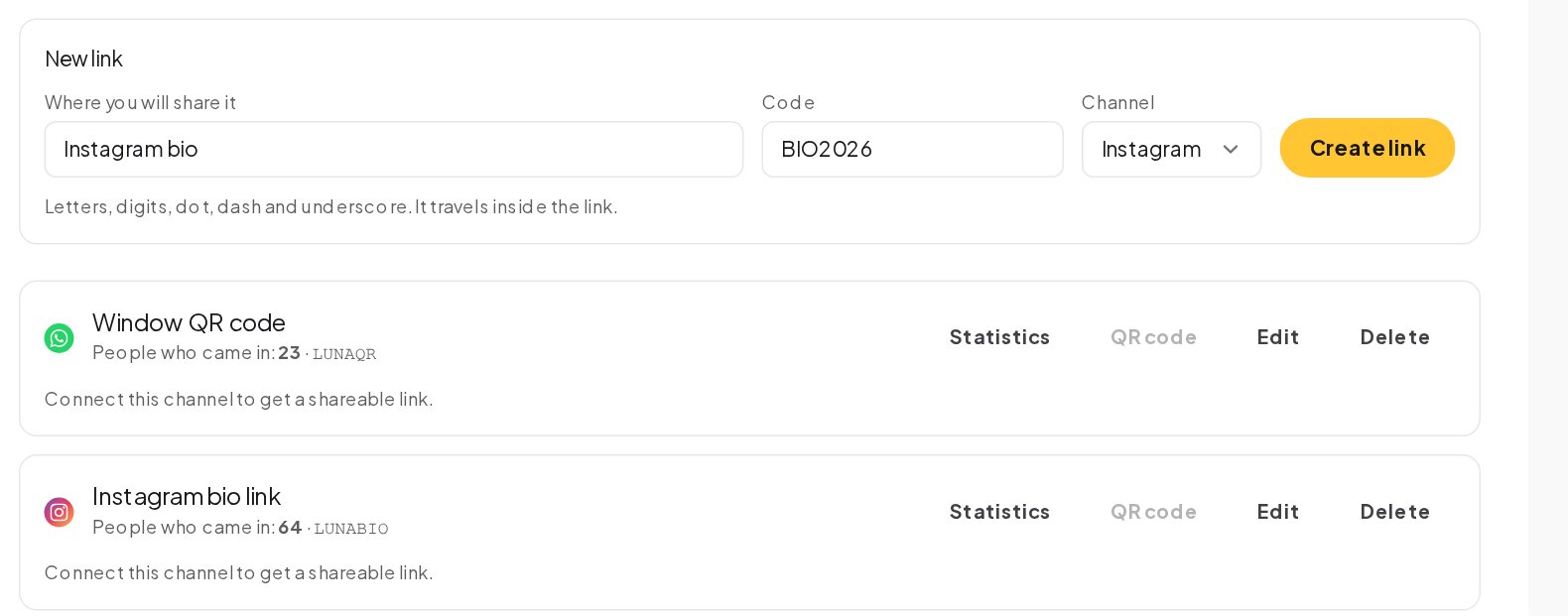
The Automations tab in Analytics then shows which flows ran most and how many finished, so you can see which post's keyword actually worked.
How to write DMs your fans enjoy
An automated DM is read as a message from you, so write it the way you talk on camera.
- Open with the thing they asked for. "Here's the routine 👇" and the link, before anything else.
- Sound like you. Your words, your emoji, your sign-off. Fans notice a corporate tone straight away.
- Keep it to one screen. Two short messages beat one long one; a typing indicator between them makes it feel live.
- Ask one easy question. "Beginner or advanced?" with two buttons tells you who they are and keeps the conversation open.
- Say what happens next. "Day two arrives tomorrow at 9" sets expectations and cuts down "where's the next part?" messages.
- Thank them. A comment, a share or a tag took effort. A short thank-you is the cheapest way to get the next one.
Test every flow with Try it before you publish, and read it on your phone; that is where your fans will see it.
Turn followers into an email list you own
Followers belong to the platform; a list belongs to you. Every automation above can save something you keep:
- An email address, asked for before the guide is sent and checked with a Reply check step.
- A tag, such as the topic they came for, so a later broadcast reaches only the fans who care.
- A Telegram start, by offering your Telegram bot in the DM, so you can message them without a 24-hour window.
- A referral, with Refer a friend giving each fan a personal link and a reward when friends join.
Creator DM automation glossary
- Comment to DM. An automation that answers a comment with a private message, such as the link you promised in the video.
- Private reply. Meta's single private message in answer to a comment, a text with an optional link, sent within 7 days of the comment.
- Public reply. A reply under the comment itself, so other viewers see that commenting works.
- Story reply. A message someone sends by replying to your story. It opens a DM conversation.
- Story mention. A story in which someone tags your account. ChatinFlow can thank them with a heart and a DM.
- Growth link. A link with its own code, such as for your bio, that opens a chat with you and counts who came in through it.
- Sequence. A planned series of messages over days, such as one lesson a day, that stops on its own when the contact replies.
- Live comment. A comment during an Instagram Live. A keyword in it can get a private reply while the stream is still running.
Creator DM automation mistakes to avoid
- A keyword nobody can guess. Put the word in the caption, in capitals, and keep it to one short word.
- Every time on comment automations. Use once per post, or fans get the same DM twice.
- A DM that only says "here you go". Add one next step: a button, a question or a link to more.
- Pitching before giving. Send what they asked for first, then offer the next thing.
- Never reading the hidden comments. Protection is a filter, not a judge.
Instagram automation for creators: FAQ
Can I use different links for different Reels?
Yes. Give each Reel its own comment automation set to that post. A post-specific automation wins over one that watches every post.
Does an automatic comment reply look like a bot?
Less so with three versions. Write up to three public replies; one is picked at random each time.
Can I give fans a discount code automatically?
Yes. A one-time code step gives each person their own code from your list, the same code if they ask again, and a Full path when the list runs out.
Can my manager handle brand deals?
Yes. Invite them to the workspace with the role that fits, and let the brand-deal flow alert them and assign the conversation.
Sources
- Private Replies, Meta for Developers, on replying to a comment by DM within 7 days.
- Messenger Platform and IG Messaging API policy, Meta for Developers, on the 24-hour window.