Şifreli kimlik bilgileri, iki adımlı giriş, çalışma alanı denetim günlüğü, GDPR dışa aktarma ve silme araçları. Bu sayfa, verinizi bugün neyin koruduğunu sade bir dille anlatıyor.
Kanal jetonları ve gizli anahtarlar, çalışma alanı başına mühürlü
TLS 1.2+
Her bağlantıda, HSTS ile
AB
Veriler Finlandiya'da barındırılır
Korumalar
Ürünün içinde.Rozette değil.
ChatinFlow'un SOC 2 raporu ya da ISO 27001 sertifikası yok. Aşağıdaki korumalar bugün üründe çalışıyor; güvenlik anketinizi de [email protected] yanıtlıyor.
instagram_token
EAAG3xQ7Zk9pL2mW8
••••••••••••••••
Sealed with AES-256-GCM
Her zaman açık
Encrypted credentials
Kanal jetonları ve entegrasyon anahtarları, her çalışma alanına ayrı bir anahtarla AES-256-GCM ile şifrelenir.
4
8
1
9
0
6
Signed in
Her planda
Two-step sign-in
Her hesapta doğrulama uygulaması kodları; tek tıkla diğer tüm oturumlardan çıkış.
MC
Export ready
Erased
Panelinizde
GDPR tools
Bir çalışma alanını ya da tek bir kişiyi dışa aktarın, bir kişiyi silin veya hesap silmeyi planlayın.
•••• 4242
Payment providerNo card number here
Yalnızca ödeme sağlayıcısında
Card data
Kart numaralarının tamamını Paddle ve Stripe alır. Hiçbiri sunucularımıza ulaşmaz.
İç güvenlik programımız ISO/IEC 27001 kontrol setini izler: risk kaydı, ayrıcalıklı erişimin üç ayda bir gözden geçirilmesi ve kontrollerimizin nasıl ayarlandığının günlük kaydı. Henüz bağımsız bir denetimden geçmedi.
Güvenlik kontrolleri
Üründe çalışan kontroller.
Şifreleme
Trafik her bağlantıda şifrelenir; bağladığınız kimlik bilgileri de veritabanına ulaşmadan önce mühürlenir.
Yalnızca TLS 1.2 veya 1.3, HSTS ile
Kanal jetonları ve gizli anahtarlar için AES-256-GCM
Her çalışma alanı için ayrı bir veri anahtarı
Erişim yönetimi
Hazır çalışma alanı rolleri ve kendi özel rolleriniz, her hesapta iki adımlı giriş ve hesapta açık oturumların listesi.
Sahip, yönetici, üye, gelen kutusu temsilcisi ve izleyici rolleri
Her planda doğrulama uygulaması kodları
Diğer tüm oturumlardan tek tıkla çıkış
Denetim ve kayıt
Çalışma alanındaki değişikliklerin ve güvenlik olaylarının denetim günlüğü; incelemeleriniz için CSV dışa aktarımıyla.
Kim neyi, ne zaman değiştirdi
Entries cannot be edited or deleted
Ayrı güvenlik olayları görünümü
Uygun planlarda CSV dışa aktarımı
Değişiklik denetimi
A flow that can message a large share of your contacts does not go live on one person's click, and neither does a broadcast to a large audience. A second teammate approves it first; if you are the only one who can, you approve it with a fresh two-factor code.
Yüksek etkili akışlar için ikinci onay
Second signature for large broadcasts
Yalnızca yayın yetkisi olan üyeler onaylayabilir
Sending protection
Your own sending is watched so your channels stay healthy. When volume or STOP replies climb, sending slows or pauses before a platform blocks your account, and you see the reason.
Slows down before it pauses, never an automatic ban
A broadcast pauses when too many people reply STOP
The reason and an appeal on screen
Veri hakları
GDPR talepleri destek kaydı açmadan, doğrudan panelden karşılanır.
Bir çalışma alanını ya da tek bir kişiyi dışa aktarın
Talep üzerine kişi silme
Bekleme süreli hesap silme
Ağ koruması
Cloudflare, chatinflow.com'un önünde durur ve trafiği sunucularımıza ulaşmadan süzer.
Cloudflare CDN ve DDoS koruması
Veritabanı ve önbellek internete kapalı
Yedekleme ve izleme
Veritabanı ve yüklenen dosyalar her gece yedeklenir, son yedek her ay bir testte geri yüklenir ve otomatik bir kontrol hizmeti beş dakikada bir test eder.
Her gece veritabanı ve dosya yedeği
Son yedeğin aylık geri yükleme testi
Beş dakikada bir sağlık kontrolü
Barındırma
Verilerinizin barındırıldığı yer.
Her çalışma alanı AB'de, Finlandiya'daki bir Hetzner veri merkezinde barındırılır. Bölge seçimi yoktur: tüm çalışma alanları aynı sunucularda durur ve trafiği onlara Cloudflare taşır.
Uygulama
Finlandiya · AB
Panel, API ve otomasyon işçileri bir Hetzner veri merkezindeki sunucularımızda çalışır.
Veritabanı ve dosyalar
Finlandiya · AB
Kişiler, konuşmalar ve yüklenen dosyalar aynı sunucularda, internete kapalı olarak saklanır.
Yedekler
Finlandiya · AB
Veritabanının ve yüklenen dosyaların her gece alınan kopyası, aynı sunucularda saklanır.
Alt işleyiciler
Hizmeti sunmamıza yardım eden tedarikçiler.
Alt işleyici
Amaç
Bölge
Hetzner Online
Barındırma: sunucular, veritabanı, dosya depolama ve yedekler
Finlandiya · AB
Cloudflare
chatinflow.com için CDN, TLS ve DDoS koruması
Küresel
Paddle
Ödeme, faturalama ve satış vergisi
Birleşik Krallık
Stripe
Ödeme işleme
ABD
Bağladığınız kanallar (Meta üzerinden Instagram, Messenger ve WhatsApp, Telegram, X, Twilio, Postmark) ve kendi anahtarınızla eklediğiniz AI sağlayıcıları (OpenAI, Anthropic, Google Gemini, Azure OpenAI) veriyi siz bağladığınız için ve kendi koşullarıyla alır; bu yüzden bu listede yer almazlar.
Sorumlu açıklama
Bir güvenlik açığı mı buldunuz? Yeniden üretme adımlarıyla birlikte [email protected] adresine yazın ve herkese açık paylaşmadan önce düzeltmemiz için bize fırsat tanıyın.
Chatbot security and GDPR: how your customer conversations are protected
Where your data lives, how secrets are sealed, sign-in and roles, approvals for big sends, the audit trail, backups and your data rights, with the gaps listed just as plainly.
A DM automation tool holds some of the most sensitive data a small business has: every conversation with every customer, the tokens that let software post as your brand, and the keys to your AI and payment accounts. Before you connect anything, you should know where that data lives, who can see it, how it is protected and what you can do when something goes wrong. This guide explains ChatinFlow's security in plain terms: the infrastructure, how secrets are sealed, sign-in and sessions, roles and approvals, the audit trail, backups, and your data rights. It also lists, just as plainly, what ChatinFlow does not have yet, so you can judge it against your own requirements.
Where chatbot data is hosted: EU servers in Finland
ChatinFlow runs on its own servers in a Hetzner data center in Finland, inside the European Economic Area. The dashboard, the API and the automation workers run there, and contacts, conversations and uploaded files are stored on the same servers, closed to the internet: the database and cache accept no connections from outside.
Cloudflare sits in front of chatinflow.com. It filters traffic before it reaches the servers, absorbs attacks and serves the site's static files from a nearby location. Every connection between your browser, the platforms and ChatinFlow is encrypted with TLS 1.2 or 1.3, and HSTS tells browsers never to fall back to an unencrypted connection.
Layer
What protects it
Network edge
Cloudflare in front of chatinflow.com, filtering traffic and absorbing attacks
Connections
TLS 1.2 or 1.3 only, with HSTS
Database and cache
Closed to the internet, reachable only from the servers themselves
Secrets
AES-256-GCM, with a separate data key for each workspace
Backups
A nightly copy of the database and uploaded files
Monitoring
An automated health check every five minutes
How channel tokens and API keys are encrypted
The most valuable things in a ChatinFlow workspace are not messages but keys: the token that lets ChatinFlow answer as your Instagram account, the secret of a webhook, your OpenAI or Stripe key. A leaked token is worse than a leaked conversation, because someone could send as you.
ChatinFlow seals them with envelope encryption before they reach the database. Each workspace has its own data key; each secret is encrypted with AES-256-GCM under that key. After you save a key, the dashboard only ever shows a masked preview. If you rotate a key at the provider, update it in ChatinFlow and the old one is replaced.
Payments work the same way from the other side: card details never reach ChatinFlow at all. Subscription payments are handled by Paddle and Stripe, and Buy button payments in your flows go through your own Stripe or PayPal account, straight to you.
Two-factor authentication and secure sign-in
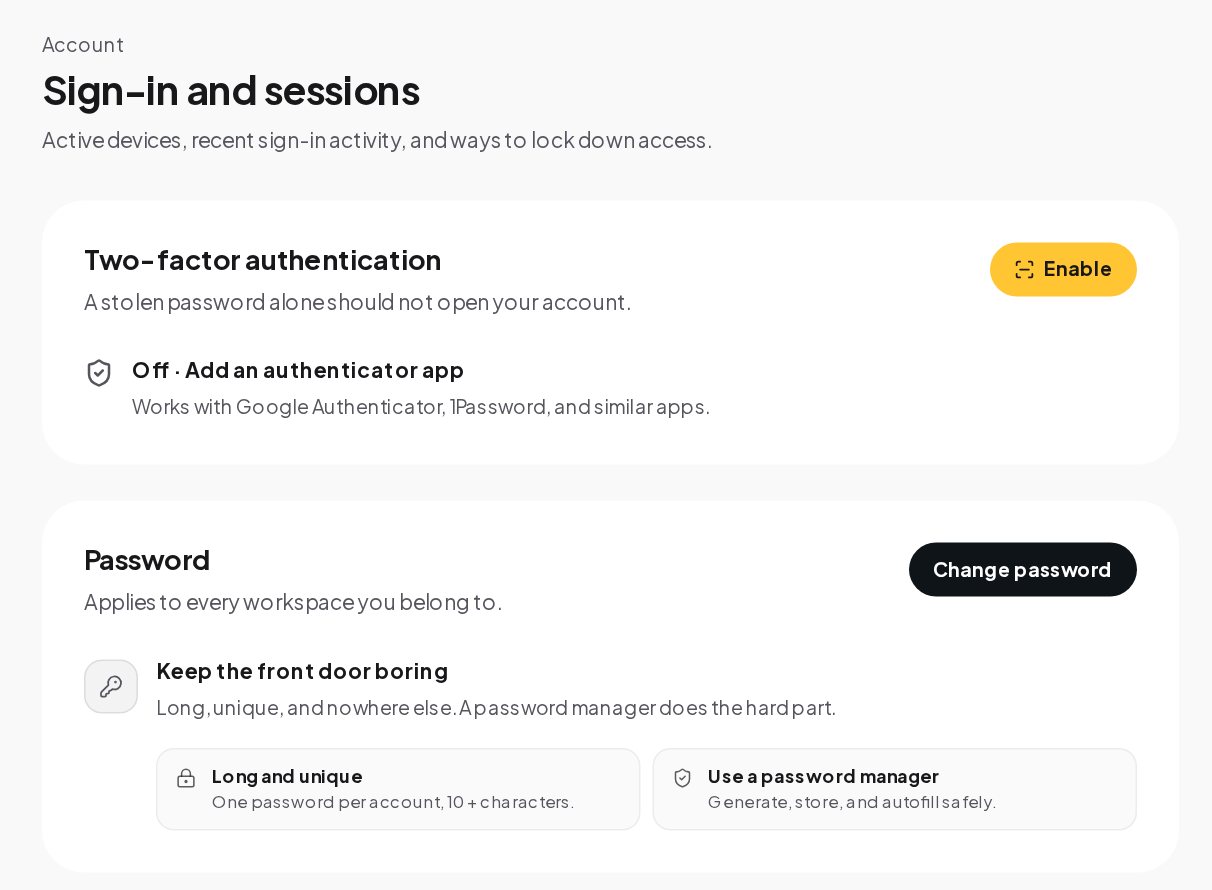
Open Settings, Security. Three things live here.
Turn on two-factor authentication and keep a long, unique password.
Two-factor authentication. A stolen password alone should not open your account. Turn it on with Google Authenticator, 1Password or a similar app, on every plan. After that, each sign-in asks for the six-digit code.
Password. It applies to every workspace you belong to. Long, unique and stored in a password manager is the whole recipe.
Active sessions and recent activity. Every device signed in to your account is listed, with the browser, the system and the time. Revoke one, or revoke all other sessions in one click when a laptop goes missing.
Sign-in with an outside identity is guarded too. A social login or single sign-on is never attached to an existing account with the same email that has not been verified, which closes a common account takeover trick.
Roles and permissions for your team
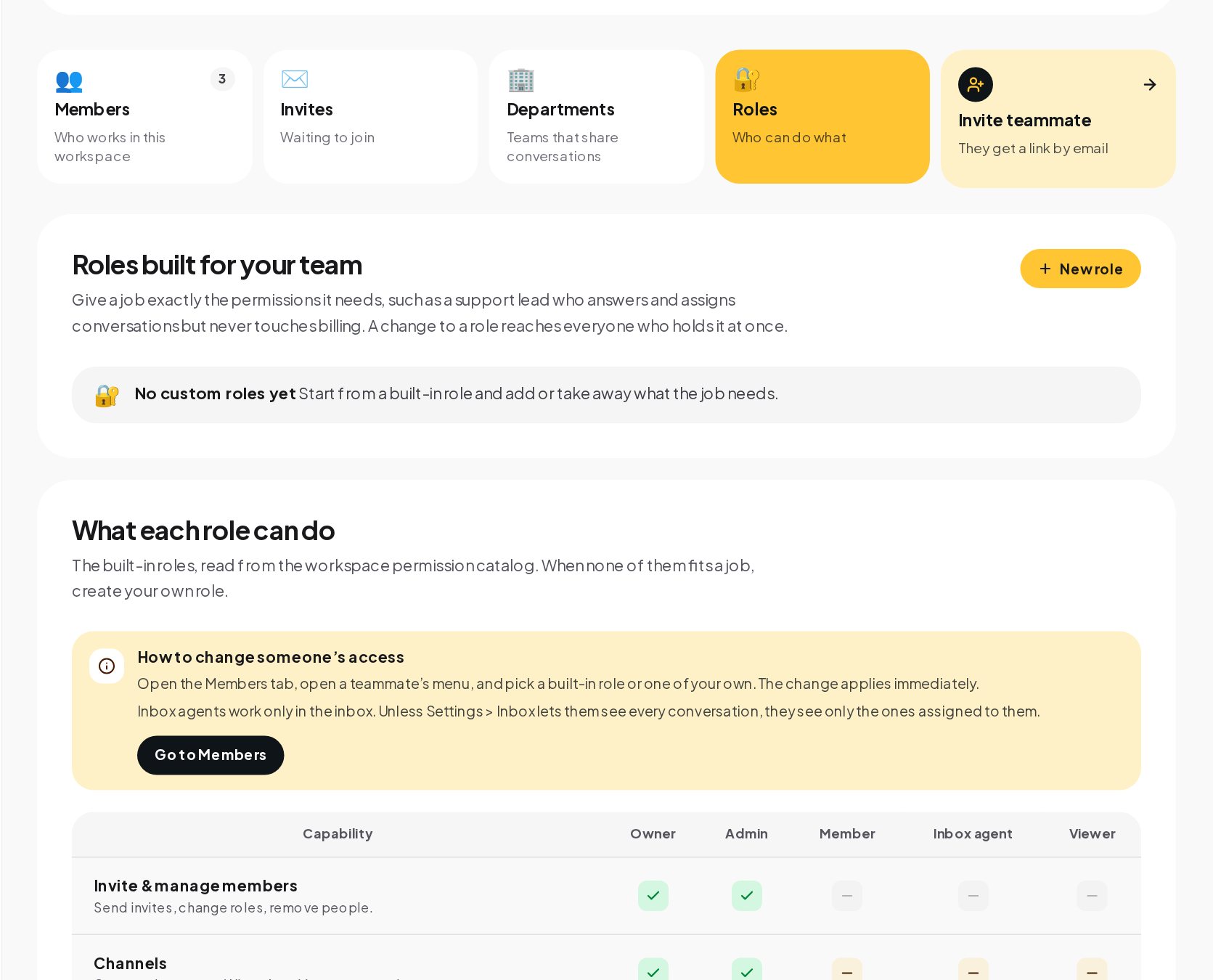
Open Team to invite teammates and choose their roles. The Roles tab shows what each built-in role can do, capability by capability.
Built-in roles side by side, and room for your own.
Owner and Admin can do everything in the table: invite and manage members, connect channels, build and publish automations, launch broadcasts, change the plan and read the audit log.
Member works in the inbox and with contacts, with limited access to channels, automations, deals and broadcasts, and no access to members, billing or the audit log.
Inbox agent works only in the inbox. Unless Settings, Inbox lets them see every conversation, they see only the ones assigned to them, and they cannot build automations or launch broadcasts.
Viewer has limited access across the workspace and cannot manage members, billing or the audit log.
When none of them fits a job, create a custom role: start from a built-in role and add or take away what the job needs, such as a support lead who answers and assigns conversations but never touches billing. A change to a role reaches everyone who holds it at once.
Approval for large sends and high-impact flows
A flow or a broadcast that can message a large share of your contacts does not go live on one person's click. When a flow with a sending step is published in a workspace with 1,000 contacts or more, or a broadcast's audience reaches 1,000, another teammate who can publish approves it first. If you are the only one who can publish, you approve your own request with a fresh two-factor code. The approval covers what was reviewed, so changing the content asks again.
This is the control that prevents the worst automation accident: a test message sent to everyone.
Audit log: who changed what, and when
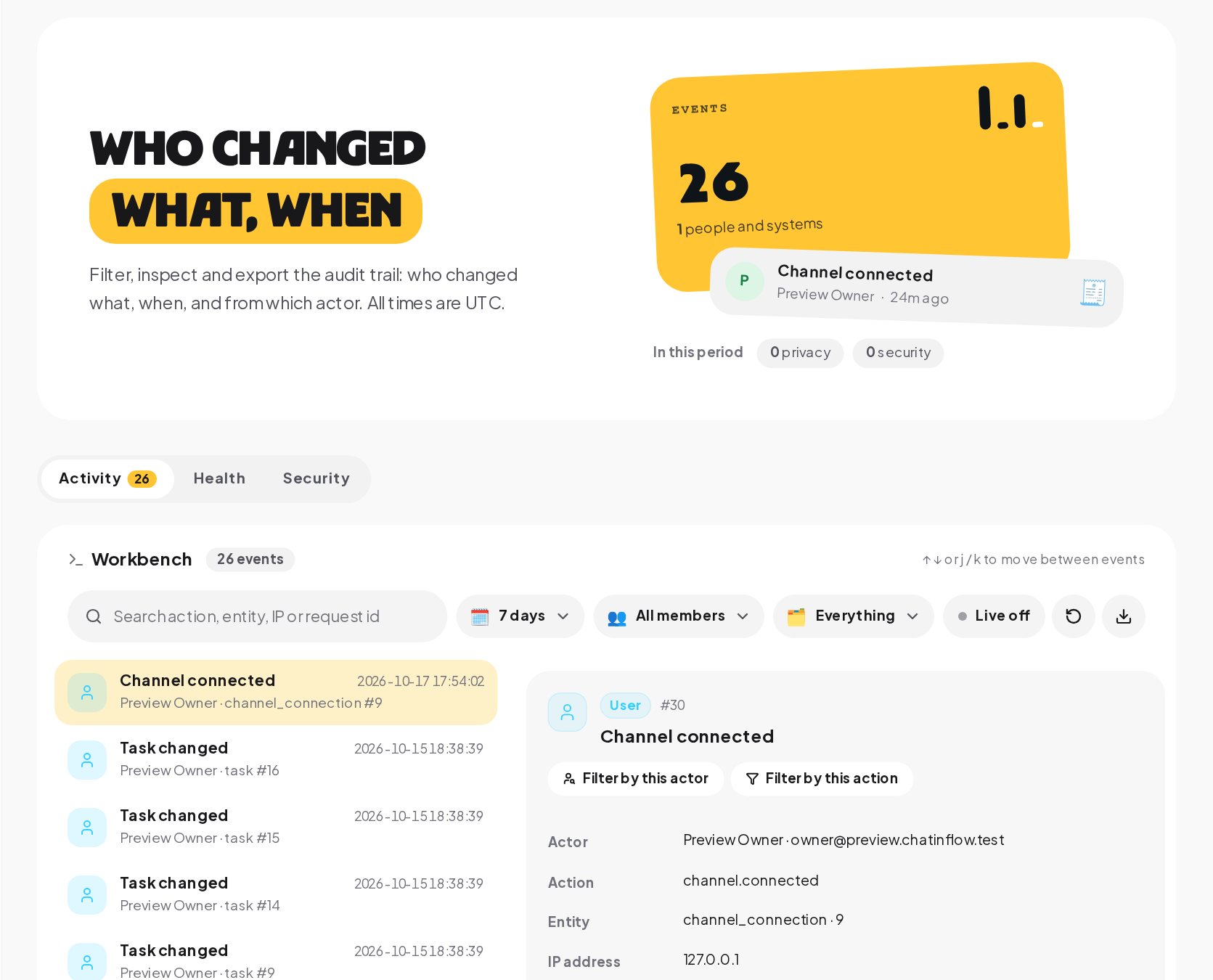
Every change in the workspace is written down. Open the Workbench to see who changed what, when and from which actor.
Filter, inspect and export the audit trail. Demo workspace.
Activity lists workspace changes, such as a channel connected, a flow published or a member's role changed, with the actor, the time and the details.
Security lists security events in their own view, apart from everyday changes.
Filters narrow the list by time range, by member and by kind of event, and every event shows its details and IP address.
Export downloads every event that matches the current filters as CSV, on eligible plans, for your own reviews.
All times are in UTC, so events from different time zones line up.
Back up your automations and settings
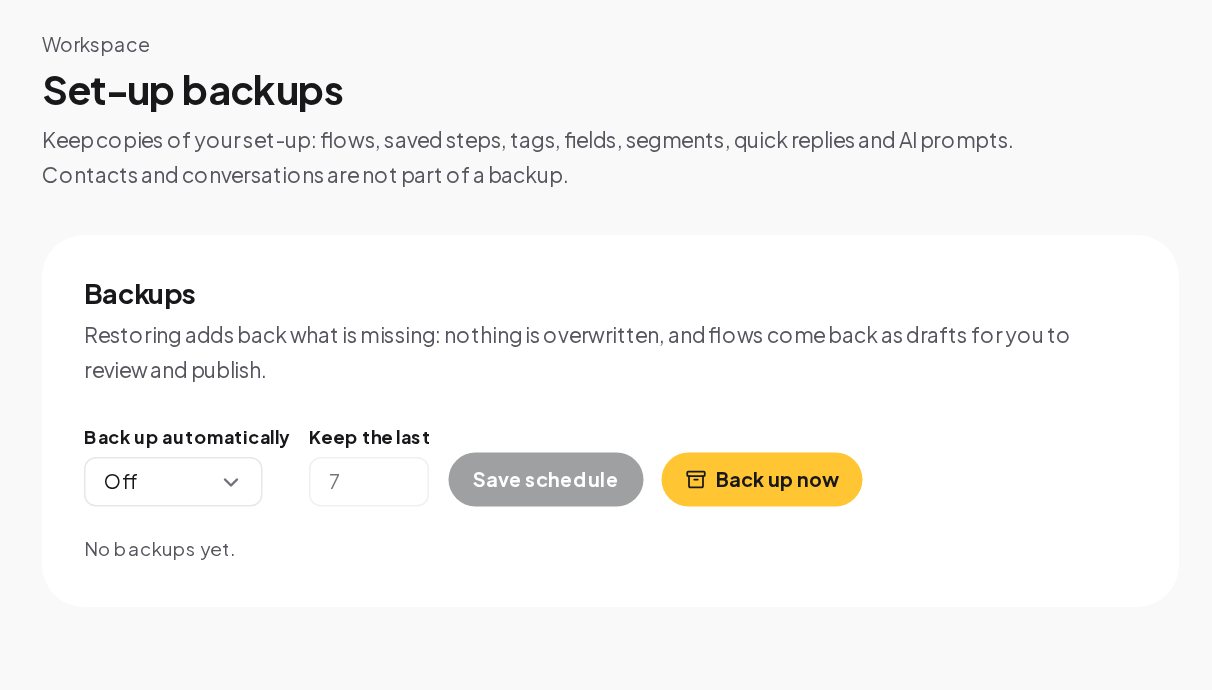
The database and uploaded files are backed up every night. On top of that, workspaces on eligible plans can keep their own copies of their set-up under Settings, Backups.
Back up flows, saved steps, tags, fields, segments, quick replies and AI prompts.
A set-up backup holds your flows, saved steps, tags, custom fields, segments, quick replies and AI prompts. Contacts and conversations are not part of it. Restoring adds back what is missing without overwriting anything, and flows come back as drafts for you to review and publish. Keep the last several backups on a schedule, or press Back up now before a big change.
GDPR data export and deletion requests
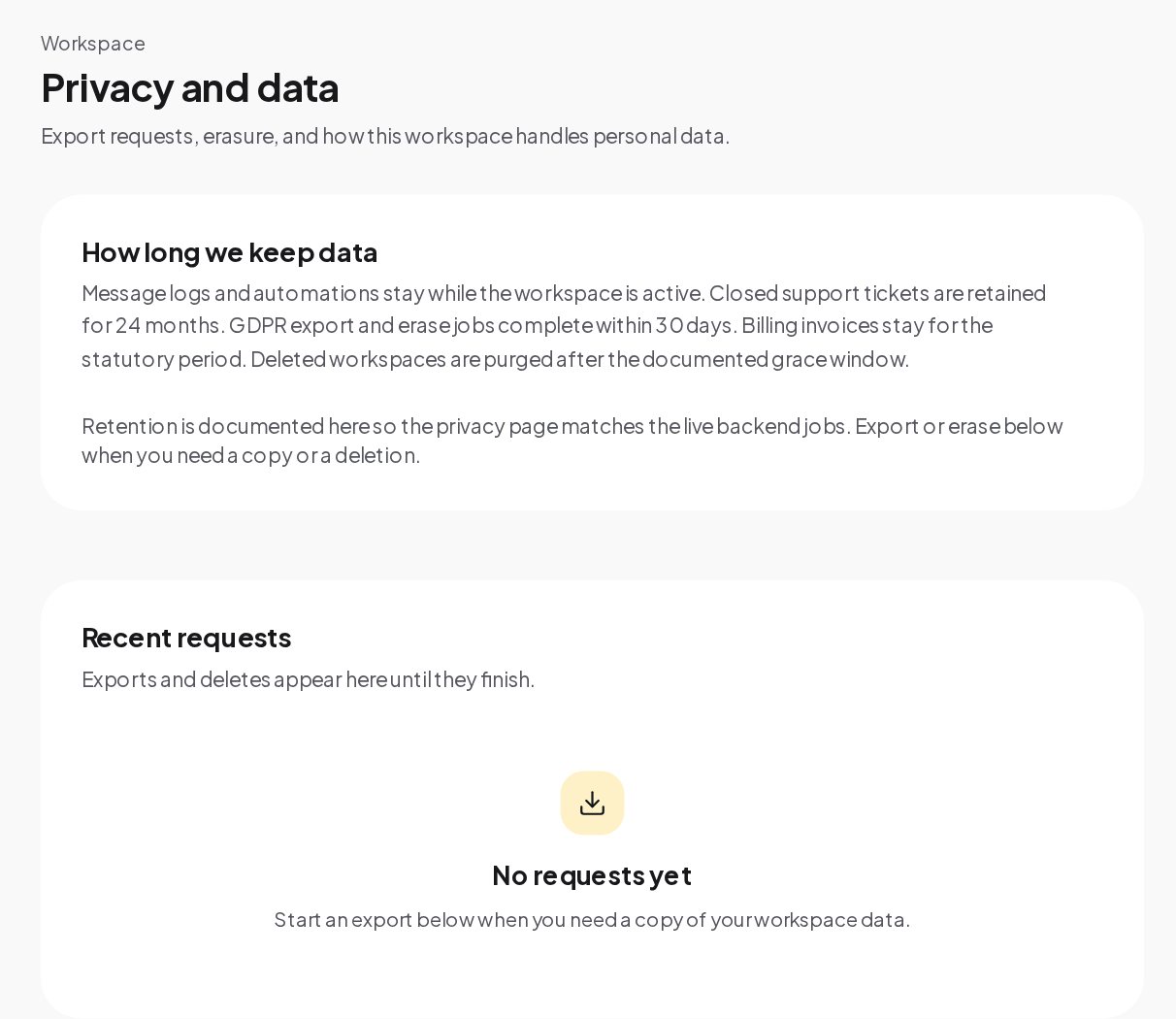
Customers have rights over their data, and so do you. Settings, Privacy handles the requests without a support ticket.
Export the workspace, erase a contact or delete your account, from the dashboard.
Export workspace data. Messages, contacts and metadata as a downloadable archive.
Erase a contact. Delete them in Audience when a customer asks to be forgotten.
Delete your account. From your profile; your personal data is erased after a grace period you can cancel.
Retention. Message logs and automations stay while the workspace is active, closed support tickets are kept for 24 months, and export and erase jobs complete within 30 days.
Single sign-on (SSO) and IP allowlists for larger teams
Business and up add two controls for teams with an IT department.
Single sign-on through OpenID Connect. Connect your identity provider, such as Okta, Microsoft Entra ID or Google Workspace, and verify your email domain with a DNS TXT record. With single sign-on required, members can no longer sign in with a password or a social login; the owner keeps a way in.
An IP allowlist. The owner can limit where members reach the workspace from: the dashboard, API keys, the realtime connection and notifications. Paths your customers use, such as the website chat and booking pages, are not affected.
AI providers and data processing
AI replies and the inbox helpers run on keys you connect, from OpenAI, Anthropic, Google Gemini or Azure OpenAI. Without a key, no conversation text is sent to an AI provider, and ChatinFlow does not train any model on your workspace. When those features run, the text goes to the provider you picked, under your account and that provider's terms. Incoming voice messages are transcribed automatically on ChatinFlow's own servers in Finland, in a process with no network access, so that audio never leaves them. Only when a teammate presses Transcribe on one message while that service is unavailable is the message sent to OpenAI, on the workspace's own key and only if one is connected.
The companies that process data for ChatinFlow itself are Hetzner, for hosting, Cloudflare, for the network edge, and Paddle and Stripe, for payments. Channels and tools you connect, such as Meta's apps, Telegram or your CRM, receive data because you connected them.
What is not offered yet: SOC 2, ISO 27001, SAML
Honest gaps help you decide.
No SOC 2 report or ISO 27001 certificate.
No SAML and no SCIM. Single sign-on works through OpenID Connect.
No end-to-end encryption. Messages are encrypted in transit and stored on servers closed to the internet, but ChatinFlow can read them to run your automations.
No region choice. Workspaces are hosted in Finland.
No paid bug bounty. Security reports are welcome at [email protected].
How to report a security issue
Found a problem? Email [email protected] with the steps to reproduce it and its impact, and give ChatinFlow the chance to fix it before you share it publicly. The scope is chatinflow.com and its API.
Security glossary
Envelope encryption. Each workspace has its own data key, and each secret is encrypted with AES-256-GCM under that key.
Two-step sign-in. A six-digit code from an authenticator app at each sign-in, available on every plan.
Second approval. A check before a flow or broadcast that can reach 1,000 or more contacts goes live: another teammate who can publish confirms it.
Set-up backup. A planned copy of flows, saved steps, tags, fields, segments, quick replies and AI prompts, restored without overwriting anything.
Chatbot security and GDPR: FAQ
Is two-factor authentication available on the free plan?
Yes. Two-step sign-in with an authenticator app works on every plan, as does signing out every other session.
Can an inbox agent see every conversation?
Only if you allow it. By default an inbox agent sees the conversations assigned to them; Settings, Inbox can let them see every one.
Are contacts part of a set-up backup?
No. A set-up backup holds flows, saved steps, tags, fields, segments, quick replies and AI prompts. The database itself, contacts and conversations included, is backed up every night.
Where do I see who changed a flow?
In the Workbench audit trail. Filter by the member or by the kind of event, and open the event for its details.