The full guide
The best time to post on Instagram, TikTok and Facebook in 2026
Search for the best time to post on Instagram and you will find a dozen confident answers that disagree with each other. Tuesday at 11. Wednesday at 6. Weekends at 9. They disagree because they are averages over millions of accounts, and your audience is not an average.
Search for the best time to post on Instagram and you will find a dozen confident answers that disagree with each other. Tuesday at 11. Wednesday at 6. Weekends at 9. They disagree because they are averages over millions of accounts, and your audience is not an average. A gym's followers scroll before work, a bar's followers scroll at night, a B2B consultant's followers scroll at their desks. This guide explains what actually decides your best hours, how audience type and timezone shift them, how to move from a starting estimate to your own data and how to turn the result into a posting plan.
Why timing still matters, and how much
When a post goes out, the first people to see it are mostly your followers. How they react in the first hour shapes how widely it gets shown after that. A post that lands while your audience is asleep starts slowly, and a slow start is hard to recover from.
At the same time, timing is not magic. A great post at a quiet hour will still find its audience over the following hours and days; a weak post at the perfect hour will not be rescued. Think of timing as removing a handicap rather than adding a boost. That is also why the Post Advisor gives the posting time the lowest weight of its six checks.
What decides your best hours
Three things move your best hours far more than the day of the week.
1. The kind of audience
People use social apps around their routines, and different audiences have different routines. The tool groups niches into five kinds of audience, each with its own daily curve:
| Audience type | Niches | When they are most active (their local time) |
|---|---|---|
| Everyday consumers | Food, home, parenting, events, lifestyle | Early evening, around 18:00 to 20:00, with a lunch bump near 12:00 |
| Creators and visual niches | Fashion, beauty, travel, art, photography | Late afternoon into evening, around 17:00 to 20:00 |
| Professionals | Business, finance, tech, real estate, education | Working hours, strongest 9:00 to 11:00, quieter at weekends |
| Evening audiences | Gaming, music, pets, sports, automotive | Evening, 18:00 to 21:00, stronger at weekends |
| Morning routines | Fitness, wellness | Early morning, around 7:00 to 8:00, and again after work |
These curves are a starting model of when each kind of audience tends to be online, not a measurement of your account. The tool labels them as such.
2. Where your audience lives
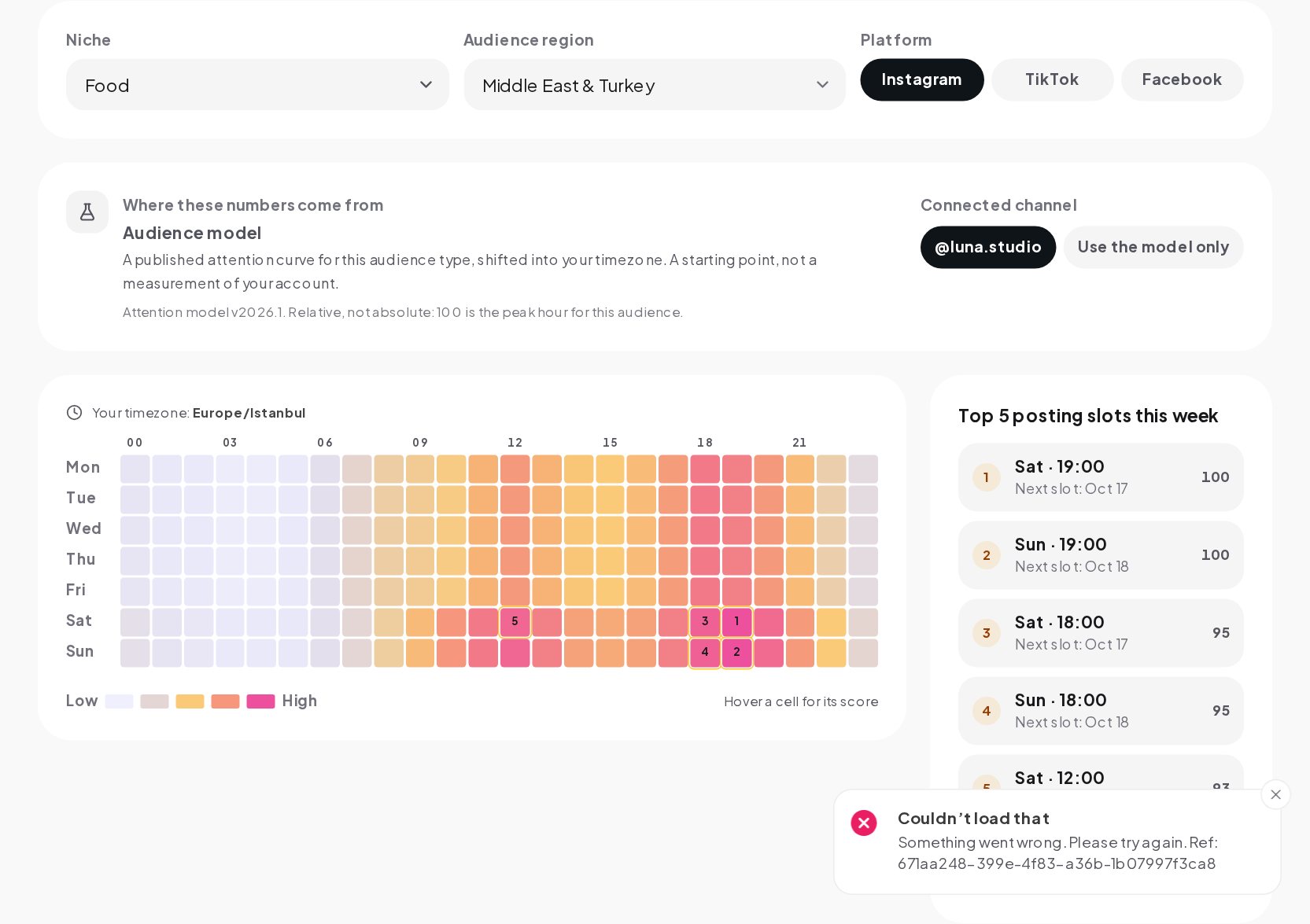
Your best hours are your audience's hours, not yours. If you live in Berlin and most of your customers are in New York, your best slot is in their evening, which is the middle of your night. The tool asks for your audience region and shifts the curve into your own timezone, so the heatmap always reads in the clock on your wall.
| Region | Reference timezone |
|---|---|
| United States and Canada | New York |
| Europe | Berlin |
| Asia Pacific | Singapore |
| Latin America | São Paulo |
| Middle East and North Africa | Istanbul |
The region is picked from your own timezone at first. Change it whenever you sell across borders, because that guess is wrong for exactly the businesses that need it most.
3. The platform
The same audience behaves a little differently on each app. TikTok use runs stronger at weekends, Facebook a little weaker, and Instagram sits in between. The tool adjusts the weekend hours for the platform you pick.
Weekdays versus weekends
Weekends are not simply "more" or "less". They shift the curve. Professionals almost disappear from work content at weekends; evening and entertainment audiences get busier; morning routines start later. If you post the same thing on a Saturday that works on a Tuesday, expect a different result, and check the weekend rows of the heatmap separately.
From a starting model to your own data
General curves are a reasonable start. Your own history is better. In your ChatinFlow dashboard, once Instagram is connected, the tool reads the times of your past posts and how much engagement each one got, and blends that into the heatmap.
It does this carefully, so a few lucky posts cannot take over:
- Below 8 posts, the account history is not used at all. The heatmap stays on the model.
- From 8 posts, each hour where you have posted is blended toward your own results. An hour with one post moves a little; an hour with four or more posts follows your data fully.
- Hours where you have never posted stay on the model, because there is nothing to measure.
A label next to the grid always tells you which you are looking at: the model, a blend or your own account. When your posts cover enough of the week, the label switches to your account.
There is a catch worth knowing. Your data only tells you about the hours you have tried. If you have always posted at 9:00, the tool cannot know whether 19:00 would be better. That is why testing matters.
How to find your own best hours
- Start from the heatmap. Pick two or three of the strongest slots for your audience and region.
- Post at those times for a few weeks. Keep the content comparable, so the time is the main thing that changes.
- Try one new slot a week. Use one of the next strongest hours, not a random one.
- Compare the first day of each post. Look at reach and interactions after 24 hours, not after a week, when timing has stopped mattering.
- Keep a simple log. The free PDF guide includes a four-week log for exactly this.
After a month you will have more evidence about your own audience than any general chart can give you.
Turning the hours into a plan
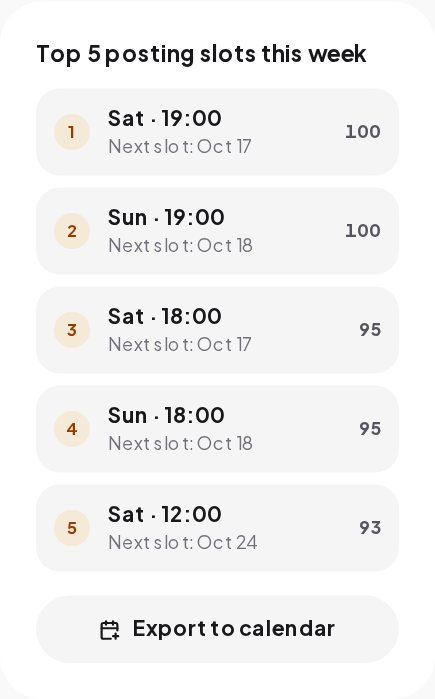
Knowing your best hours only helps if you post at them. The tool exports the coming week's best slots as a calendar file that Google Calendar, Apple Calendar and Outlook can open, so the slots sit next to the rest of your week as reminders. Scheduling tools let you publish at those times without being at your phone.
A few habits help:
- Prepare posts in batches. Write and design several posts at once, then schedule them into the best slots.
- Be around after posting. The first hour is when comments arrive. Replying quickly adds to the conversation and keeps it going.
- Do not chase every peak. Two well made posts a week in good slots beat seven rushed posts at perfect times.
Mistakes to avoid
- Using a chart for someone else's audience. A general "best time" chart is an average across niches and countries that may not include yours.
- Posting in your own timezone by habit. Check where your followers actually live in Instagram Insights under your audience.
- Judging a time by one post. One post at a new hour is a sample of one. Give each slot a few tries.
- Forgetting daylight saving time. When clocks change in one region and not another, the gap between you and your audience changes too. The tool works the shift out for the current date.
Finding your hours in a minute
- Open Best Time to Post.
- Pick your niche, your audience region and the platform.
- Read the heatmap. Darker cells are better hours, shown in your own timezone.
- Check the label to see whether the hours come from the model or your posts.
- Export the coming week's best slots to your calendar.
Be there when they reply
Posting at the right hour brings comments, story replies and DMs at the right hour too, which is often when you are busy or offline. With customer support automation in ChatinFlow, the usual questions get an answer in seconds and anything tricky is handed to you, so the people who respond to your well timed post are not left waiting.
Quick answers
What is the best time to post on Instagram?
For most consumer audiences, early evening in the audience's own timezone, with a smaller lunchtime window. Professional audiences peak in the morning on weekdays. Your own data is the final word.
Is the best time the same on TikTok and Facebook?
The daily shape is similar for the same audience, but TikTok runs stronger at weekends and Facebook slightly weaker.
Does posting time affect reach?
It affects the start. A post that meets an active audience gets its first reactions faster. It does not replace a strong post.
Sources
- Instagram Platform: Insights, Meta for Developers.