The full guide
Keyword auto reply for Instagram and WhatsApp: start the right reply every time
Keyword triggers decide which automation answers a message. Learn the five match modes, how Catch typos forgives small mistakes, which automation wins when two could, and how to test before you publish.
A keyword trigger is the simplest promise in DM automation: write this word, get that reply. A follower comments LINK under a Reel, replies GUIDE to a story or sends PRICE in a DM, and the answer arrives while they are still holding their phone. The reply is the easy part. The hard part is deciding which messages count as a match, which automation answers when two could, and what happens when someone types "lnik" on a small keyboard. This guide explains how keyword matching works in ChatinFlow, walks through the setup screen by screen and covers the choices that keep the right reply going out: match modes, typo tolerance, priority between automations, repeat limits, languages and patterns.
Where keyword auto replies work: comments, DMs, stories and Lives
A keyword is checked against the text of whatever started the conversation. That can be a comment, a message or a reply, depending on the channel and the trigger you choose.
| Channel | Where the keyword is matched | Good to know |
|---|---|---|
| Comments on posts and Reels, DMs, story replies and mentions, Live comments | A comment can get a private DM and a public reply under it | |
| Messenger | Messenger chats and comments on your Facebook Page posts | A Page comment gets a private reply in Messenger, not a public one |
| Telegram | Messages to your bot | A t.me link with a start code can start an automation too |
| Viber | Messages to your Viber bot | Same match modes as every other chat |
| Website chat | Messages in the chat on your site | Handy for "pricing" or "demo" on a landing page |
Buttons and links use the same matching engine. A button tap carries a payload that a flow matches exactly, and a growth link or an ig.me or m.me link carries a ref value, so a link in your bio or an ad can start an automation without the person typing anything.
Keyword match types: contains, exact, starts with, any, pattern and intent
Every keyword trigger asks one question first: which messages start it? The answer is a match mode.
| Mode | Starts the automation when | Best for |
|---|---|---|
| Any message (Any comment on comment triggers) | Anything arrives | A default reply or a welcome |
| Contains a keyword | The keyword appears anywhere in the text | Campaign words such as LINK or GUIDE |
| Is exactly | The whole message is the keyword | Short words that hide inside longer ones |
| Starts with | The message begins with the keyword | Commands such as BOOK or JOIN |
| Matches a pattern | A regular expression matches | Order numbers and many spellings at once |
| Intent (AI) | Your AI model decides the message means what you described | Questions people phrase in many ways |
A few details decide whether a mode behaves the way you expect.
Contains is a plain text search. It does not look for whole words, so "art" also matches "start" and "party", and "link" matches "LinkedIn". Keep Contains for distinctive words and move short or common words to Is exactly, Starts with or a pattern with word boundaries.
Is exactly compares the whole message. With only case ignored, "Link!" is not the same as "link", because of the exclamation mark. With Catch typos on, punctuation counts as a space, so "Link!" and "link." match as well.
Ignore upper and lower case is on by default. PRICE, Price and price are the same keyword. Turn it off only when capital letters carry meaning, which is rare in chat.
Intent (AI) is for DM triggers. You describe the request in one sentence, such as "asks about opening hours", and when no keyword automation answers a message, your connected model picks the intent that fits. If none fits, your Any message automation answers. It runs on your own OpenAI, Anthropic, Google Gemini or Azure OpenAI key, and without a key an intent automation never starts. Comments do not offer this mode.
Catch typos in keywords, letter by letter
Phones autocorrect, thumbs slip and many people skip accents. Catch typos lets a keyword match messages that are close without matching everything. It works in Contains, Is exactly and Starts with, and it only steps in when no keyword matched exactly.
| Keyword length | Mistakes forgiven | Example |
|---|---|---|
| 1 to 3 letters | None | "buy" matches only "buy" |
| 4 letters | One swap of two neighboring letters | "lnik" matches "link" |
| 5 to 8 letters | One mistake | "fiyt" matches "fiyat", Turkish for price |
| 9 letters or more | Two mistakes | "sbuscirbe" matches "subscribe" |
A mistake is a missing letter, an extra letter, a wrong letter or two neighboring letters swapped. A few more rules shape what counts:
- Accents and special letters fold. é is e, ş is s and ı is i, so "cuanto" matches "cuánto" and "kirmizi" matches "kırmızı". Accents fold on Latin, Greek and Cyrillic letters; vowel signs in scripts such as Hindi and Thai stay part of the word.
- A letter typed twice counts once. "linkkk" and "Liiink" are both "link".
- Punctuation is a space. "link!!" and "link?" match "link".
- Whole words are compared. "pink" is never treated as a typo of "link", because the tolerance looks at words, not at letters inside other words.
- Exact beats corrected. When one automation matches a message exactly and another only with a typo forgiven, the exact one answers.
Patterns, Any message and Intent (AI) are not affected by the switch. The four-letter rule is stricter on purpose: with only one swap allowed, "link" does not also catch "line", "lint" or "pink".
How to set up a keyword auto reply, screen by screen
The quickest path is the quick setup, which builds a working automation on one screen. You can open it as a flow on the canvas whenever you want more steps.
1. Pick the channel and what starts it
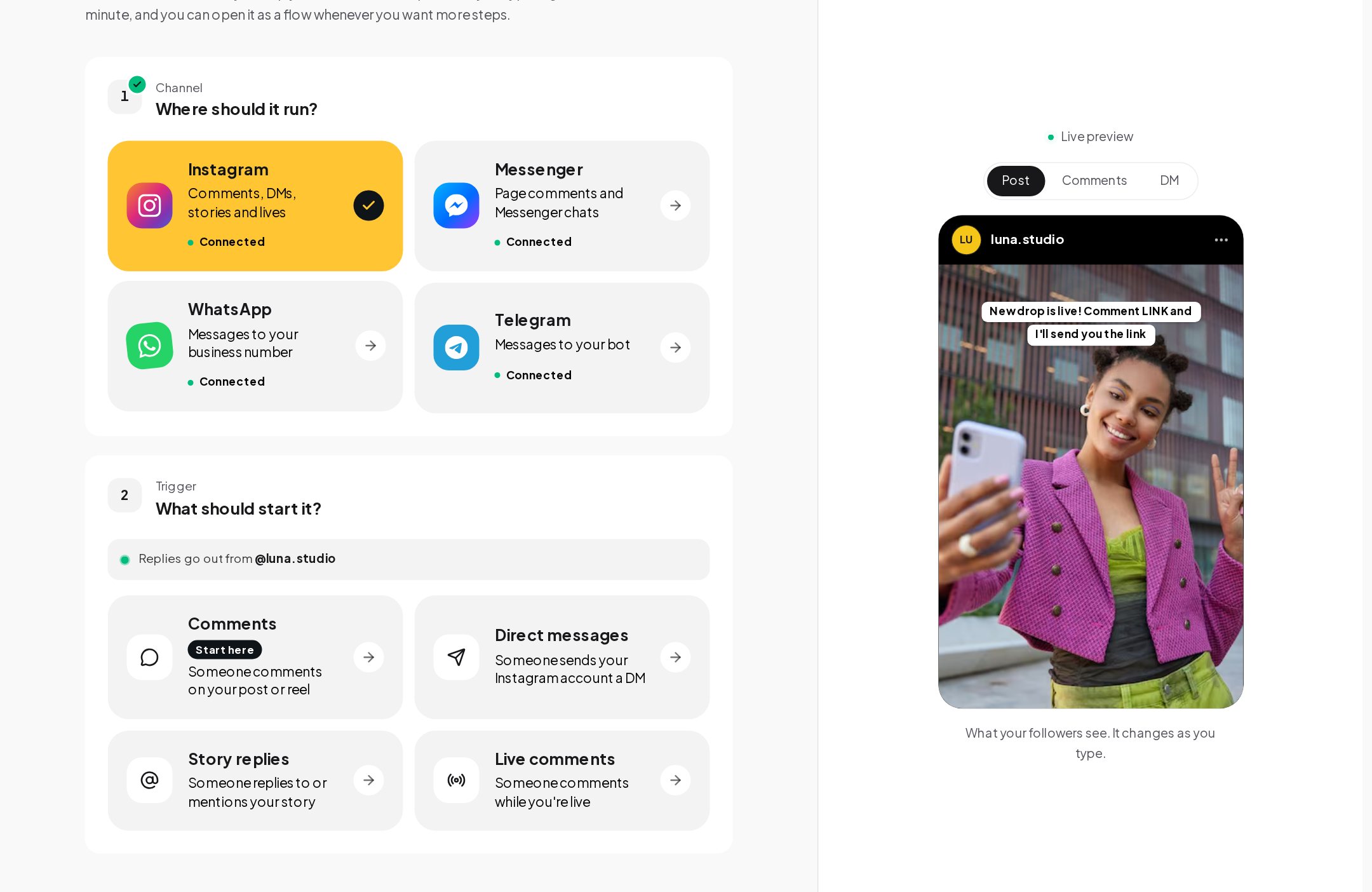
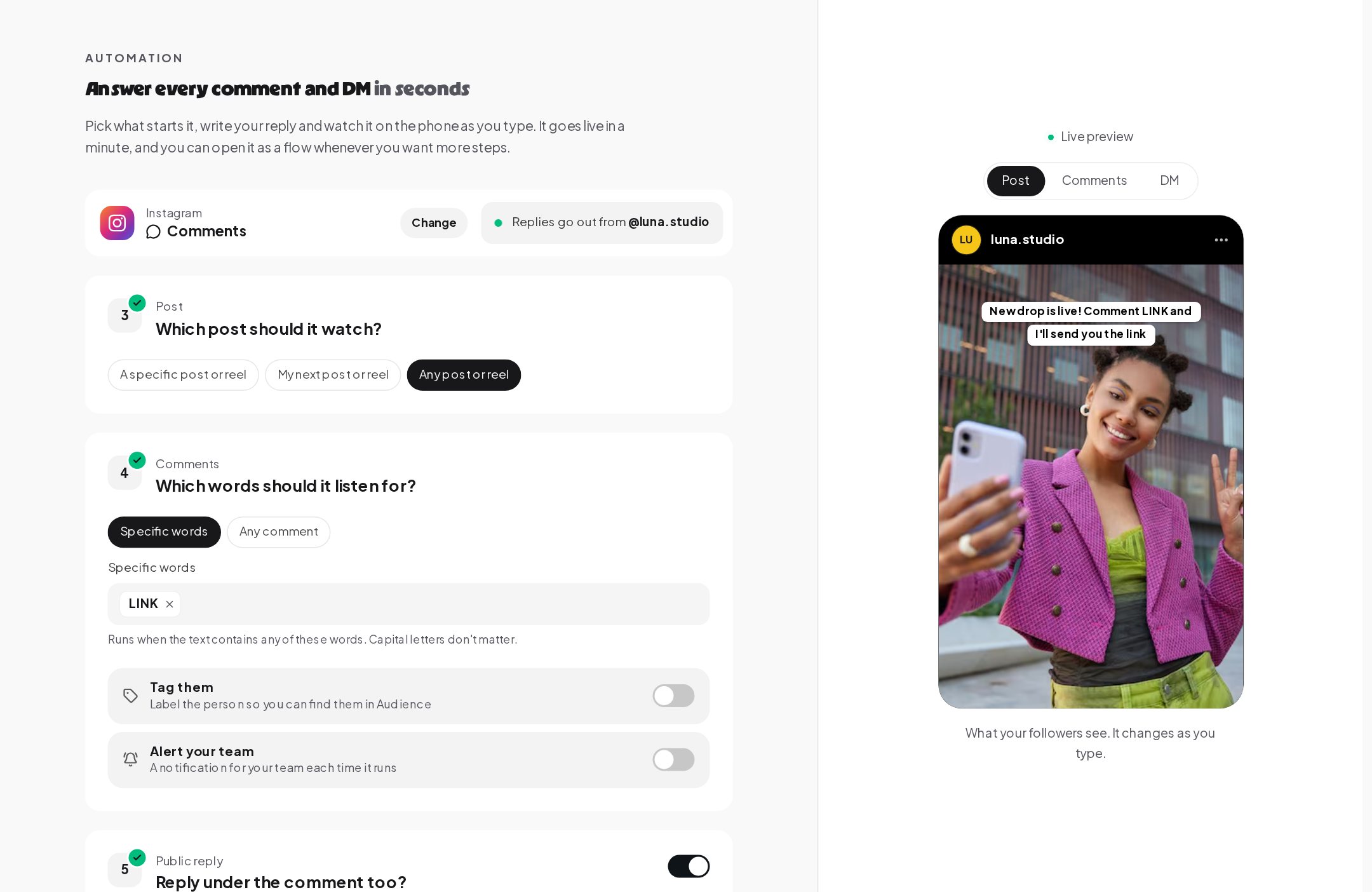
Open Automations and press New automation. The quick setup asks where it should run, then what should start it. On Instagram you can choose comments, direct messages, story replies or Live comments. A live preview on the right shows the post, the comments and the DM as your followers will see them, and it changes as you type.
2. Choose the post and the keywords
For comments, the next question is which post the automation watches: a specific post or Reel, your next one, or any of them. Then add the words. Type a keyword and press Enter, and it becomes a chip. Add as many as you like, and any one of them starts the automation. The quick setup uses Contains with capital letters ignored, as the hint under the box says. Two switches below tag everyone who comments and alert your team each time it runs, and the next cards set the public reply and the DM.
3. Fine-tune the keyword trigger
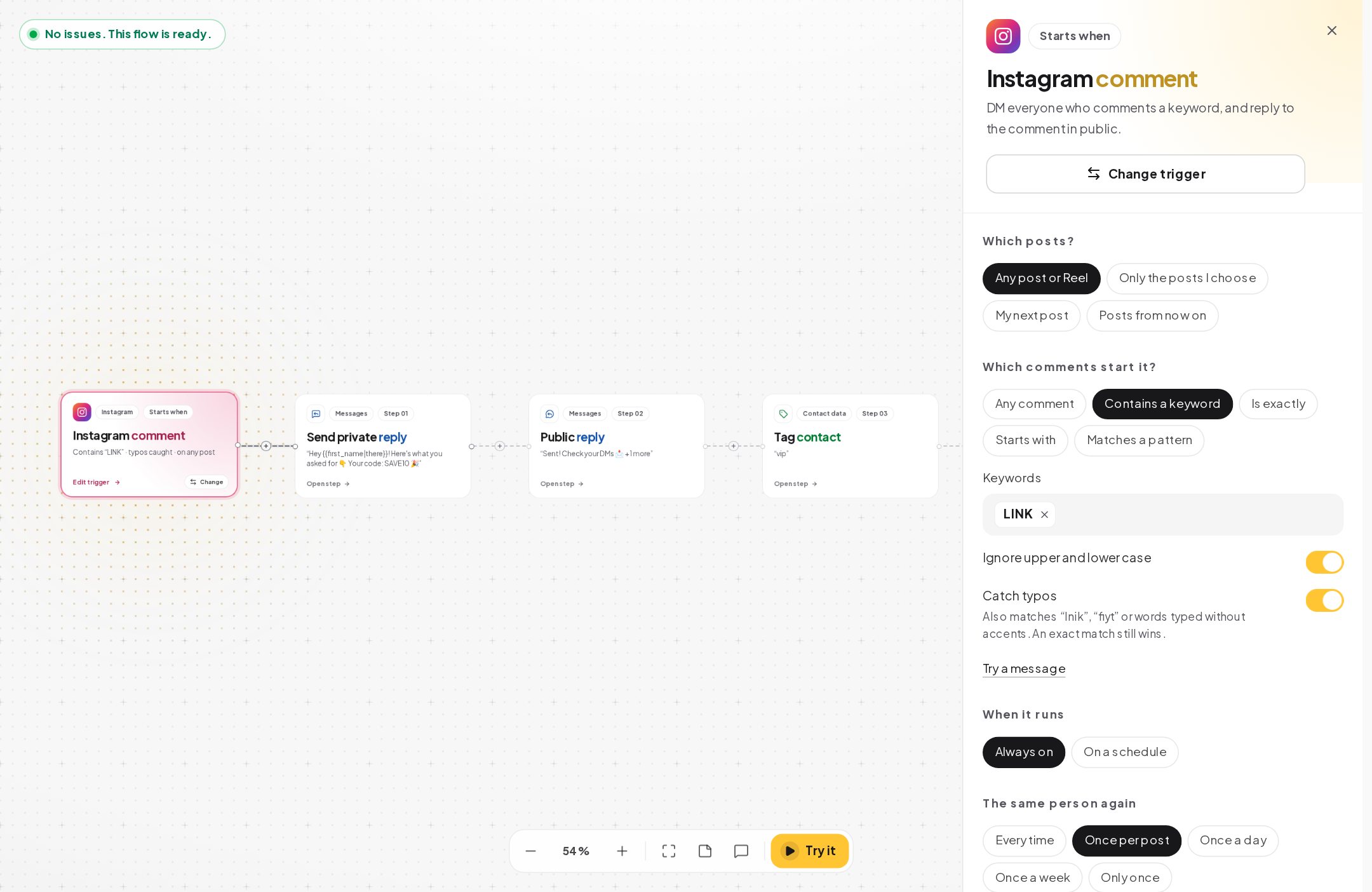
Switch to Flow at the top, or open the automation later from My automations, and click the trigger card. The panel on the right holds every option: which posts, which comments start it, the keywords, the case and typo switches, when it runs, how often the same person gets a reply, what happens when another automation also matches, and who can enter. The card on the canvas sums it up in one line, here Contains "LINK", typos caught, on any post.
4. Test a message before you publish
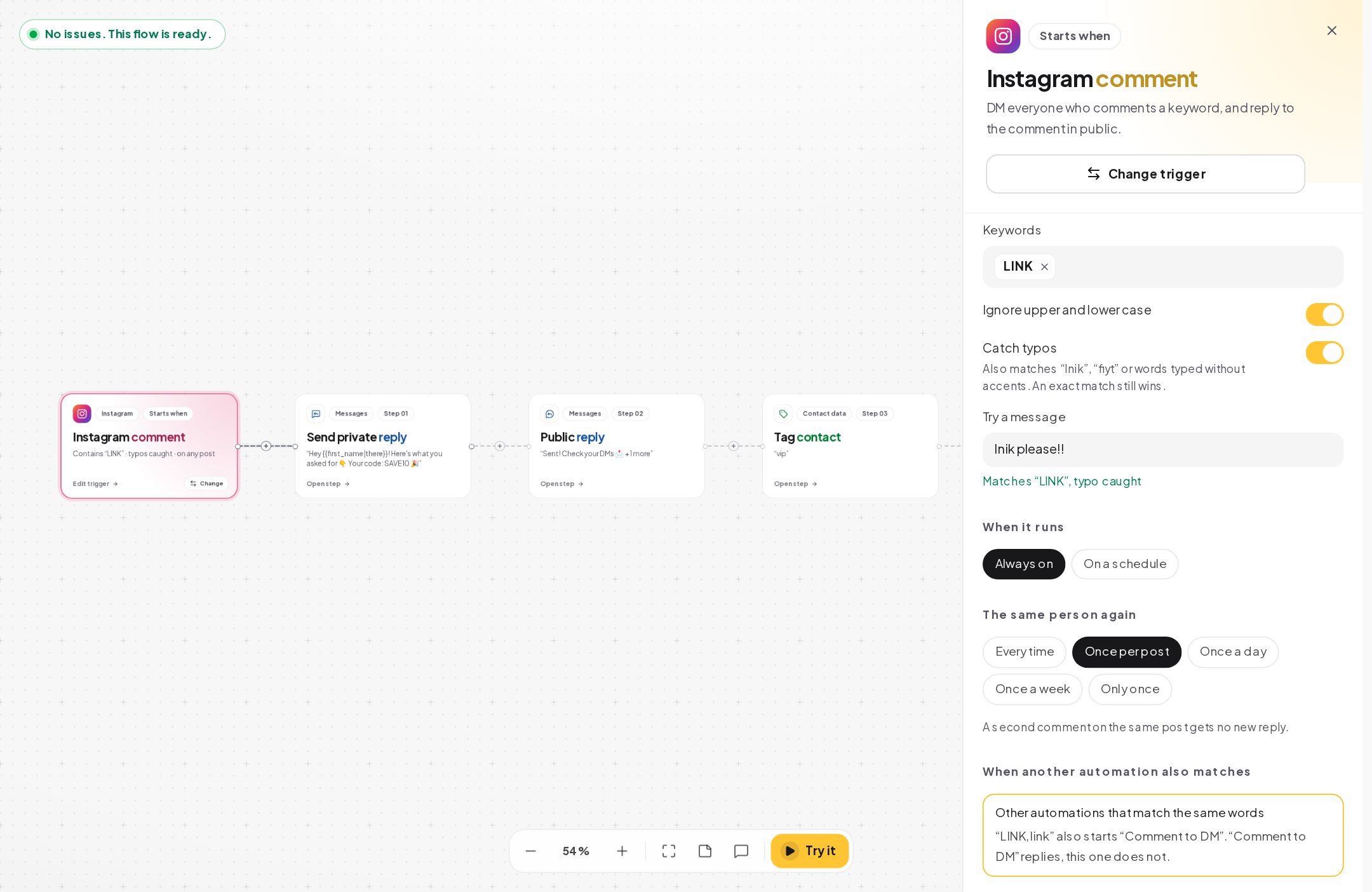
Under the switches, Try a message opens a box. Type what a customer might write and the panel answers at once. Here "lnik please!!" matches "LINK", typo caught. Try the short version, the long version, a misspelling and a message that should not match. If a message you expect to match does not, the fix is usually a second keyword or a different mode.
Lower in the same panel, a yellow box lists other automations that match the same words. In this example another automation called "Comment to DM" also listens for LINK and wins, so this one would not reply. Fix it before you publish: limit one of them to a specific post, change a keyword, or remove the older one.
5. Add a default reply for everything else
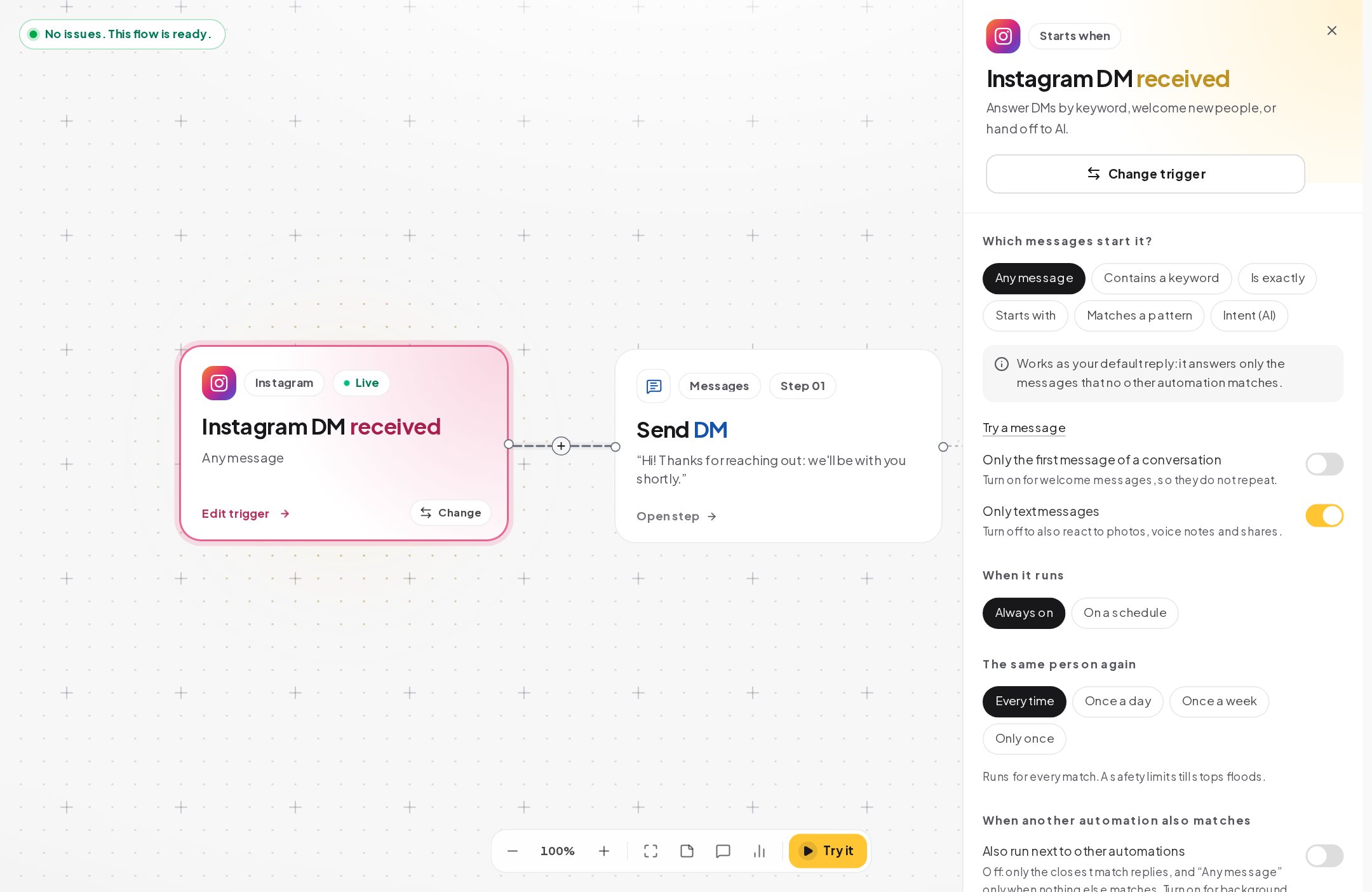
Not every message carries a keyword. A DM trigger set to Any message works as your default reply; the panel says it answers only the messages that no other automation matches. Turn on Only the first message of a conversation for a welcome that should not repeat, and leave Only text messages on unless the reply also makes sense for photos, voice notes and shares.
6. Test a whole keyword list at once
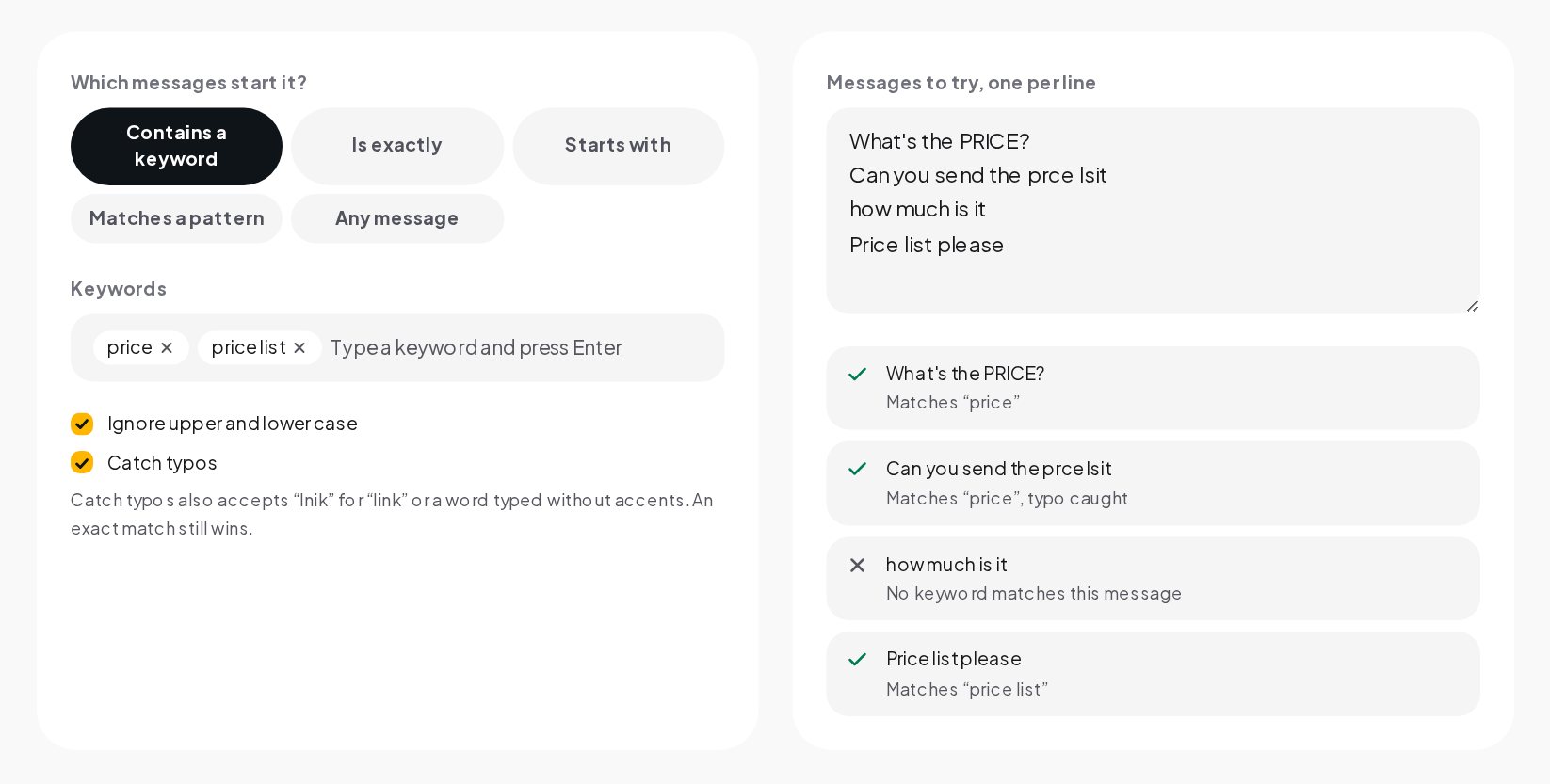
When you are choosing words for a campaign, the Keyword Tester checks many messages in one go. It is in the dashboard's free tools and on our website. Pick the mode, add the keywords, paste messages customers really send, one per line, and each line shows whether it matches and which keyword won. With Catch typos on, "Can you send the prce lsit" matches "price", typo caught, while "how much is it" matches nothing. That second line tells you to add a keyword, or a pattern, for the way people actually ask.
One message, one reply: keyword priority between automations
When a message matches several automations, ChatinFlow does not send several answers. It ranks the matches, and only the first one replies:
- An automation set to a specific post, Live, story or ad beats one that watches all of them.
- Then the kind of match: Is exactly beats Starts with, which beats Contains and patterns, which beat Any message.
- Then an exact match beats one that needed a typo forgiven.
- Then the longer keyword wins, so "price list" beats "price".
- Then an automation limited to the first message of a conversation beats one that is not, and one limited to an audience beats one open to everyone.
- If two are still tied, the older automation answers.
Two settings change this on purpose. Also run next to other automations lets an automation run in addition to the winner, which suits background work such as tagging every message that mentions a product. Because it runs alongside, keep it for steps that do not send a second reply. Restart for every new message, on DM triggers, decides what happens when the same person writes again while the automation is still running. Off, it does not start a second time while the first run is still going, for example while it waits for an answer.
How often the same person gets an auto reply
Under The same person again you choose how often one person can start the automation: every time, once a day, once a week or only once. Comment triggers add Once per post, which the panel explains as "a second comment on the same post gets no new reply". That is the right choice for most comment campaigns, because people comment twice to tag friends or to say thanks, and a second identical DM looks like spam. Every time still has a safety limit that stops floods.
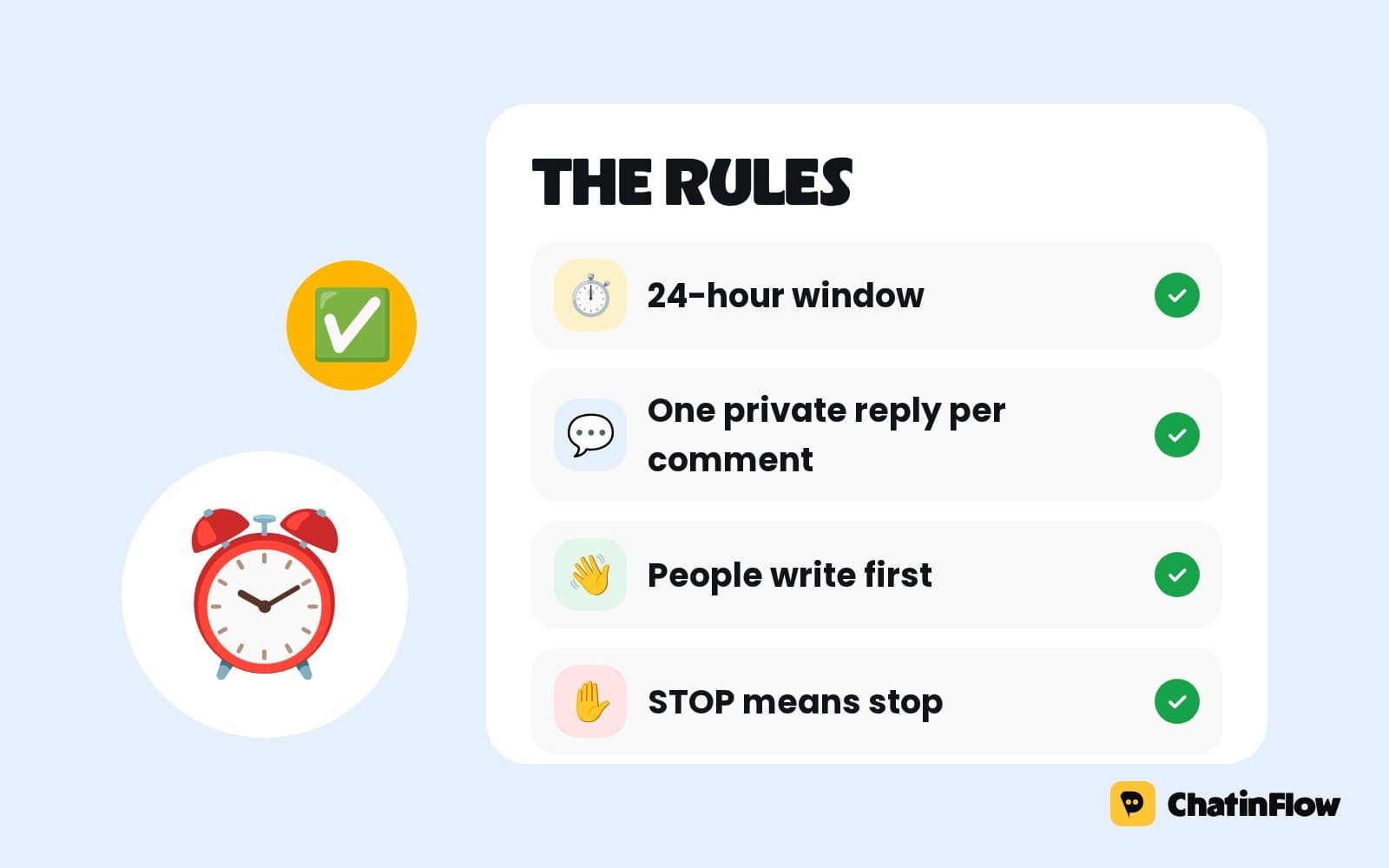
Platform rules apply on top. On Instagram and Messenger, a comment can receive one private reply, and free-form messages go out while the conversation's 24-hour window is open. ChatinFlow checks the window before every send.
How to choose keywords people actually type
The best keyword is the one people copy from your post without thinking.
- Put the word in the post, in capitals. "Comment GUIDE and I will send it" works because people type what they see.
- One short, distinctive word beats a phrase. GUIDE, LINK, MENU and SIZE are easy to type; "send me the guide please" is not a keyword, it is a sentence.
- Avoid words people use anyway. "Yes", "info" and "hi" appear in many messages. If you need one of them, use Is exactly so it only fires when the whole message is that word.
- Add the obvious variants as extra chips. The plural, the word in your other languages and the emoji if your post uses one. An emoji works as a keyword on its own.
- Use a new word per campaign. A fresh keyword keeps campaigns apart in the activity view, and it stops last month's word from answering this month's post.
- Retire or limit old words. When a campaign ends, unpublish it or limit it to its own post, so the word stops answering everywhere else.
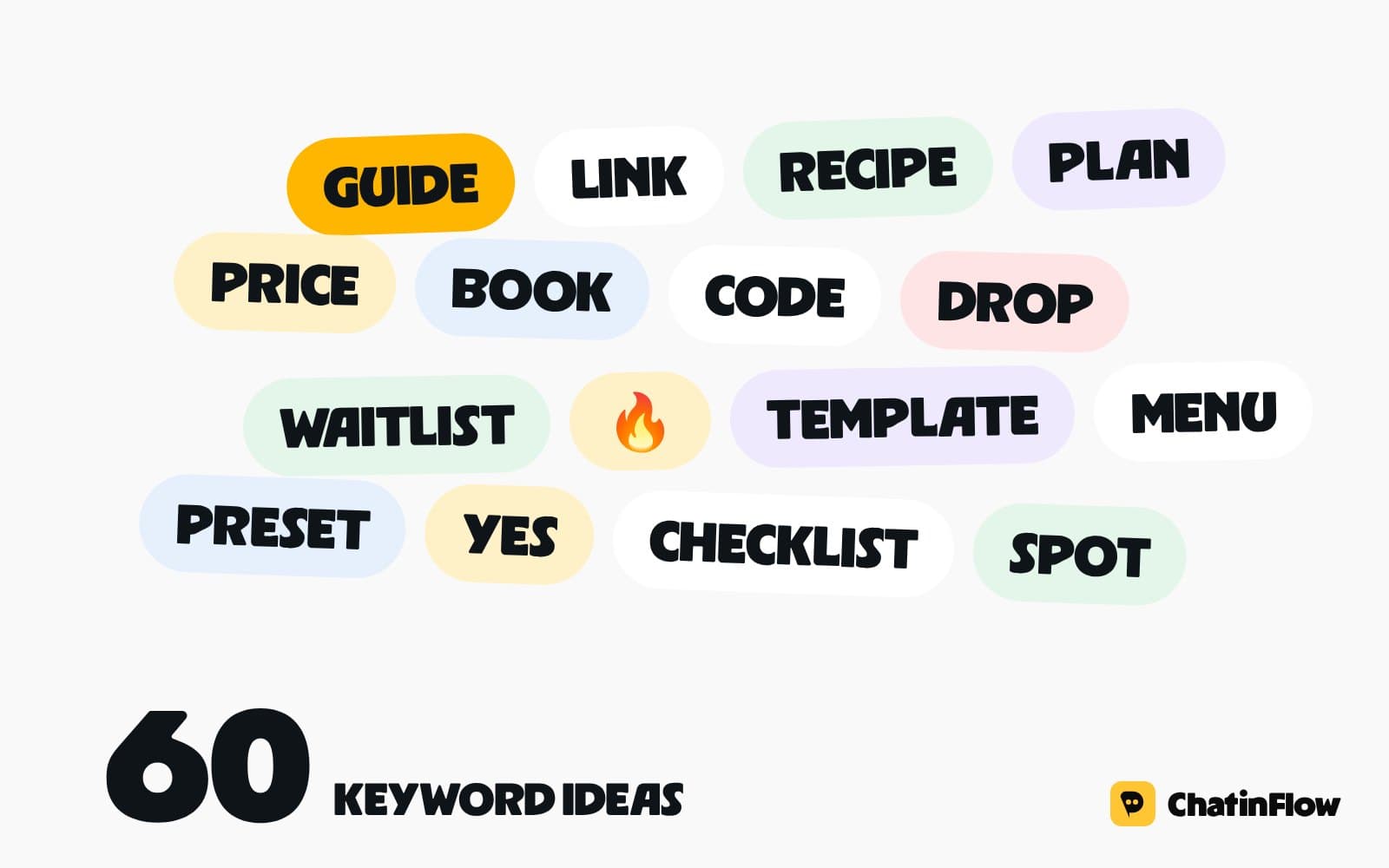
For dozens of ready ideas sorted by goal, see our list of comment keyword ideas.
Keywords in Instagram comments, stories and Lives
Comment triggers have one choice DM triggers do not: Which posts? Any post or Reel, only the posts you choose, your next post, or posts from now on. "My next post" is useful when you set up the automation before you publish the post. Because an automation set to a specific post outranks one that watches all posts, you can run the same keyword on two posts with two different replies.
On Instagram a comment automation can also reply in public under the comment. The quick setup lets you write three versions of that reply, and one is picked at random each time, so the replies under your post do not all look the same. On Facebook Page comments the reply goes out privately in Messenger only.
Story triggers start when someone replies to your story or mentions you in theirs, and you can choose one story or all of them. Live comment triggers run while you host an Instagram Live, sending a private reply to every viewer who writes the word, and a tag step marks them so you can follow up after the Live.
Keywords in more than one language
Matching works in any language and script, from Spanish and Arabic to Hindi and Japanese. There is no automatic language detection, so give the trigger the words people really use: add each language's word as another chip in one automation when the reply can be the same, or build one automation per language when the replies differ.
Two details help with keyboards that lack local letters. Ignore upper and lower case handles the Turkish capital İ correctly. With Catch typos on, the dotless ı and i, ş and s, and ç and c count as the same letter, and German ß counts as ss, so "KIRMIZI" typed on an English keyboard still matches "kırmızı".
Regex keyword patterns for what words can't cover
Matches a pattern takes a regular expression, with case ignored when that switch is on. A few patterns that work well:
^(hi|hello|hey)\bmatches a greeting at the very start of a message.\b(price|cost|how much)\bcatches several ways of asking about price, as whole words.\blink\bmatches "link" but not "LinkedIn".order\s?#?\d+matches "order 1042" and "order #1042".
Two limits are worth knowing. The keyword box splits on commas, so a pattern cannot contain one, which rules out ranges such as {2,4}. And a pattern that is invalid, or takes too long on a message, never matches; nothing breaks, the automation simply does not start. Check every pattern with Try a message before you publish.
STOP and opt-out keywords
Some words are handled before any automation sees them. A message that says only STOP or UNSUBSCRIBE opts the person out and cancels their running automations, and START brings them back. Incoming DMs that contain profanity or common scam phrases are marked as blocked and never start an automation. Comments are not filtered this way.
Comments are a separate matter. Comment protection, under Automations, is off until you turn it on, and then hides or deletes Instagram comments with your own words, scam or spam phrases, profanity, phone numbers, email addresses or links. A hidden comment does not start an automation unless you allow it.
Keyword automation schedules and who can enter
When it runs is Always on or On a schedule. A schedule follows weekly hours in your business timezone, with holidays to skip, which suits a "we are open" reply that should only answer during opening hours. Who can enter is everyone, contacts with a tag or contacts without a tag. "Without a tag" is the easy way to keep existing customers out of a first-order discount: tag buyers, then exclude the tag.
See which keyword fired
Each automation has an Activity tab with every run: how it ended, how long it took and where it stopped, with totals and a chart for the last 24 hours, 7, 30 or 90 days. When a customer says they got no reply, open the conversation in the inbox, then check the activity of the automation you expected. If there is no run, the keyword did not match or another automation won; Try a message on the same text tells you which.
Keyword auto reply mistakes to avoid
- Contains on a short word. "go" and "art" hide inside hundreds of words. Use Is exactly or a pattern.
- The same keyword on two automations that watch all posts. Only one answers, and it may not be the one you meant. Read the yellow notice in the trigger panel.
- Every time on a comment campaign. People comment more than once. Use Once per post.
- No default reply. Without an Any message automation, a message no keyword catches gets no answer at all.
- Changing the word in the caption only. The trigger still listens for the old word until you change it there too.
- A comma inside a pattern. The box splits it into two broken keywords.
- Intent (AI) without a key. It never starts until a provider key is connected.
Keyword auto reply: FAQ
Can one automation listen for several keywords?
Yes. Add each word as a chip; any one of them starts the automation. When several of them appear in the same message, the longest one counts as the match.
Does "link" also match "LinkedIn"?
With Contains, yes, because Contains is a plain text search. Use Is exactly, Starts with or the pattern \blink\b when the word can hide inside longer ones.
Can the same keyword do different things on different posts?
Yes. Give each post its own automation with "Only the posts I choose". An automation set to a specific post beats one that watches all posts, so each post answers with its own reply.
Can someone start an automation without typing a keyword?
Yes. A button tap matches its payload, and a growth link or an ig.me or m.me link with a ref starts its automation directly. An Any message automation answers everything else.
Sources
- Private Replies, Meta for Developers, on answering a comment with a DM.
- Messenger Platform and IG Messaging API policy, Meta for Developers, on the 24-hour window.
- Pattern syntax, PHP manual, on the regular expressions that Matches a pattern accepts.
- Damerau-Levenshtein distance, Wikipedia, on the edit distance behind Catch typos.