The full guide
How to analyze an Instagram post: six checks that explain why it worked
Most people judge a post by one number, and the number rarely explains itself. A post with a low like count might have been saved and shared far more than usual. A post that flopped might have had a great image and a first line nobody could get past.
Most people judge a post by one number, and the number rarely explains itself. A post with a low like count might have been saved and shared far more than usual. A post that flopped might have had a great image and a first line nobody could get past. To learn from a post you have to take it apart: the hook, the call to action, the length, the tags, the engagement and the timing. This guide walks through each of those six checks, what good looks like for each, how they add up to one score and how to read the result without fooling yourself.
The six checks at a glance
| Check | What it reads | What good looks like |
|---|---|---|
| Hook strength | The first 125 characters of the caption | A number, a question or a reason to keep reading |
| Call to action | Words such as comment, save, share, DM, book, link in bio | One clear next step |
| Caption length | Characters, against a range for the format | Inside the range for reels, photos, carousels or stories |
| Hashtag mix | The tags in the caption and the tag field | Within the platform cap, at least two tiers |
| Engagement vs benchmark | Likes, comments and saves against followers or reach | At or above the reference line for the niche and size |
| Posting time | The hour and day the post went out | Inside a busy window for the audience |
The first four come from the caption alone. The last two need numbers, and they are left out of the score until you add them, so a missing number never drags the result down.
Check 1: the hook
On Instagram, the start of the caption is what people see before the more button, roughly the first 125 characters. If that opening does not give a reason to continue, the rest of the caption might as well not exist. The advisor reads that lead and sorts it into one of five patterns:
| Opening | Example | How it scores |
|---|---|---|
| Starts with a number | "5 protein bars, ranked" | Strongest |
| Curiosity gap | "I tested every protein bar so you don't have to" | Strong |
| A question | "Which protein bar is actually worth it?" | Good |
| A plain statement | "New review on the blog today" | Weak |
| Too short | "New post" | Weakest |
Numbers work because they promise something concrete and finite. Curiosity openings work when they are honest: "I tried", "the mistake", "before you" and "here's why" set up a payoff. Questions work best when they invite the comment you want. A flat statement is not wrong, it just gives the reader no reason to read the second line.
Check 2: the call to action
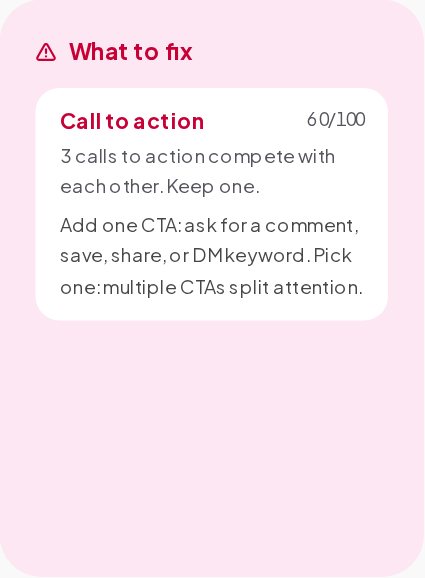
A post that people enjoy and then scroll past has done half its job. The call to action tells them what to do next. The advisor looks for the words people use to ask for something: comment, save, share, DM, follow, tag a friend, link in bio, shop, book, sign up, subscribe, download, and the arrows and pointing emoji that say "look below".
- No call to action scores low. Interested readers had nowhere to go.
- One or two score well. One is ideal.
- More than two is flagged. "Save this, share it, follow me and comment below" splits attention so thinly that most people do none of it.
The most effective calls to action are specific and easy. "Comment RECIPE and I'll send you the full list" beats "Let me know what you think".
Check 3: caption length
There is no single right length. A reel carries its message in the video and needs a short caption. A carousel is something people stop to read and can carry more. The advisor compares your caption with a range for each format:
| Format | TikTok | ||
|---|---|---|---|
| Reel or video | 80 to 350 | 40 to 200 | 60 to 250 |
| Photo | 120 to 600 | 40 to 200 | 80 to 300 |
| Carousel | 140 to 800 | 40 to 200 | 100 to 400 |
| Story text | 10 to 120 | 10 to 100 | 10 to 120 |
Inside the range is full marks. The score falls away gradually outside it, so a caption slightly too long loses a little and a caption three times too long loses a lot. A caption that is far too short leaves Instagram and its search almost nothing to read.
Check 4: the hashtag mix
Since December 2025 Instagram accepts at most five hashtags on a post, a reel or a carousel. The advisor counts the tags in the caption and in the tag field together, flags a set over the cap for the platform and then looks at the mix:
- No tags means the post depends entirely on people who already follow you and on what the caption says.
- Tags of one size only, all broad or all niche, are flagged as flat.
- At least two tiers of broad, medium and niche tags is a real blend.
Size is judged by the shape of the tag, the same rule the Hashtag Generator uses: a short single word reads as broad, a joined pair as medium, a longer phrase as niche. It is a rule of thumb, not a count of posts under each tag.
Check 5: engagement against a benchmark
Engagement only means something in context. A rate that is excellent for an account the size of a national brand is ordinary for a small creator, because small accounts have closer, chattier audiences. The advisor compares your post with a reference line for your niche and your audience size.
How the rate is worked out
Add the likes, comments and saves, divide by followers and multiply by 100. If you give reach instead of followers, the advisor divides by reach. Rates by reach run much higher than rates by followers, since everyone in the denominator actually saw the post, so the reference line moves up when reach is used. The two are never compared against each other.
Where the reference line comes from
The line starts from published median engagement by audience size:
| Audience size | Reference engagement by followers |
|---|---|
| Under 10K | 3.8% |
| 10K to 100K | 2.3% |
| 100K to 1M | 1.5% |
| 1M and more | 1.0% |
It is then bent for how chatty each niche tends to be. Morning routines such as fitness and wellness, and evening audiences such as gaming, music and pets, run a little higher. Professional niches such as finance, real estate and business run lower. The page always says that this is a reference line, not a measurement of any account, and it is the same line the Engagement Rate Calculator uses.
A post at the line scores well, and one at one and a half times the line or more gets full marks. Below the line the score drops in step with the gap, so a post well under it shows up as a weak spot.
Check 6: the posting time
The advisor reads the hour and the day of the post against the same attention curve that the Best Time to Post tool draws for your niche and audience region. A post inside a busy window scores well, one on the edge of a peak scores in the middle and one in a quiet hour scores low.
Timing has the lowest weight of the six checks, and for good reason. A strong post at a quiet hour still does well, and a weak post at the perfect hour still does badly. Timing tips the balance; it does not decide it.
How the six checks add up
Each check gives a score out of 100, and the overall score is a weighted average of the checks that had something to judge:
| Check | Weight |
|---|---|
| Hook strength | Highest |
| Engagement vs benchmark | High |
| Call to action | Medium |
| Caption length | Normal |
| Hashtag mix | Normal |
| Posting time | Lowest |
The hook carries the most weight because it decides whether anything else is read. Engagement comes next because it is the only check based on what people actually did.
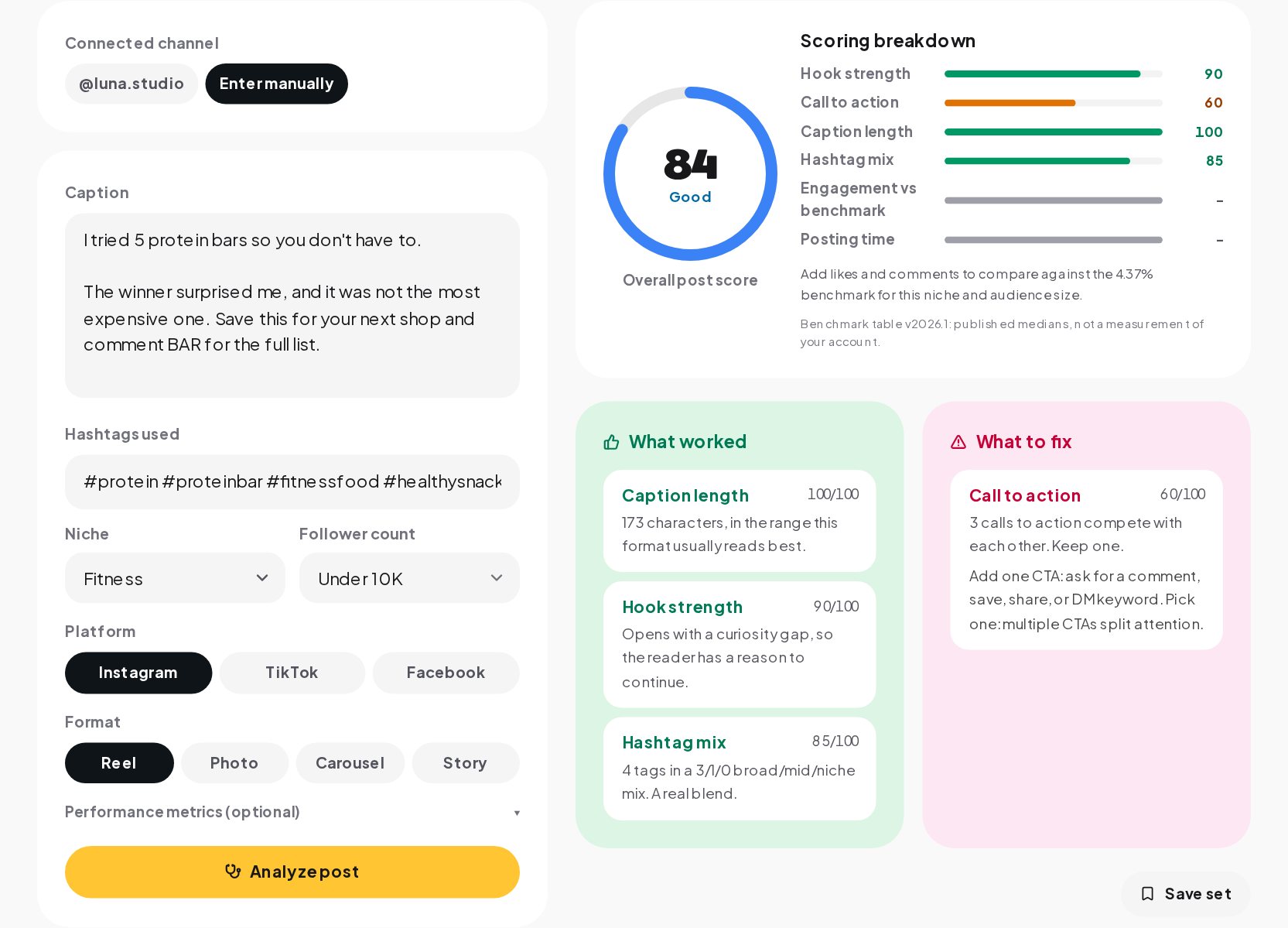
The overall score falls into four bands: excellent from 85, good from 70, fair from 50 and needs work below that. Under the score you get up to three strengths, the checks at 70 or above, and up to three weak spots, the checks below 70, each with the reason.
Reading the result honestly
- Compare posts with each other, not with a perfect score. The useful question is what your best posts did that your weaker ones did not.
- Change one thing at a time. If you rewrite the hook, add a call to action and move the time all at once, you will not know which change helped.
- Look at saves and shares, not only likes. A post that people save is one they want to come back to. Add saves when you have them.
- Remember what the advisor cannot see. It does not look at the image or the video. The first two seconds of a reel matter enormously, and only you can judge them.
Checking a post in a minute
- Open the Post Advisor and paste the caption. Add the hashtags in the caption or in their own field.
- Pick the niche, the audience size and the format.
- Add likes, comments, saves and reach if you have them, and the date and time it went out. They unlock the engagement and timing checks.
- Read the overall score, then the strengths and weak spots, each with its reason.
- Change the weakest part on your next post and compare.
In your ChatinFlow dashboard you can also connect Instagram and pick one of your own posts. The caption, tags, format and counts fill in from the post, and the follower count comes from your account.
When the post brings comments
A post that works brings comments: questions about the price, requests for the link, people tagging friends. That is the part of engagement that turns into customers, and it is the part most accounts answer slowly or not at all. With comment moderation and auto-replies in ChatinFlow, every comment can get a reply and a DM in seconds, and scam links are hidden before your audience reads them.
Quick answers
What makes an Instagram post perform well?
A first line that gives a reason to read on, one clear call to action, a caption that suits the format, a few accurate tags and an audience that is online when it goes out. The image or video itself matters most of all.
What is a good engagement rate on Instagram?
It depends on the niche and the size of the account. Published medians run from about 3.8% for accounts under 10K to about 1% for accounts over a million.
Does the advisor need my account?
No. Paste a caption and it works. Connecting Instagram lets you pick your own posts instead of typing the numbers.
Sources
- Instagram puts a limit on hashtag usage, BetaNews, 19 December 2025.
- Instagram Platform: Insights, Meta for Developers.