The full guide
UTM links for Instagram, TikTok and WhatsApp: track which link brought the sale
You post a story, update your bio link, send a link in a DM and share one on WhatsApp. A week later the sales are in, and your analytics says most of them came from "instagram" or, worse, from "direct". Which link worked? Without tags you cannot tell.
You post a story, update your bio link, send a link in a DM and share one on WhatsApp. A week later the sales are in, and your analytics says most of them came from "instagram" or, worse, from "direct". Which link worked? Without tags you cannot tell. UTM parameters are small labels added to the end of a link that tell Google Analytics and most shop analytics exactly where a visit came from. This guide explains what each parameter means, how to name them so your reports stay clean, ready values for the places social sellers use most and how to tag a link in under a minute.
What a UTM link looks like
A tagged link is your normal address with a few parameters added after a question mark:
The page is the same. The visitor sees the same thing. The parameters only tell your analytics where the visit came from, and they are kept with every sale that visit leads to.
The five parameters
| Parameter | Answers | Examples |
|---|---|---|
| utm_source | Where does the link live? | instagram, tiktok, whatsapp, facebook, newsletter |
| utm_medium | What kind of channel is it? | social, dm, chat, email, paid-social |
| utm_campaign | What is it promoting? | summer-sale, spring-launch, free-guide |
| utm_content | Which link, in the same place? | bio, story, reel-caption, button |
| utm_term | Which keyword or variant? | Mostly used for search ads; optional |
Source, medium and campaign are the three you always set. Content is the one most social sellers underuse: it tells apart several links in the same place, such as the bio link and a story link, both from Instagram. Term was made for search ad keywords and is rarely needed for social.
Ready values for social selling
The builder has presets for the places social sellers use most. They fill source, medium and content; you name the campaign.
| Where the link goes | utm_source | utm_medium | utm_content |
|---|---|---|---|
| Instagram bio | social | bio | |
| Instagram story | social | story | |
| Instagram DM | dm | automation | |
| WhatsApp message | chat | message | |
| TikTok bio | tiktok | social | bio |
| Facebook post | social | post |
These are sensible defaults, not the only correct values. What matters most is that you pick one set and use it every time.
Naming rules that keep reports clean
Analytics tools treat every different spelling as a different value. "Instagram", "instagram" and "IG" become three rows, and your Instagram sales are split across them. A few rules prevent that:
- Lowercase everything. The builder lowercases values for you.
- No spaces. Spaces turn into strange codes in a link. The builder turns spaces into dashes, so "Summer Sale" becomes summer-sale.
- Use dashes, not a mix. summer-sale, summer_sale and summersale are three different campaigns. Pick dashes and stick to them.
- Keep the campaign name the same everywhere. The bio, the story, the DM and the WhatsApp message for one offer all use the same campaign name. Then the campaign shows its total, and source and content show which place worked.
- Write your names down. A shared sheet of sources, mediums and campaign names stops your team inventing new spellings. The free PDF guide for this tool has a naming sheet to fill in.
Source or medium?
The most common mix-up is putting the platform in medium or the channel type in source. Remember: source is the place (instagram), medium is the kind of place (social). Google Analytics 4 groups visits into channels such as Organic Social using these two values, so getting them the right way round keeps your channel reports meaningful.
Your existing link stays intact
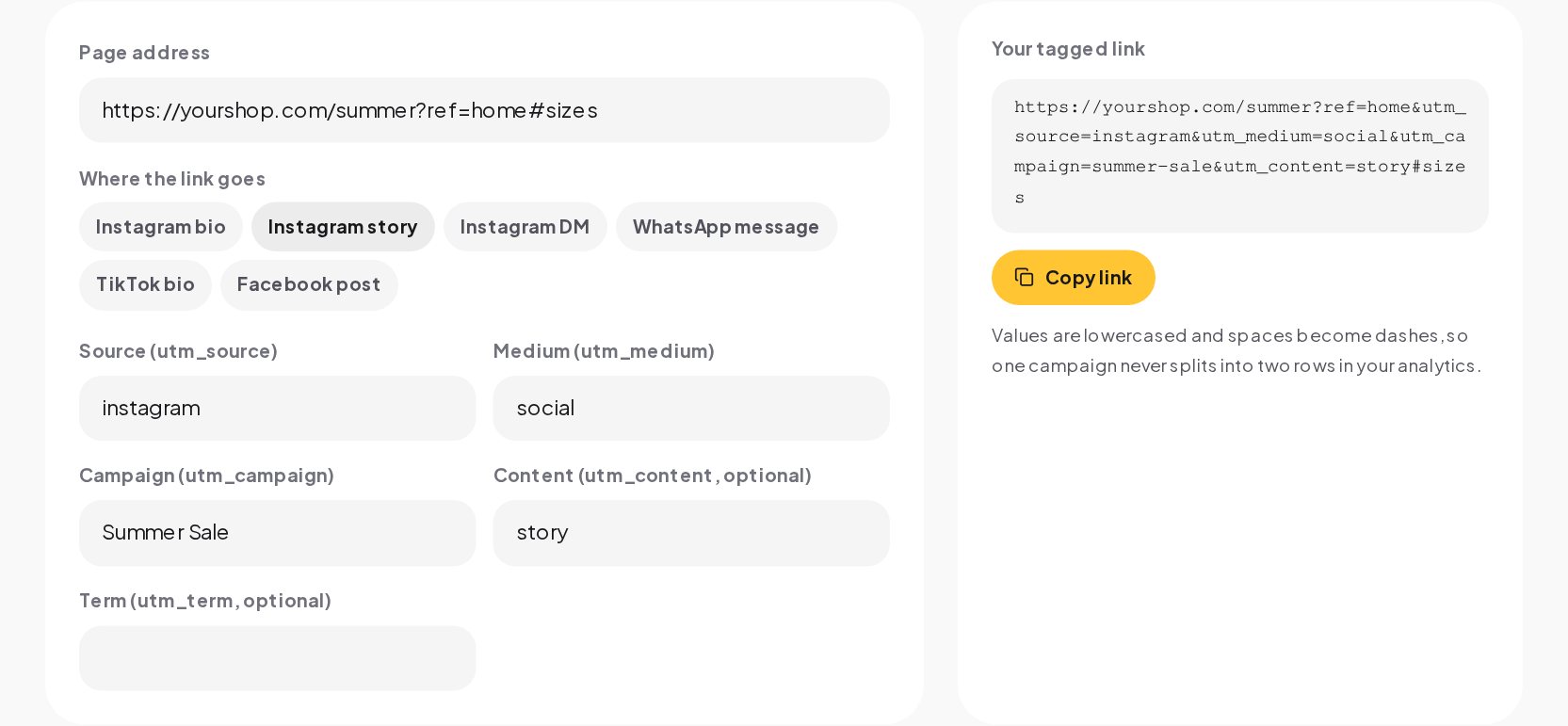
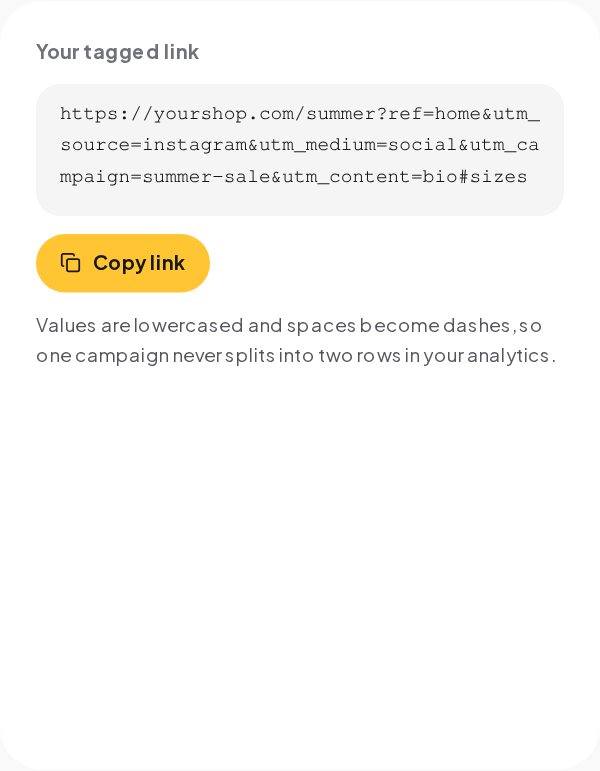
Many shop links already carry parameters, such as a product variant or a referral code, and sometimes a part after a # that jumps to a section of the page. The builder keeps all of it. It only adds the UTM parameters, and if the link already had old UTM values, it replaces them instead of adding a second set.
For example, this address:
becomes:
The ref parameter and the #sizes part are exactly where they were.
Where UTM links help most on social
Bio links
Your bio link is the most clicked link on most accounts, and without a tag its visits blend into general Instagram traffic. Tag it with content=bio. If you change the bio link for each campaign, change the campaign name too.
Stories
Link stickers in stories bring short bursts of traffic. Tag each one with content=story, and add the date or the topic if you run several stories in one campaign, such as story-day1 and story-day2.
DMs and automated replies
Links sent in DMs are the ones most often untracked, and they are often the ones that sell, because the person asked for them. Tag every link you send in a DM, including the ones an automation sends, with medium=dm.
Links shared in WhatsApp chats often show up as "direct" in analytics, because the app does not always pass on where the visit came from. A UTM tag fixes that. Use source=whatsapp and medium=chat.
Reading the results
In Google Analytics 4, the traffic acquisition report shows sessions by source and medium, and you can add campaign as a dimension. Most shop platforms, such as Shopify, show sales by UTM campaign and source in their own reports. Look at three views:
- By campaign: how did the summer sale do overall?
- By source and medium: did Instagram or WhatsApp bring more of it?
- By content: within Instagram, did the bio or the stories sell?
The answers tell you where to put your effort next time.
Mistakes to avoid
- Tagging internal links. Never add UTM tags to links within your own website. A visitor who clicks one starts a new session with the wrong source, and you lose the real one.
- Mixed spellings. The single biggest cause of messy reports. Let the builder lowercase and dash your values.
- Changing names mid-campaign. If the campaign is summer-sale on Monday, it is summer-sale on Friday.
- Very long links in captions. Instagram captions do not make links clickable anyway; put tagged links in the bio, stories or DMs.
- Forgetting the DM links. The conversations that sell are often the ones you never tracked.
Tagging a link in a minute
- Open the UTM Builder and paste the page address you want people to land on.
- Pick where the link goes: Instagram bio, story or DM, WhatsApp, TikTok bio or a Facebook post. Source, medium and content fill in.
- Name the campaign, and use the same name in every place for the same offer.
- Copy the tagged link and use it.
Send the tagged link in the DM
When someone comments "LINK" or asks for the price in a DM, the link you send back is the moment of highest intent. With revenue attribution in ChatinFlow, the automation sends your tagged link in the DM, so the sales that start in a chat show up in your analytics with the right source, medium and campaign. For links that open a WhatsApp chat rather than a web page, use the WhatsApp Link Generator.
Quick answers
What do utm_source, utm_medium and utm_campaign mean?
Source is where the link lives, such as instagram. Medium is the kind of channel, such as social or dm. Campaign is the offer or the launch.
Are UTM parameters case sensitive?
Yes, in Google Analytics. Instagram and instagram are two different sources, which is why the builder lowercases every value.
Can I use a UTM link in my Instagram bio?
Yes. It works like any other link and the parameters only tell your analytics where the visit came from.
Do UTM tags slow down or break a page?
No. The page ignores them; only analytics reads them.
Sources
- URL builders: Collect campaign data with custom URLs, Google Analytics Help.
- Default channel group, Google Analytics Help.