The full guide
DM automation platform for Instagram, WhatsApp and Messenger: how ChatinFlow fits together
One workspace for every customer conversation: channels, automations, the shared inbox, audience, bookings, sales and analytics, and how they work together for one customer.
Most small businesses run their customer conversations across five apps and three spreadsheets: Instagram DMs on one phone, WhatsApp on another, a booking tool, a CRM nobody updates, and a notes app for follow-ups. ChatinFlow puts the whole journey in one workspace. Messages from Instagram, Messenger, WhatsApp, Telegram, Viber and your website land in one inbox; automations answer the predictable questions; a person takes over when it matters; and every contact, booking, deal, task and sale is kept in the same place. This guide is the map: what each part does, how the parts connect, and the order in which most teams set them up.
What a DM automation platform includes
The sidebar groups everything into four areas. Each one answers a different question.
| Area | What lives there | The question it answers |
|---|---|---|
| Dashboard | Channels, Automations, Audience, Inbox | Who is writing, and how do we answer? |
| Engage | Broadcasts, Studio, Ads, Giveaways | How do we start conversations and campaigns? |
| Grow | Sales, Tasks, Bookings | What did the conversation lead to, and what is next? |
| Manage | Analytics, AI, Team, Settings | How is it going, and who can do what? |
You do not need all of it on day one. Most teams start with one channel, three automations and the inbox, and add the rest as the conversations grow.
Start from the dashboard
The dashboard opens with what is waiting for you: open conversations, the automations that are live, and the last 30 days in numbers.
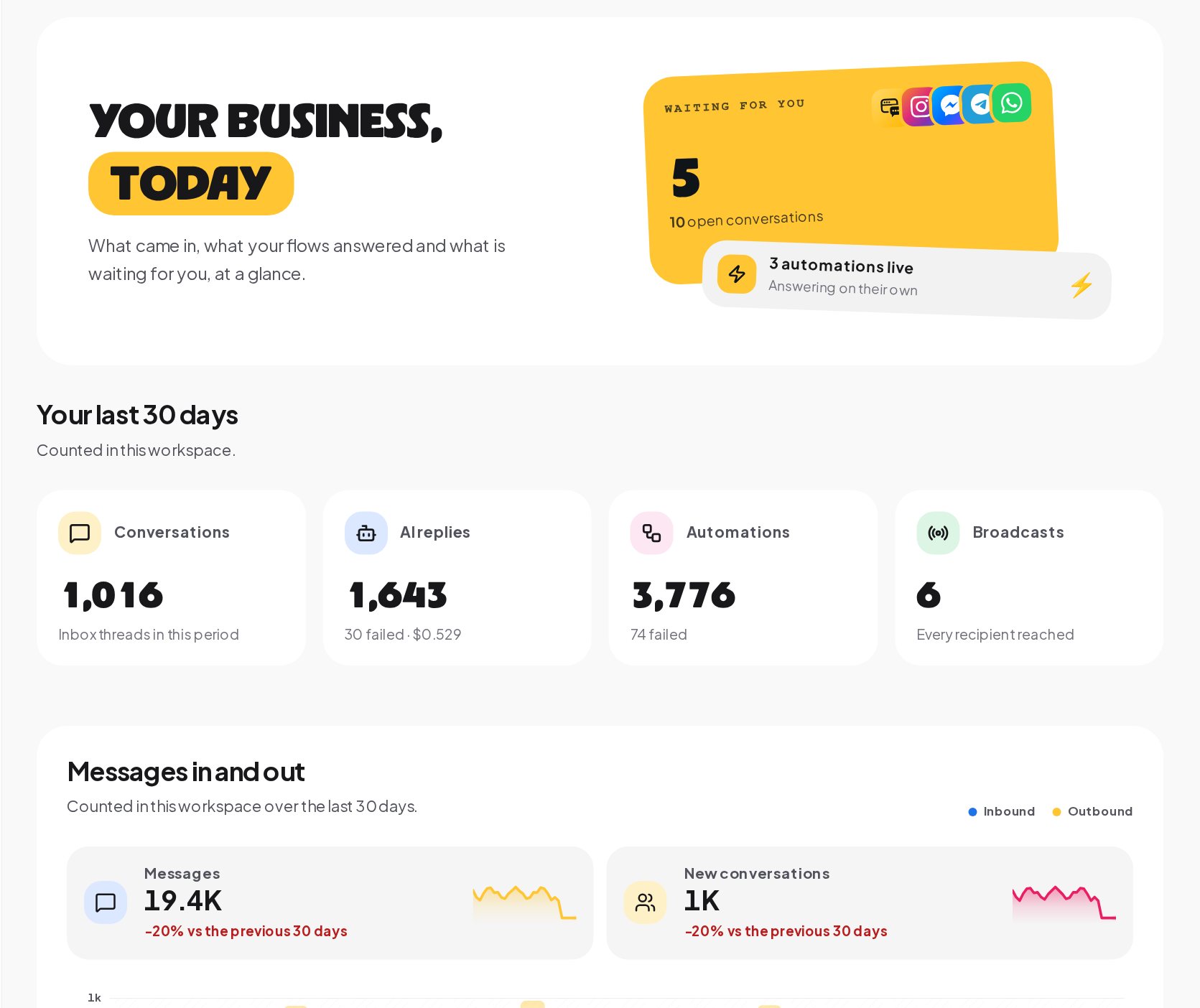
Below the summary, charts show messages in and out, the automations that ran and where DMs land, and a row of ready-made playbooks to start from. The dashboard is the page to open in the morning; Analytics is the page to read once a week.
Connect Instagram, WhatsApp, Messenger, Telegram and more
Open Channels and connect the apps your customers already write in. Each one answers through your flows and lands in the same inbox.
- Instagram. Comments on posts, Reels, ads and Lives, DMs, story replies and mentions. See the Instagram guide.
- Facebook Messenger. Messenger chats and comments on your Page posts. See the Messenger guide.
- WhatsApp. Through Meta's official Cloud API, with templates for messages outside the 24-hour window. See the WhatsApp guide.
- Telegram. A bot that can write to everyone who started it, with no window and no templates. See the Telegram guide.
- Viber. A Viber bot that answers and takes orders. See the Viber guide.
- Website chat. A chat window on your own site, with one line of code. See the website chat guide.
Email through Postmark and SMS through Twilio are enabled together with you, on request. The free plan connects one channel other than WhatsApp, so you can try the whole workspace on the channel you use most.
Build the automations that answer for you
Automations are the heart of ChatinFlow. Each one starts from a trigger, such as a comment keyword, a DM, a story reply, a button tap, a new order or a booking, and runs its steps: messages, questions, buttons, tags, waits, AI replies, conditions and hand-offs.
Three ideas make them reliable:
- One message, one answer. When several automations could answer the same message, only the most specific one does. An Any message automation is the default reply.
- Keywords, AI and buttons. Keywords answer the questions you can predict, Catch typos forgives the misspellings, Intent (AI) on your own key picks a flow for the messages keywords miss, and buttons let people tap instead of type.
- Versions and approvals. Every publish saves a version you can return to, and a flow that can reach many people needs a second approval.
The flow builder guide covers building flows step by step, and the keyword guide explains how messages are matched.
Work as a team in one shared inbox
Every conversation, from every channel, lands in the shared Inbox with its full history. Assign it to a teammate, add internal notes, snooze it, star it or close it. When a teammate replies, the automation running in that chat stops and the bot stays quiet, so the customer never hears two voices. AI helpers suggest replies, rewrite drafts and summarize long chats on your own key, voice notes are transcribed on ChatinFlow's own servers, and nothing is sent until a person presses send.
Know your audience: contacts, tags and segments
Every person who writes becomes a contact in Audience, with their channels, tags, fields, score and history.
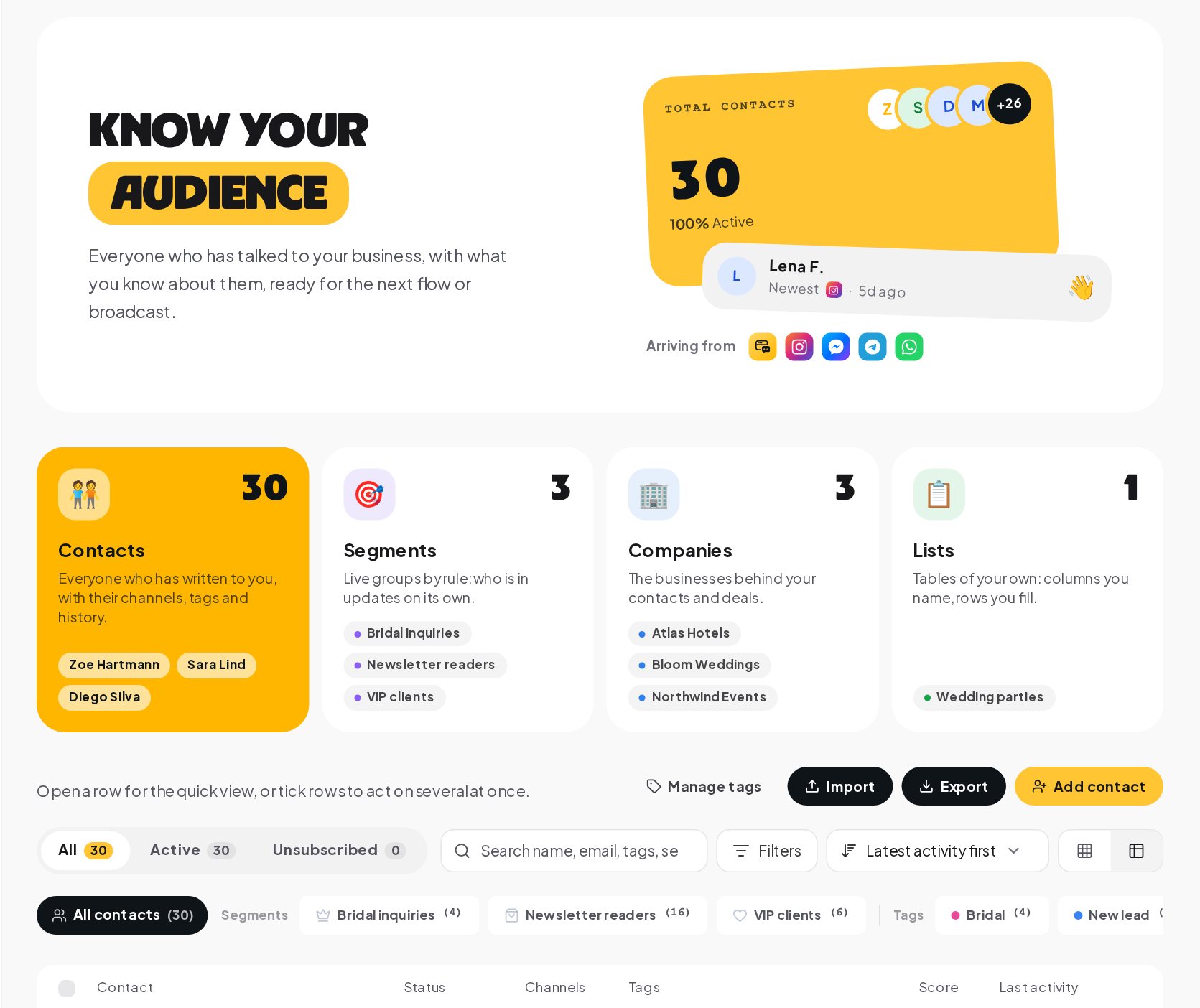
- Contacts. Everyone who has written to you, with their channels, tags and history. Import a list or export it at any time.
- Segments. Live groups by rule, such as everyone tagged VIP who wrote in the last 30 days. A segment updates on its own and feeds broadcasts.
- Companies. The businesses behind your contacts and deals.
- Lists. Tables of your own, with columns you name and rows you fill.
Tags and custom fields are added by flows as people tap buttons and answer questions, so the profile builds itself while you work.
Turn conversations into bookings, deals and tasks
The Grow area keeps what each conversation leads to.
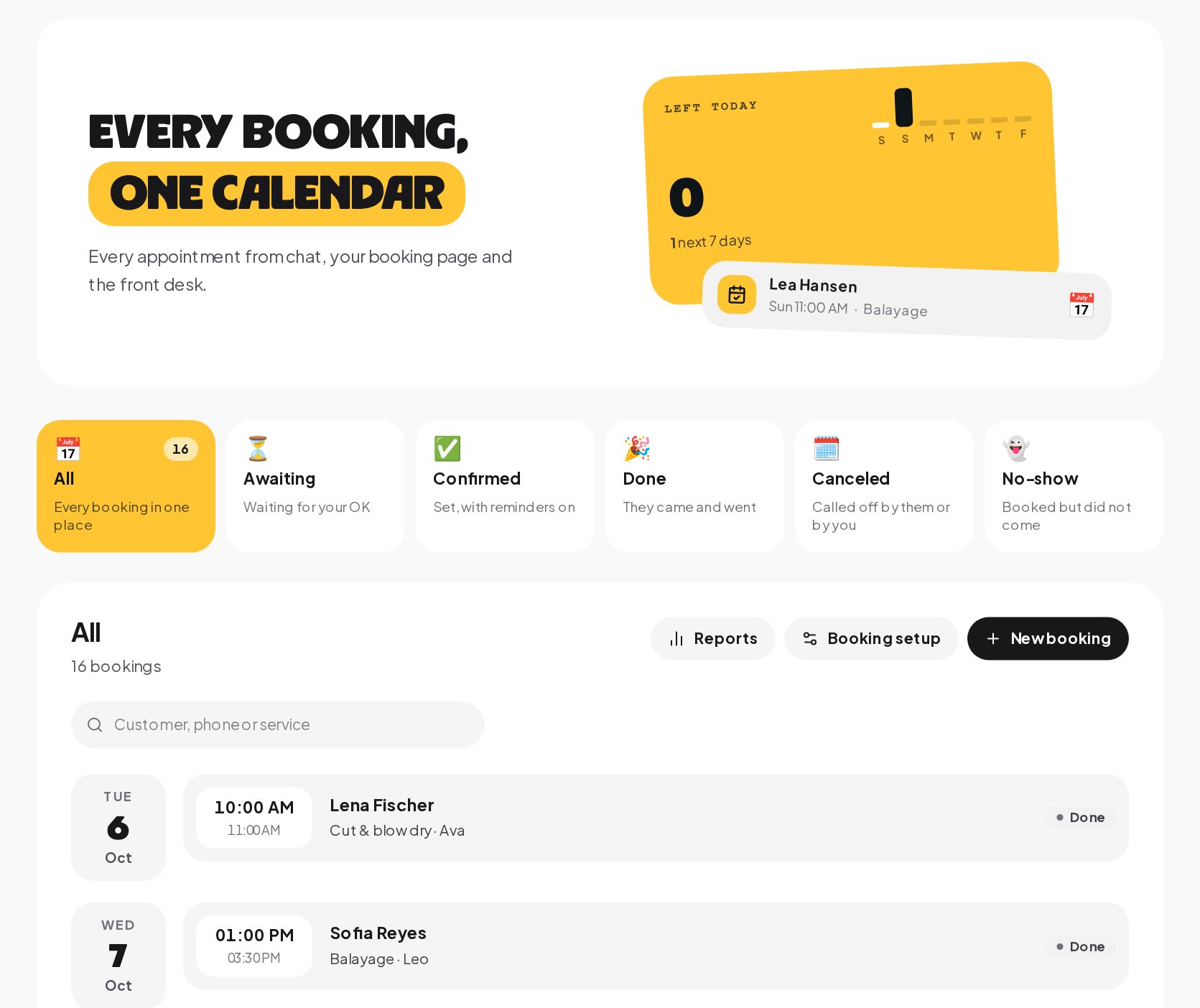
Bookings. Customers book where they already talk: free times as taps in the chat, your booking page or the front desk. Every booking lands on one calendar, with statuses for awaiting your OK, confirmed, done, canceled and no-show, and reminder times on each service start a Booking reminder due flow that follows the booking when it moves.
Sales. Every deal starts in a conversation. The board shows where each one stands and what the pipeline is worth, a won deal is recorded as a sale with its value, and the Orders tab lists payments from buy buttons and orders from a connected store.
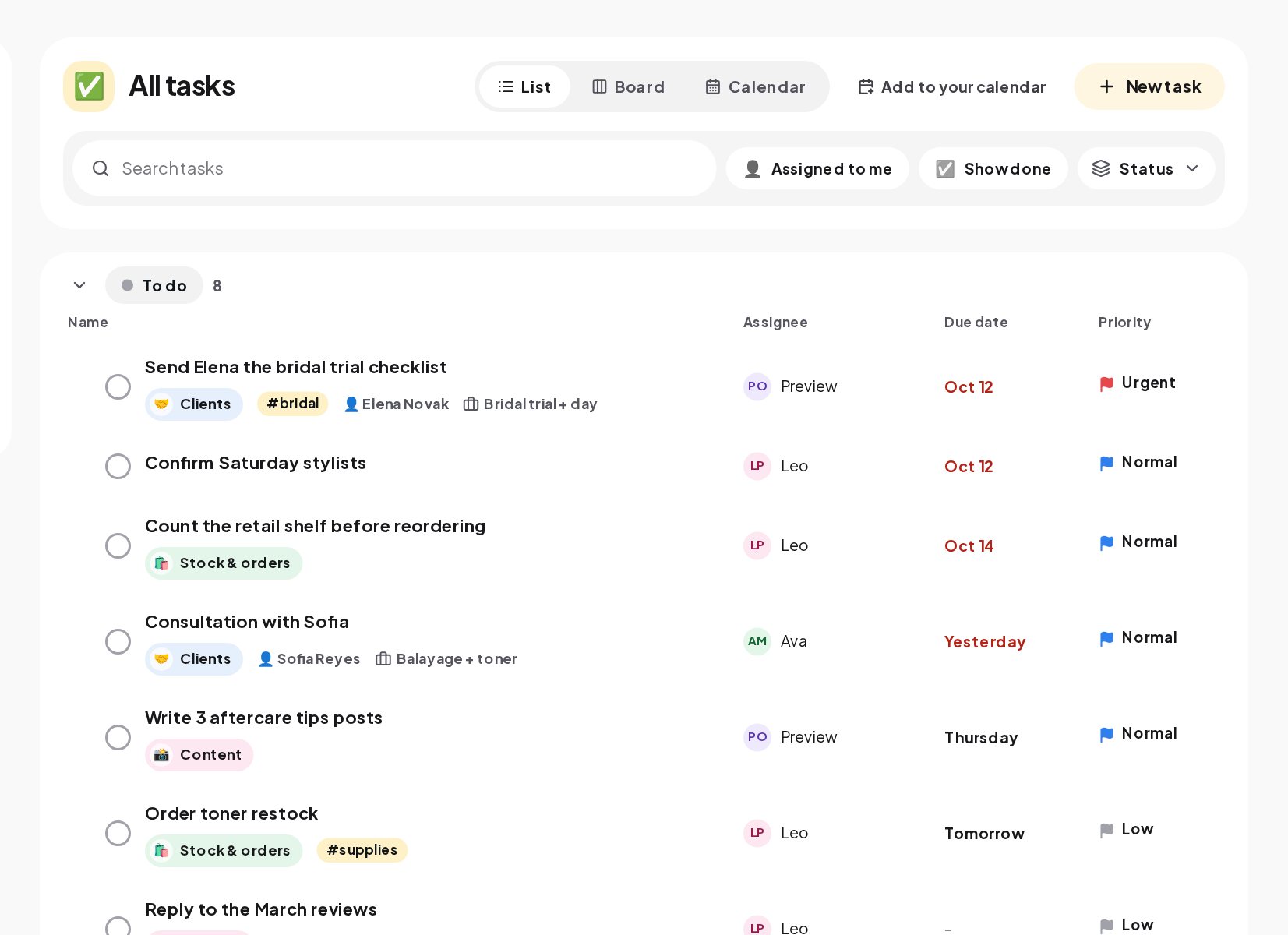
Tasks. Write it down where it comes up: a follow-up from a conversation, a task created by a flow, or one you add by hand. Tasks have an assignee, a due date and a priority, in a list, a board or a calendar, and a reminder goes out when one is due.
Start conversations with broadcasts and ads
The Engage area is for reaching out.
- Broadcasts send one message to a segment, on each channel's rules: templates on WhatsApp, everyone who started your bot on Telegram, and recent writers on Instagram and Messenger. See the broadcast guide.
- Ads connect Meta ads, with messaging ads that start a flow and spend shown next to the chats and sales it brought.
- Giveaways run prize draws, with the winners picked for you.
- Studio helps you prepare the content that starts conversations.
Measure what the chats turned into
Analytics answers five questions in plain words: what happened, what your chats brought in, how fast people heard back, which automations did the work, and where and when people write. See the analytics guide.
Attribution connects sales to the messages that earned them: the last flow message, AI reply or broadcast in the 30 days before a sale gets the credit, and each sale can go back to Meta, TikTok and Google Ads. See the attribution guide.
How the parts work together: one customer's journey
Here is how a single conversation moves through the workspace.
- A follower comments PRICE under a Reel. A comment automation replies in public and sends the price list by DM.
- They tap Book a time in the DM. The flow offers free times, books the one they pick, tags them as a new client and saves their email.
- The booking lands in Bookings, with a confirmation and the change link in the same chat.
- After the visit, a review request follows, and a teammate opens a deal for a package the client asked about.
- The client pays with a Buy button in the chat. The deal is won, the sale is credited to the comment automation in Attribution, and the conversion goes back to Meta.
- A task reminds the stylist to check in a month later, and the client joins the VIP segment for next season's broadcast.
Every step happened in one workspace, with one contact record holding the whole story.
AI chatbot on your own key
AI runs on your own OpenAI, Anthropic, Google Gemini or Azure OpenAI key, with daily and monthly caps per key. It writes replies from your instructions, answers from your sources with the AI agent, collects details in conversation, picks the right flow with Intent (AI) and helps your team in the inbox. Without a key, nothing is sent to an AI provider. See the AI guide.
Team, security and integrations
Team invites teammates with built-in roles, owner, admin, member, inbox agent and viewer, or custom roles for a specific job. Settings hold two-step sign-in, privacy and data requests, set-up backups and the audit trail; the security guide explains each control. Integrations connect your CRM, payments, store, forms, Slack and ad platforms, and the API, webhooks and MCP server connect anything else; see the integrations guide.
Your first week with a DM automation platform
- Day 1. Connect your main channel and turn on a default reply.
- Day 2. Build a comment-to-DM automation for your next post.
- Day 3. Add keyword replies for your three most common questions.
- Day 4. Invite your team and set their roles.
- Day 5. Connect your calendar, CRM or store, whichever matters most.
- Day 6. Send a first broadcast to a small segment.
- Day 7. Read The story in Analytics and fix the automation that fails most.
DM automation glossary
- Workspace. One business's space in ChatinFlow, with its own channels, inbox, contacts, automations and analytics.
- Channel. A connected account, such as an Instagram account, a Facebook Page or a Telegram bot.
- Automation. What answers for you: something that happens, such as a comment or a DM, and the steps that follow it.
- Flow. The steps an automation runs, built on a visual canvas: messages, questions, conditions, waits and actions.
- Contact. A person who wrote to you on any channel, with tags, custom fields and their history.
- Segment. A saved filter of contacts that stays up to date as contacts change, used for broadcasts and reports.
- Touch. A message a contact received, recorded so a later sale can be credited to it.
DM automation platform: FAQ
Do I need every part of the platform to start?
No. Start with one channel, a few automations and the inbox. Bookings, sales, tasks, broadcasts and AI are there when you need them.
Can several people work in the same workspace?
Yes. Invite teammates with built-in or custom roles; inbox agents can be limited to the conversations assigned to them.
Where do bookings and deals come from?
From conversations. A flow can offer times and book them, a deal can be opened from a conversation, and a won deal counts as a sale.
Is there a free DM automation plan?
Yes. The free plan connects one channel other than WhatsApp, so you can try the workspace before you choose a paid plan.
Sources
- Messenger Platform and IG Messaging API policy, Meta for Developers, on the 24-hour window that shapes every Meta channel.
- About the WhatsApp Business Platform, Meta for Developers.
- Bots: An introduction for developers, Telegram.