Flow template · Lead capture
Comment to DM
A comment with your word gets your link in their DMs.
Copy this flow
Open the template in your workspace, change the words to yours and publish when it looks right. It's free to start.
More recipes
A comment with your word gets your link in their DMs.
AI answers from your sources and hands off when it should.
Story replies and mentions turned into leads.
 Creators6 min read
Trial reels show a reel to non-followers before your followers see it. How to use them to test hooks, offers and comment keywords, and the check to run before you judge a test by its DMs.
 Creators6 min read
From a reel to a paid download in one chat: the comment keyword, the free first message, the price, the buy button and delivery after payment. For templates, presets, ebooks, courses and coaching.
 E-commerce6 min read
Stores that reach seven figures stop losing the customers who were already trying to buy. The six places social sales leak, the automation that closes each one, and the order to build them in.
The full guide
A comment with your word gets a one-time code and the product link by private reply, then a carousel and a Buy button when the viewer replies.
A Reel that shows a product in use does the selling on its own; what loses the sale is the step after. "Link in bio" sends people hunting, and a code in the caption ends up on every coupon site by the evening. A Reel comment flow closes that gap: the viewer comments a word, gets their own one-time code and the product link in a private reply, and, when they answer, a carousel of the pieces that go with it and a way to pay without leaving the chat. This guide builds the flow step by step, from the call to action on screen to the sale credited back to the Reel.
| Step | What happens | Built with |
|---|---|---|
| 1. The Reel | "Comment LINEN for 15% off" on screen and in the caption | |
| 2. The comment | A viewer comments the word | The Instagram comment trigger |
| 3. The private reply | Their own code and the product link | Give a one-time code, Send private reply |
| 4. The public reply | "Sent you the code!" under the comment | Public reply |
| 5. Their answer | They reply, and the chat opens | Any DM step |
| 6. The lineup | A carousel of related pieces, or a Buy button | Send card carousel, Buy button |
Open Automations and search the gallery for "lineup". Show your product lineup in DM replies with a swipeable carousel of your top picks when someone DMs a word such as shop.
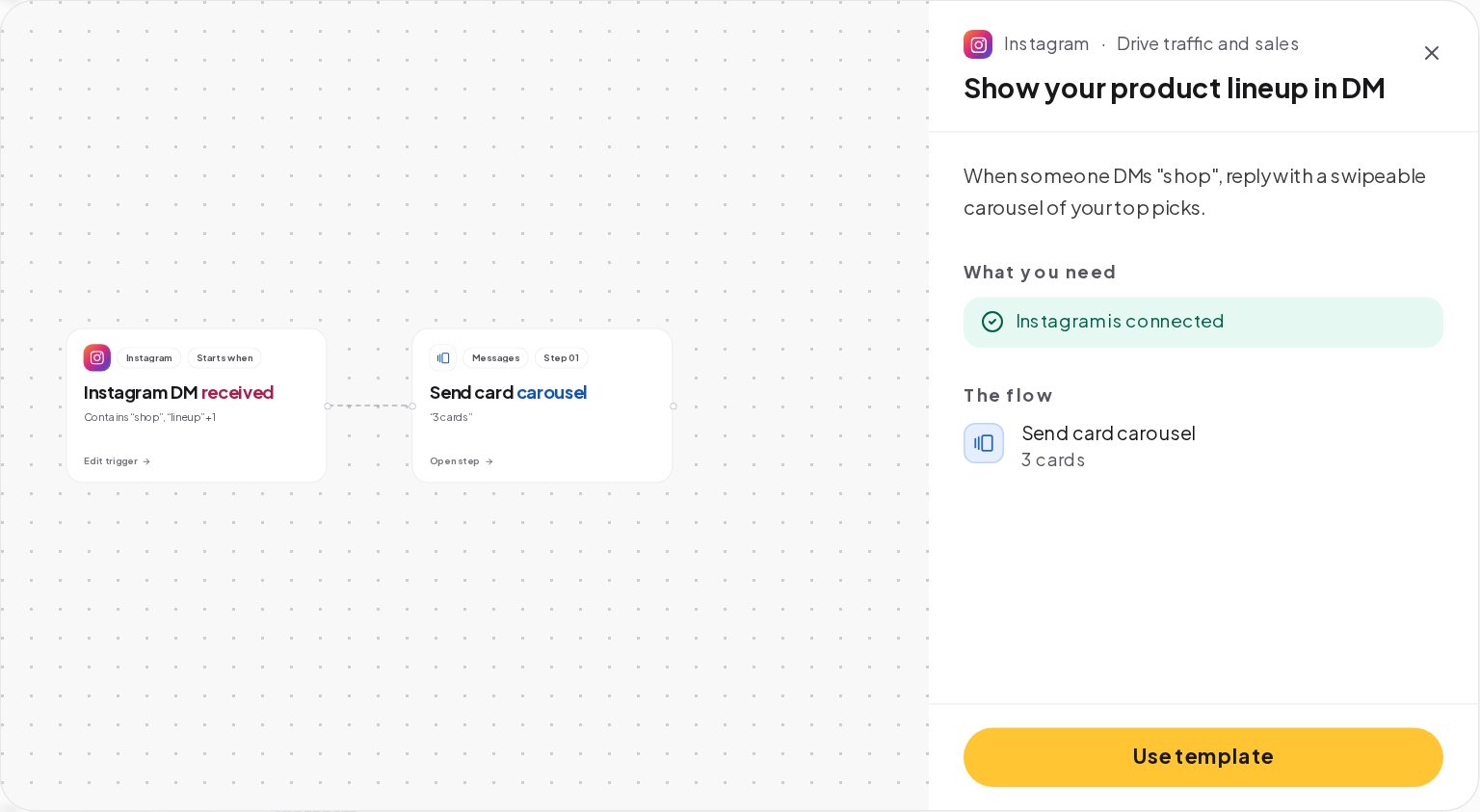
For a Reel, pair it with a comment flow: the comment gets the code and the link by private reply, and the carousel goes out once the viewer replies. Start the comment side from the Comment to DM template, and the lineup side from this one.
Open the comment trigger and choose the Reel, or the Reels of one campaign. Pick a word nobody writes by accident, such as the product's name: LINEN, GLOW, TRAIL. Set the match to Contains and turn on Catch typos, so "linnen" still counts.
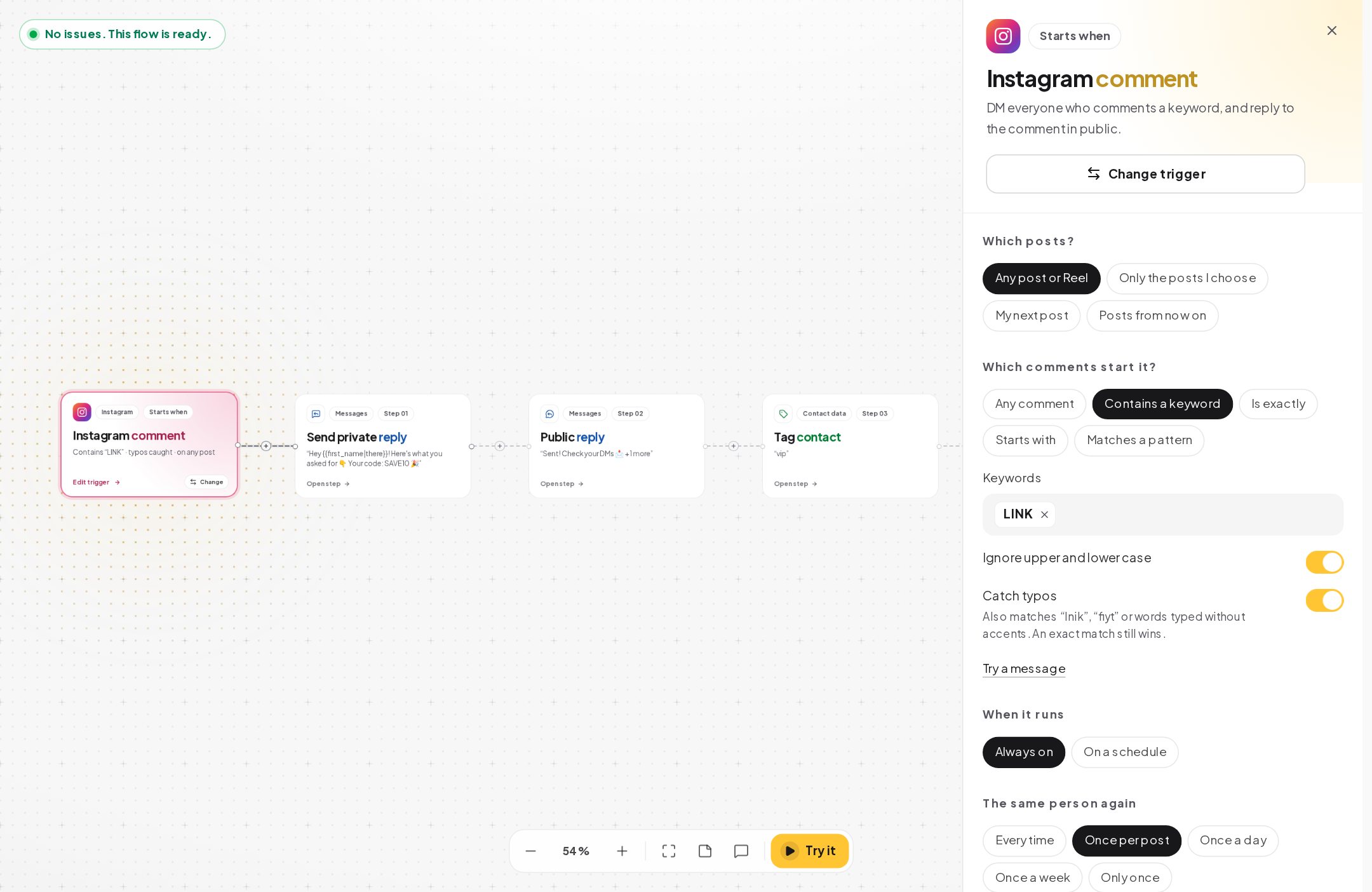
A word per Reel tells you later which video sold.
A code in the caption is the same for everyone and leaks within hours. A one-time code goes to one person only. Open Automations, One-time codes, create a list and upload the codes from your store.
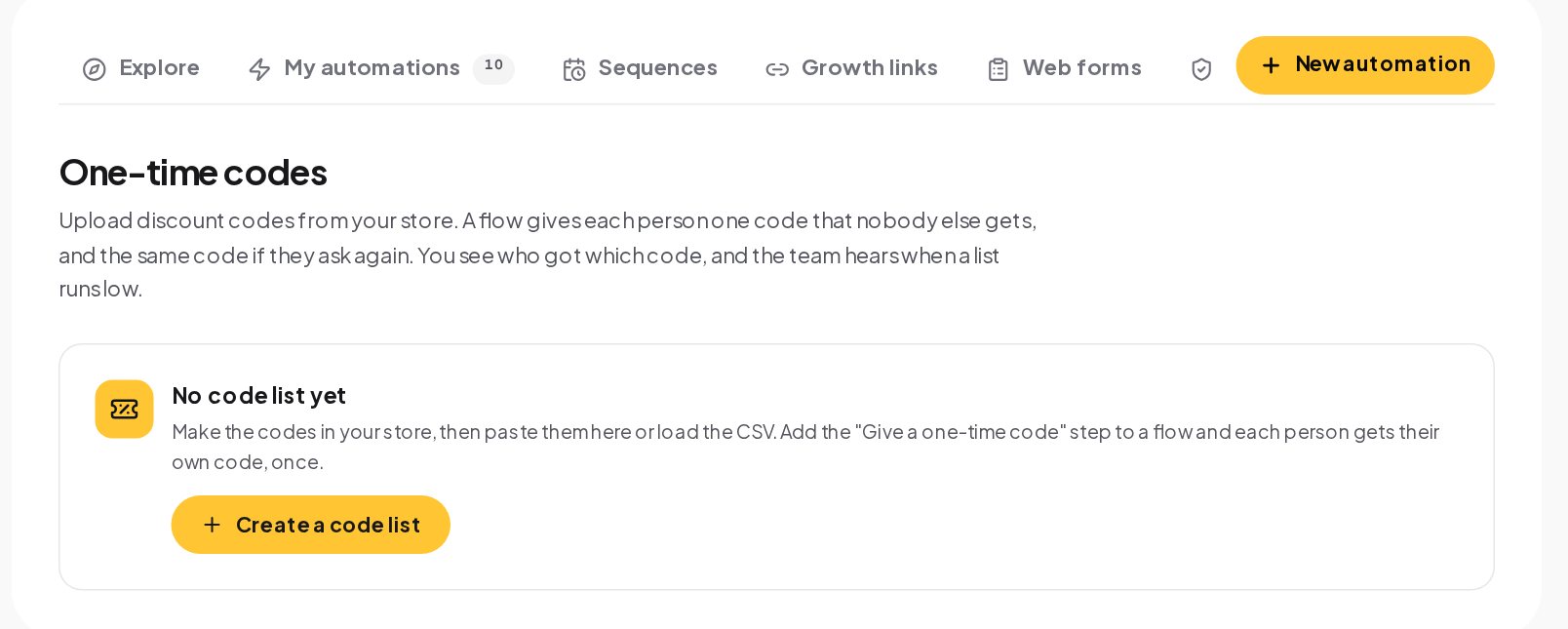
In the flow, the Give a one-time code step takes the next free code for the person, and the private reply carries it as a variable. Someone who already got a code from this list gets the same one again, so asking twice does not double the discount. When the list runs out, the step takes its other path, the No codes left message, such as "The launch codes are gone, but here's the collection."
Meta allows one private reply per comment, within 7 days of it, and it is one text with an optional link. Make it count:
Add a Public reply under the comment, such as "Sent you the code!", so other viewers know commenting works.
When the viewer answers, the chat is open for 24 hours after their message. That is where the selling happens:
Keep the carousel to the pieces that fit the Reel. Three to five cards convert better than ten.
Every message the flow sends is a touch on the contact who got it. When a sale happens, the last touch in the 30 days before it gets the credit:
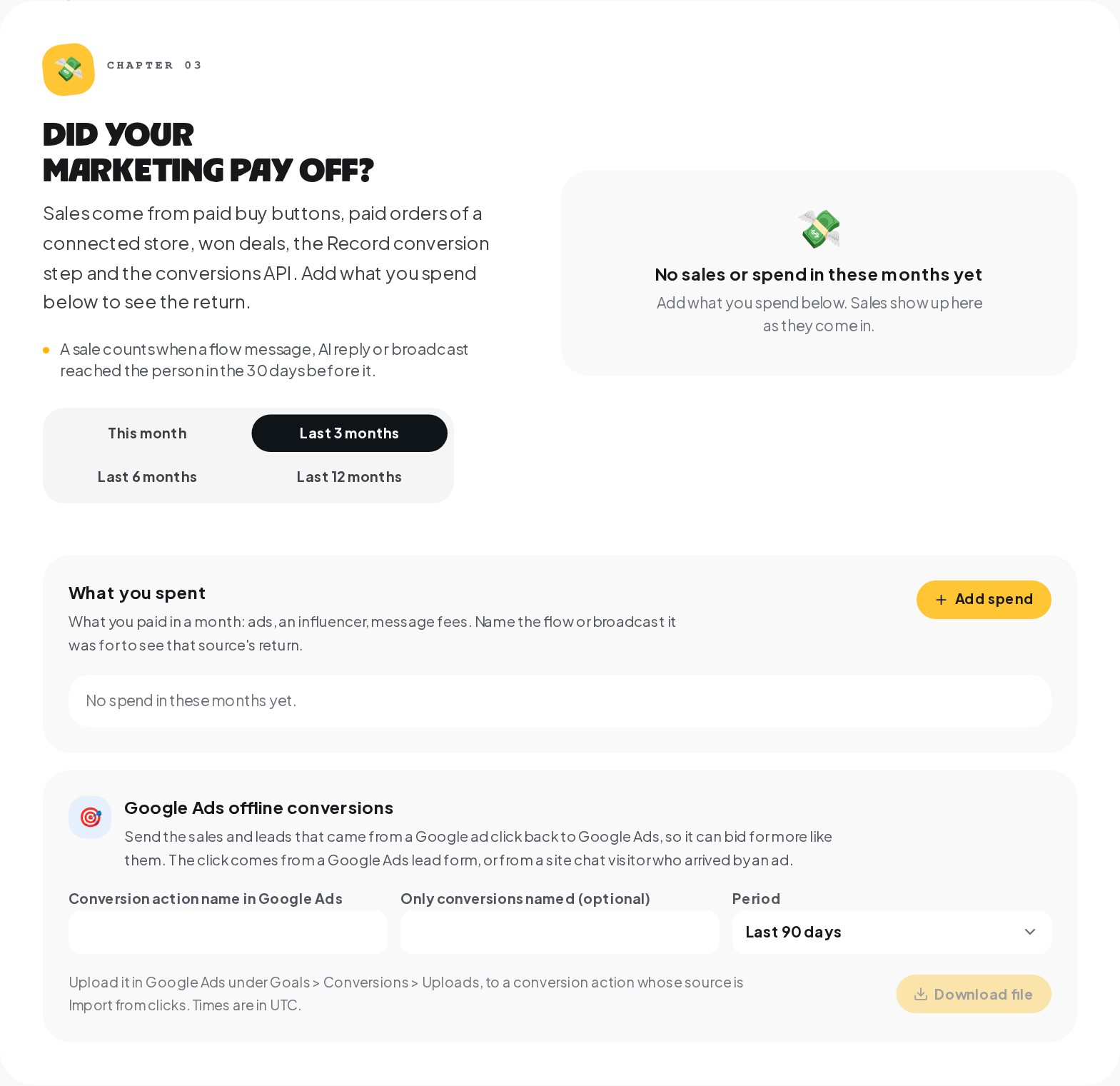
The Results tab of Analytics shows the sales next to the flow that made them, so the Reel with the best word is easy to spot. Add what you spent on the Reel, if you promoted it, and the return appears next to the sales.
For a launch with a fixed number of units or discounts, a Limited spots step gives places to the first people and sends the rest down a Full path. Set the number of spots, and use {{vars.spots.left}} in the message for an honest "only 12 left". Your team hears when 90% of the spots are taken and again when they are gone.
| Campaign | Word | Offer | Why it works |
|---|---|---|---|
| A product launch | The product's name | 15% off for 48 hours | Urgent and specific |
| A restock | BACK | Early access before the email goes out | Rewards the people who watch |
| A bundle | SET | The second piece at half price | Raises the order value |
| A creator collaboration | The creator's name | A code tied to the collaboration | Shows which partner sold |
| A seasonal edit | The season, such as SUMMER | Free shipping this week | Removes the last objection |
A discount is not always needed. "Comment LINEN and I'll send the size guide" sells too, because the hard question is the size, not the price.
Each card has a title of up to 80 characters, a subtitle of up to 80, an image and up to three buttons. A few habits:
A Buy button payment lands back in the chat with a thank-you, and that is the best moment for one more message:
A clothing brand posts a Reel of a linen shirt on a beach, with "Comment LINEN for 15% off" on screen.
The brand sees in Analytics which Reel sold, and no code from the launch appears on a coupon site.
Yes. Give each Reel its own word and its own code list, so each campaign has its own discount.
Meta allows one private reply per comment, so a new comment can get its own reply, and the code step gives them the same code as before.
No. A Buy button sells through Stripe or PayPal on its own. Connect Shopify or WooCommerce if you want their orders counted as sales too.
The code goes only to people who commented your word, one per person. Anyone can comment, so keep the word on the Reel itself rather than shared elsewhere.
Setting up my first automation was easier than I expected. The whole dashboard feels really intuitive.
I used to spend way too much time answering the same Instagram questions. This makes things a lot simpler.
Love having everything in one place. It's made keeping up with customer messages much less stressful.
Honestly, the setup was pretty straightforward. Took me a little time to figure out the flows, but it's been smooth since.
Really handy for managing messages across different accounts. The interface is clean and easy to get around.
We're a small team, so anything that saves us time is a win. This has been genuinely useful.
We get so many repetitive questions through Instagram. Having those handled automatically makes a huge difference.
Getting everything connected was surprisingly simple. I really like how the automation builder works.
Clean interface, useful features, and no unnecessary complexity. Exactly what I was looking for.
The workflow builder is quite flexible. It took some experimenting, but now it fits our process really well.
I like how easy it is to organise customer conversations. Everything feels much more manageable now.
Simple to navigate and surprisingly powerful once you start building automations.
Managing Instagram messages used to take up a big part of my day. This has helped me get that time back.
The automation setup makes sense even if you're not particularly technical. That's a big plus for me.
I run a small online shop, and answering DMs was getting overwhelming. This makes things so much easier.
Really like the way everything is organised. The automations are easy to adjust when we need to.
Finally, a dashboard that doesn't feel complicated. I found what I needed without digging through endless menus.
Being able to manage conversations and automations together is really convenient for our team.
Pretty straightforward to get started. I especially like being able to see how the flows are organised.
We've tried a few different tools, and this one feels refreshingly simple to work with.
The dashboard is easy to understand, and creating an automation doesn't take much effort.
Nice to have our customer conversations organised without constantly switching between platforms.
I appreciate how simple the interface is. Even the more advanced settings are easy to find.
The automation features are useful, especially when you're dealing with similar customer questions every day.
The interface feels organised and easy to follow. Setting up basic workflows was very straightforward.
I like being able to manage everything from one dashboard. It makes our daily routine a lot easier.
Creating automated replies is really convenient. The dashboard is also much easier to navigate than I expected.
We needed a better way to handle incoming messages, and this fits nicely into our workflow.
The interface is clean, and managing different conversation flows feels straightforward.
I like that I can make changes to our automations without having to start everything from scratch.
This is really helpful for our Instagram shop. We can focus on orders instead of answering the same questions all day.
Easy to set up and practical for everyday use. The automation builder is my favourite part.
I manage messages for a few business pages, and having everything organised makes my day much easier.
The dashboard feels modern without being confusing. Getting started was pretty quick.
Really convenient for handling customer enquiries. I especially like how easy it is to manage automated responses.
It helps us keep conversations organised and respond to common questions without doing everything manually.
I wasn't sure how difficult setting up the flows would be, but the process was actually quite simple.
Super useful for a small business like ours. The dashboard makes managing customer messages much easier.
I like the simplicity. Everything I need for managing our conversations is easy to access.
Setting up automated replies was pretty painless. It's a practical tool for handling everyday customer messages.
What they get
A Reel that takes off brings a wave of "where can I get this?" comments. Each one gets the code and the link in private, before the moment passes.
The recipe
What to have ready, then the steps from an empty workspace to a live flow.
Ingredients
Method
Under the hood
This is how the flow is set up in the builder, and the platform rules it plays by.
In the builder
Good to know
Make it yours
Change the word and the message, and the same steps do something else for you.