The full guide
How much time does DM automation save? Work it out from your own inbox
Every business that sells through Instagram, WhatsApp or Messenger reaches a point where answering messages becomes a job of its own. ". Automation promises to take that off your hands, but how much does it really give back?
Every business that sells through Instagram, WhatsApp or Messenger reaches a point where answering messages becomes a job of its own. The same questions arrive all day, the replies take a few minutes each and the evenings fill up with "what's the price?". Automation promises to take that off your hands, but how much does it really give back? The honest answer is that it depends entirely on your inbox, which is why this guide does not quote an industry average. It explains how to count your own messages, which ones automation can answer, how to work out the hours and what they are worth, and what the result does not capture.
The formula
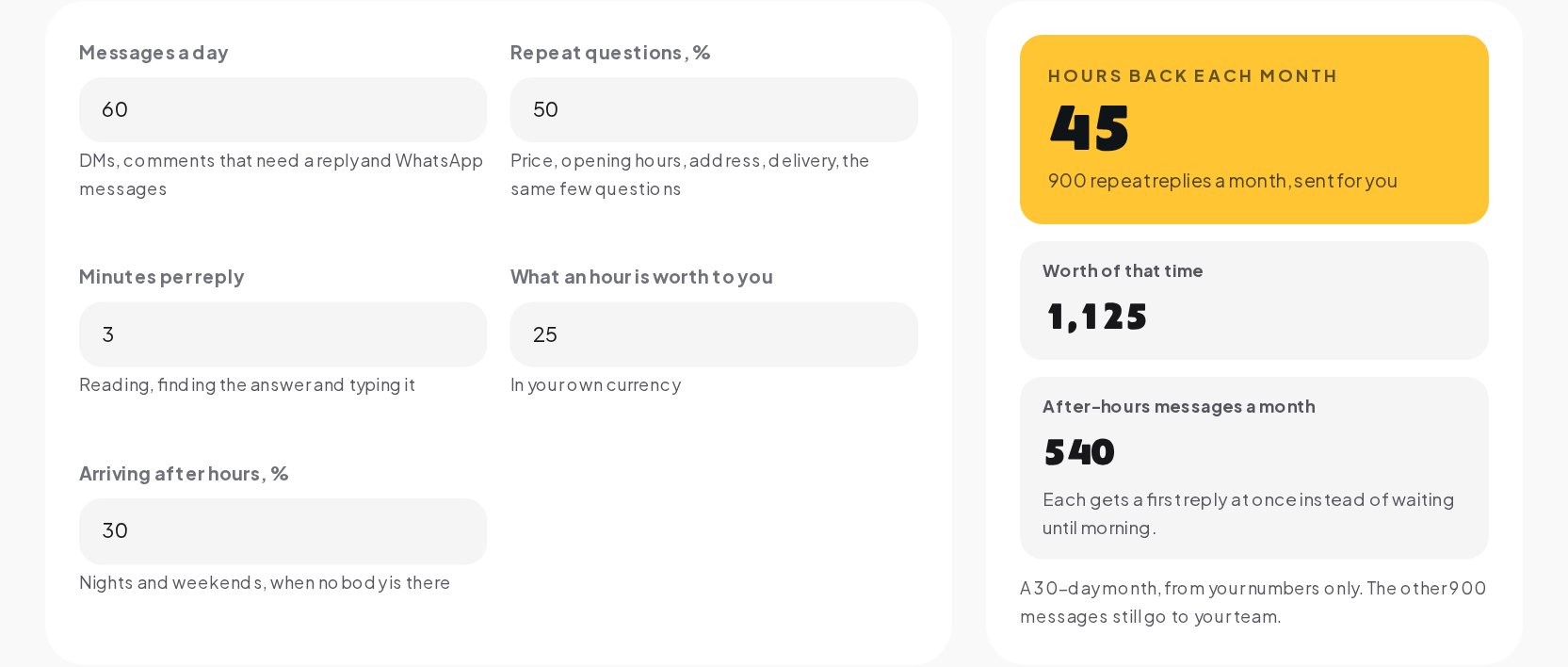
The time automation saves is the time you now spend on the replies it would take over:
Multiply the hours by what an hour of your time is worth and you have the value of that time. Every number in it comes from you. There is no hidden benchmark from other businesses, and the month is counted as 30 days so the result is easy to check.
Step 1: count a normal day
Count the messages that need an answer on an ordinary day, across every channel:
- Direct messages on Instagram and Messenger.
- Comments that need a reply, such as questions under a post. A heart emoji does not count; "how much?" does.
- WhatsApp messages from customers.
Do not count your own replies, only the messages that arrive. If your days vary a lot, take a week and divide by seven. If you are not sure, scroll through yesterday's inbox and count. It takes five minutes and gives a far better number than a guess.
Step 2: estimate the repeat share
Repeat questions are the ones you could answer with the same reply every time. For most businesses they fall into a few groups:
| Group | Typical messages |
|---|---|
| Price | "How much is it?", "price?", "what does it cost?" |
| Availability | "Do you have it in M?", "is it still available?" |
| Hours and location | "Are you open Sunday?", "where are you?" |
| Delivery | "Do you ship to...?", "how long does delivery take?" |
| Booking | "Can I book for Saturday?", "any slots this week?" |
| Order status | "Where is my order?" |
| Comment keywords | "LINK", "GUIDE", "PRICE" under a post |
Go back to the messages you counted and mark the ones that fit one of these. That share is your repeat share. Be honest: a question that needs you to look something up or think about the answer is not a repeat question.
Step 3: time a reply
Minutes per reply is the time from opening a message to sending the answer: reading it, finding the answer, maybe checking a price or a link, typing and sending. For short repeat questions this is often a couple of minutes; with interruptions and switching between apps, often more. Time yourself on five replies and take the average.
Step 4: put a value on an hour
What is an hour of your time worth? Use your own hourly rate, what you pay the person who answers messages, or what you would earn spending that hour on something else. Type it in your own currency. If you would rather not put a price on it, the hours alone tell most of the story.
A worked example
Take an inbox with these numbers:
| Input | Value |
|---|---|
| Messages a day | 60 |
| Repeat questions | 50% |
| Minutes per reply | 3 |
| Value of an hour | 25 |
| Arriving after hours | 30% |
Over a 30-day month:
- Messages that arrive: 60 × 30 = 1,800.
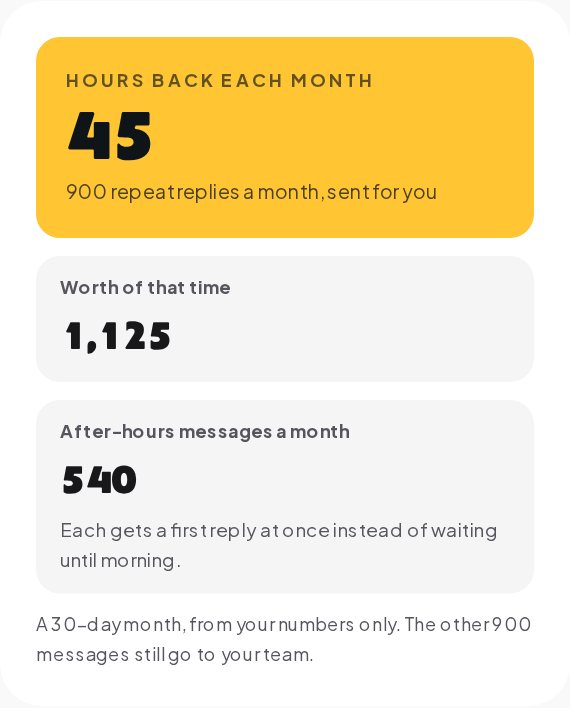
- Repeat replies sent for you: 1,800 × 50% = 900.
- Hours back: 900 × 3 minutes ÷ 60 = 45 hours.
- Worth of that time: 45 × 25 = 1,125 in your currency.
- Messages arriving after hours: 1,800 × 30% = 540, each getting a first reply at once instead of waiting until morning.
- Messages still for your team: 1,800 − 900 = 900.
Forty-five hours is more than a full working week every month, from one inbox with an ordinary volume of messages. Your numbers will differ; the point is to see them.
Why after-hours messages matter
A message that arrives at 11 pm usually waits until morning. By then, the person has often moved on: they asked three shops and bought from the one that answered. After-hours messages are frequently sent at the moment someone is ready to decide, on the sofa, phone in hand.
The calculator counts them separately for that reason. They are the messages where an instant first reply changes the outcome most, even when the answer is as simple as the price and a link.
What the number does not capture
The hours are the easiest part to measure. They are not the whole picture.
- Speed. An instant reply often decides whether someone buys. The calculator counts your time saved, not the sales a faster reply may win.
- Consistency. Automated answers give the same correct price and link every time, including on your busiest day.
- Your attention. Fewer interruptions means the messages that need you get a better answer.
- Setup and upkeep. Writing the automations takes an afternoon, and prices or opening hours need updating when they change.
None of these are added to the result, because none of them can be measured from the numbers you typed. They are reasons the real benefit is usually larger than the hours alone, not smaller.
What automation should not answer
The messages left for your team matter as much as the ones automated. Keep these with people:
- Complaints and refunds. An unhappy customer needs a person.
- Anything sensitive, such as health questions to a clinic or personal details.
- Questions that need judgment, such as a custom order or a special request.
- New questions you have not seen before.
A good automation answers the repeat question and hands the rest over clearly, with the conversation still open.
Where to start
You do not need to automate everything at once. Start with the question you answer most:
- Find your top question. Usually the price, or the comment keyword under your most popular post.
- Write the reply once. The DM Templates library has ready replies for prices, stock, bookings, orders and after hours.
- Set the keywords. Test them against real messages in the Keyword Tester so only the right messages trigger the reply.
- Add the next question a week later. Two or three automations often cover a large part of the repeat share.
Then come back to the calculator with your new numbers.
Working out your savings in a minute
- Open the DM Automation Savings Calculator.
- Type your messages a day, the share of repeat questions and your minutes per reply.
- Add what an hour is worth to you and the share of messages arriving after hours, if you want those parts of the result.
- Read the month: hours back, what that time is worth, after-hours messages answered at once and the messages still left for your team.
Turn the hours into automations
The calculator shows the hours; ChatinFlow gives them back. With customer support automation, the question you answer most gets an instant reply on Instagram, WhatsApp, Messenger and the other channels you connect, day and night, and everything else goes to your team. Start with one automation on the Free plan, with no card, and see what it does to next month's numbers.
Quick answers
How much time does DM automation save?
Multiply your messages a day by the share of repeat questions and your minutes per reply, then by 30 days, and divide by 60 for hours a month. The result depends entirely on your inbox.
Is this an average from other businesses?
No. Every number comes from what you type.
Which messages can an automation answer?
The repeat ones: price, stock, opening hours, address, booking and order questions. New or sensitive questions stay with your team.
Why count after-hours messages separately?
A message at night otherwise waits until morning. An automation answers it at once, often when the person is ready to buy.
Sources
- Messenger Platform and IG Messaging API policy, Meta for Developers, on the 24-hour window and the human agent tag.