The full guide
How to watermark your photos without ruining them
Photos travel. A product shot gets reposted by a fan page, a portfolio image ends up on a stranger's board, a preview you sent to a client is shared before the invoice is paid. A watermark keeps your name on the photo wherever it goes, so the people who see it can find their way back to you.
Photos travel. A product shot gets reposted by a fan page, a portfolio image ends up on a stranger's board, a preview you sent to a client is shared before the invoice is paid. A watermark keeps your name on the photo wherever it goes, so the people who see it can find their way back to you. Done badly, it also makes the photo look cheap.
This guide covers where to put a watermark for each use, how big and how strong it should be, text versus logo, and how to mark a whole batch of photos at once in your browser.
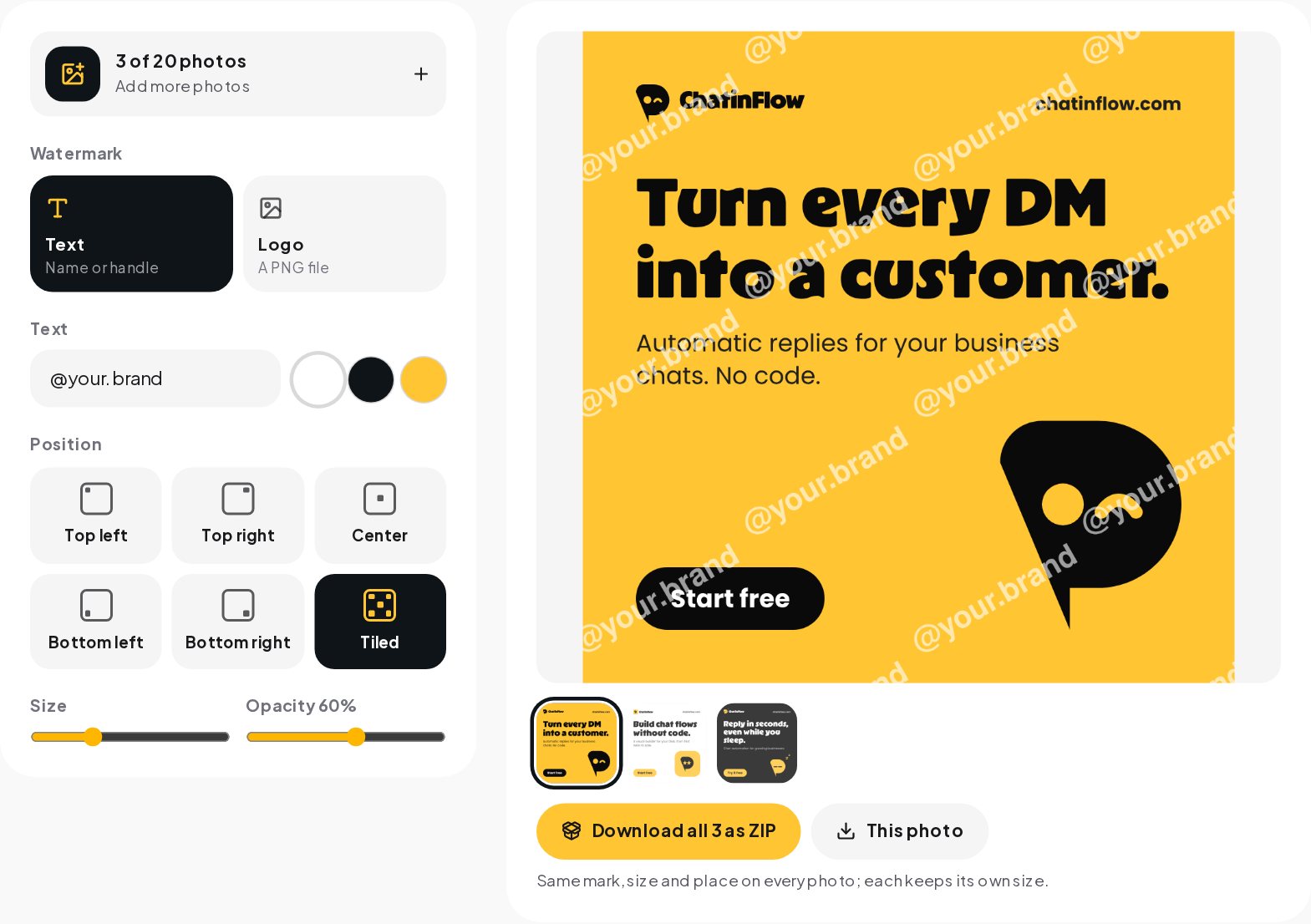
Where a watermark should go
The right place depends on what the photo is for.
| Use | Position | Opacity | Why |
|---|---|---|---|
| Posts and stories | A corner | 40 to 60% | Credit without distracting from the photo |
| Portfolio | A corner or the center | 50 to 70% | Visible in reposts, still elegant |
| Previews before payment | Tiled across | 30 to 50% | Hard to crop or edit out |
| Product photos for marketplaces | Check the marketplace rules | Some marketplaces do not allow watermarks |
A corner mark is credit; a tiled mark is protection. Decide which one you need before you choose the style.
Which corner
The bottom right is the most common place and where people look for credit. On Instagram, the bottom of a post sits close to the like and caption area in some layouts, so keep the margin generous. The tool places marks four percent of the short side away from the edge, which keeps them clear of rounded corners and crops.
Size and strength
A watermark has to be readable on a phone, yet small and soft enough to leave the photo the hero.
- Size. For a corner mark, about 15 to 25 percent of the short side of the photo is a good start. For a tiled mark, smaller is fine, because there are many.
- Opacity. Around 50 percent for corners, lower for tiles. At 100 percent a watermark looks like a sticker.
- Color. White on dark photos, black on light ones. For mixed photos, a logo PNG with a subtle shadow built into the file reads on both.
Text or logo
Text is the simplest choice and the easiest to read: your handle, your website or your studio name. Keep it short; "@your.brand" is better than a sentence.
A logo looks more professional when you have a clean mark. Use a PNG with a transparent background, so only the mark appears on the photo, not a white box around it. A logo with a long name inside it becomes hard to read when it is small; use the symbol alone for watermarks.
Watermarking a batch in a minute
- Open Watermark Photos and choose up to 20 photos.
- Choose a text mark and type your name or handle, or choose a logo and add your PNG.
- Pick the position: one of the corners, the center or tiled across.
- Set the size and the opacity, and check the preview. Tap a thumbnail to see any photo of the batch.
- Download all photos in one ZIP, or only the one you are looking at.
The photos are opened, marked and saved in your browser; nothing is uploaded. Each photo keeps its own size and gets the same mark in the same relative place, and each file is named after the original with "watermarked" added.

Does a watermark stop theft
It makes reuse harder and keeps your name on shared copies, which is what most people need. It does not make a photo impossible to steal. A determined person can crop a corner mark, and editing tools can remove marks from simple backgrounds. A tiled mark across the whole photo is the hardest to remove, which is why it is the right choice for previews you send before payment.
For anything valuable, the best protection is to send marked previews first and the clean originals only after payment.
A workflow for product photos
- Shoot and edit first. Finish color, crop and retouching before you add any mark.
- Keep the originals. Store the unmarked files in a separate folder.
- Mark the batch. Same mark, same place on every photo, so your feed looks consistent.
- Post the marked versions. Use the clean versions for your own shop and for paying clients.
Watermarks and the algorithm
Visible watermarks from other apps, especially video watermarks from a different platform, are generally a bad idea when you repost, because platforms have said they prefer original content. Your own discreet mark on your own photos is a different thing: it credits you and does not make the photo look recycled. Keep it small and soft.
Watermarks and ownership
In most countries you own the copyright of the photos you take whether or not they carry a mark. A watermark does not create that right; it makes it visible and tells people where the photo came from. That visibility is the practical value: a reposted photo with your handle on it sends people to you, and a photo without one sends them nowhere.
If someone uses your photos commercially without permission, platforms have reporting tools for copyright, and a visible mark makes it easier to show the photo is yours.
Video and other formats
The tool marks photos. For videos, the same principles apply: a small, semi-transparent mark in a corner, kept away from the area the app covers with its own interface. On Reels and TikTok, the bottom and the right side are taken by the caption and the buttons, so a top corner is usually the better place. The Safe Zone Checker shows where the apps put their interface.
Keeping a batch organized
- Name your originals clearly before you mark them, because the marked files keep the original name with "watermarked" added.
- Keep marked and unmarked files in separate folders.
- Use the same settings for a whole collection, so a client gallery or a product range looks consistent.
- Note your settings: position, size and opacity. Next month's batch will then match this one.
Common mistakes
- A mark that is too big. It turns every post into an ad.
- Full opacity. It looks like a sticker; lower it to half.
- A white box around a logo. Use a PNG with a transparent background.
- Marks in different places on every photo. The feed looks messy.
- Marking the originals. Always keep a clean copy.
From a photo to a sale in the DMs
Photos with your name on them bring people back to your profile and into your DMs, asking for a price, a size or a delivery date. ChatinFlow's WhatsApp and Instagram automation answer those questions with the details and a payment or booking link, so the interest a photo creates becomes an order, not a missed message.
Quick answers
How many photos can I watermark at once?
Up to 20 in one batch. Each keeps its own size and gets the same mark in the same place.
Should a watermark be text or a logo?
A logo looks cleanest when it is a PNG with a transparent background. Text, such as your name or handle, works well when you have no logo.
What opacity should a watermark have?
About half. At full opacity a mark looks like a sticker and pulls attention from the photo.
Sources
- What you can and cannot post: intellectual property, Instagram Help Center.